



TL;DR: How to select the front month futures contract comes down to finding the month where daily volume has moved. Confirm it with open interest, spread, the last trading day and, for CL, GC or ZC, first notice day. Then load that dated symbol, such as ESZ6 on Tradovate or ES 12-26 on NinjaTrader, in every chart and DOM. Platform auto-rolls move charts, never open positions.
A limit order that sits untouched while price trades straight through it is a familiar mid-roll problem. Often the setup was fine and the contract month was wrong.
Every futures market lists several contract months at the same time, and they do not trade equally. One month carries most of the volume, the tightest spread and the deepest book. The others sit quietly until their turn comes.
Picking the front month sounds like a calendar question. In practice it is a liquidity question, and the answer changes a few times a year in index futures and every month in crude oil. Your platform adds another layer, because each one writes the symbol differently and rolls (or does not roll) your workspace in its own way.
This guide gives one selection method that works in any market, then shows how the same contract appears and rolls in TradingView, Tradovate, NinjaTrader, Quantower, Sierra Chart and TradeStation.
What the Front Month Futures Contract Is and Why It Expires
The front month futures contract is the nearby delivery month that most traders are actually using. The CFTC glossary defines the front month as the spot or nearby delivery month, the nearest traded contract month. Months further out are called back months or deferred months.
Futures expire because each contract is an agreement about a specific delivery period. A December gold contract is a promise about gold in December, so it has to stop trading at some point and settle. The exchange lists new months on a rolling schedule so there is always a next contract to move into.
That creates the problem this guide solves. The nearest month on the calendar is not always the busiest one. On the November 4, 2026 session, the November 2026 gold contract traded 17 contracts while December gold traded 232,561. Both were listed. Only one was the market.
So the working definition traders use is narrower than the glossary: the front month is the nearest contract that still carries the bulk of the volume. Before expiration you have three choices with any position in it (offset, roll, or go to settlement), and CME's own futures course frames expiration around exactly those choices.
Related lesson: Front month and back month contracts
Futures Symbols and Contract Month Codes
A futures symbol is not complete until it names the root, the month and the year. The root identifies the product (ES for the E-mini S&P 500, CL for crude oil, GC for gold). A single letter identifies the month. The year comes last.
The month codes are the same on every exchange and platform:
| Month | Code | Month | Code |
|---|---|---|---|
| January | F | July | N |
| February | G | August | Q |
| March | H | September | U |
| April | J | October | V |
| May | K | November | X |
| June | M | December | Z |
The year is where platforms disagree. The December 2026 E-mini S&P 500 is the same contract everywhere, but it is written differently:
- Tradovate uses the root, month code and last digit of the year with no spaces, so ESZ6.
- TradeStation uses a two-digit year, so ESZ26.
- TradingView uses a four-digit year, so ESZ2026.
- NinjaTrader Desktop uses a month-year format, so ES 12-26.
- Sierra Chart on a Rithmic connection adds the exchange, so ESZ6.CME.
A one-digit year repeats every ten years, so context does the rest. When you read a symbol, read all three parts together. The letter Z alone tells you December, not which December.
Related lesson: How futures symbols and month codes are built
How to Select the Front Month Futures Contract in Five Checks
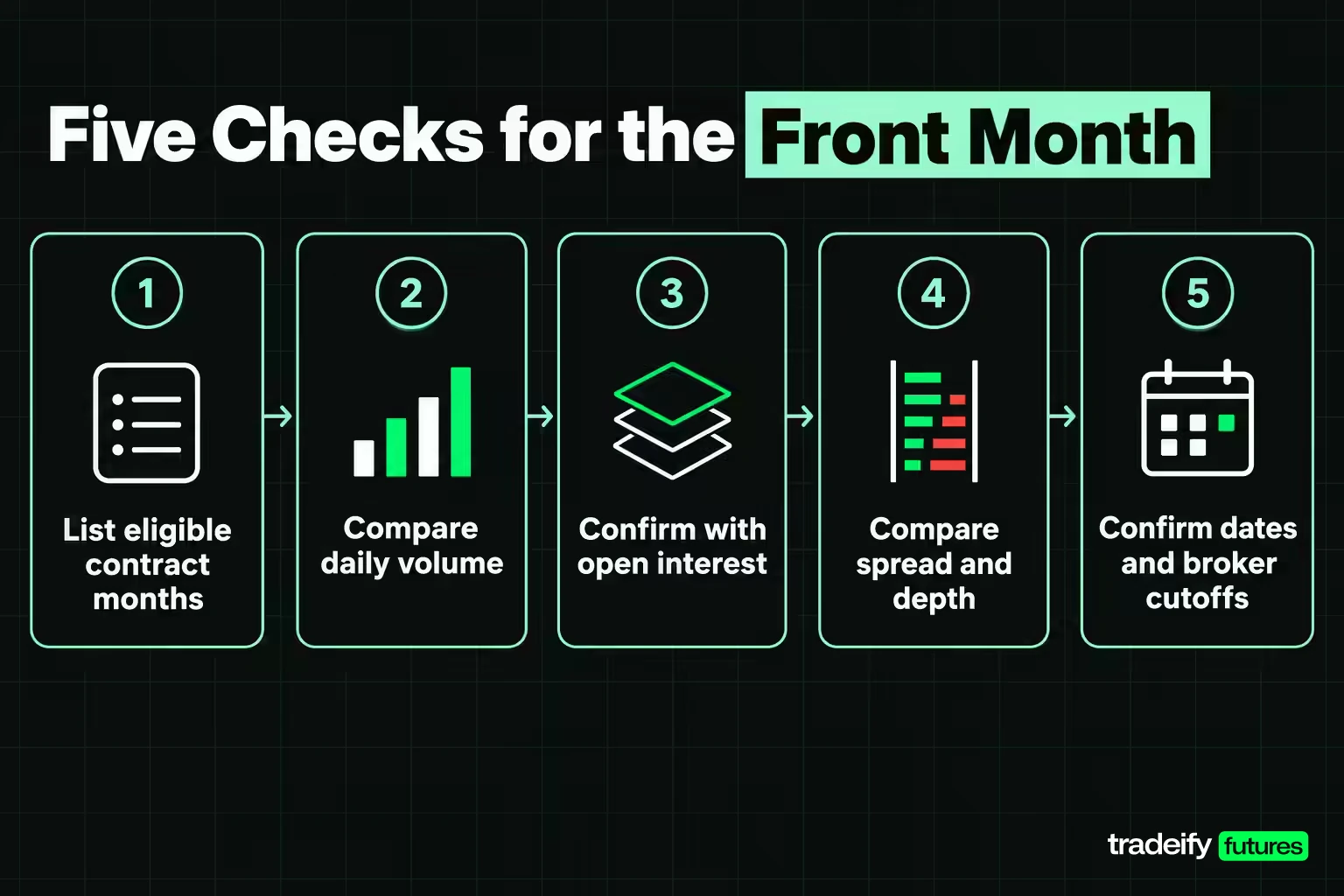
Selecting the front month futures contract takes five checks. Run them in this order whenever a market is within a few weeks of expiration, or whenever you open a product you have not traded for a while.
Check one, list the eligible contract months
Open your platform's contract list or the exchange calendar and write down the nearest month and the next month that normally trades. Some products skip months. Gold is the classic case: on November 4, 2026, the busy contract after December was February, while January traded only a few hundred contracts.
Check two, compare daily volume
Put both months side by side and compare daily volume over the same session. CME's futures course says traders decide when to roll by watching the volume of both the expiring contract and the next one. When the newer month trades more than the older one, liquidity has moved.
Here is an illustrative check with round numbers. If the expiring month trades 300,000 contracts and the next month trades 450,000, the next month holds 60% of the two months' combined volume. That is a clear shift.
The temptation is to switch the first time the new month edges ahead. A 51% reading an hour into the session is an observation, not confirmation. Recheck later in the session or wait for a full day's totals before you move your whole workspace.
Check three, confirm with open interest
Open interest counts contracts still open, not contracts traded today. It tends to follow volume into the new month, but it updates once a day. CME's settlement report shows the previous trading day's open interest, so a fast roll can show volume leading in the new month while open interest still favors the old one.
Treat open interest as confirmation. If volume and open interest both favor the newer month, the decision is easy. If they disagree, volume reflects today's trading and usually wins for an intraday trader.
Check four, compare spread and depth
The active month usually shows the tightest bid-ask spread and more resting size near the price. The fading month shows wider quotes and thinner levels. Compare both at the same time of day, because overnight books are thin in every month.
Check five, confirm dates and broker cutoffs
Look up the last trading day, and the first notice day if the product is physically delivered. Then check your broker's or account provider's own cutoff, which can come earlier than the exchange's. The earliest applicable deadline is the one that binds you.
If volume, open interest, spread and dates all point to the same month, that is your front month. Write the dated symbol down and use it everywhere in your workspace. If they split, for example volume favoring the new month while the old one still has the tighter book, the honest answer is that the roll is in progress. Trade the one with the better spread at your time of day, keep size modest, and check again tomorrow.
Expiration Dates That End a Futures Contract
Three dates matter on every futures calendar, and they fall in a different order depending on how the contract settles.
- First notice day is the first day the exchange can assign delivery notices to holders of long positions in a physically delivered contract. Cash-settled contracts do not have one.
- Last trading day is the final session in which the contract can trade.
- Final settlement is when the exchange sets the last price and the contract either delivers or cash settles.
For physically delivered products, first notice day often comes before the last trading day, sometimes weeks before. That is why the front month in gold or corn can roll well ahead of expiration.
Real CME dates for the December 2026 contracts show how much the order varies:
| Contract | First notice day | Last trading day | Settlement type |
|---|---|---|---|
| ESZ26 E-mini S&P 500 | None | December 18, 2026 | Cash |
| CLZ26 crude oil | November 24, 2026 | November 20, 2026 | Physical delivery |
| GCZ26 gold | November 30, 2026 | December 29, 2026 | Physical delivery |
| ZCZ26 corn | November 30, 2026 | December 14, 2026 | Physical delivery |
Crude oil is the odd one. Its December contract stops trading in November, three business days before the 25th of the month before delivery. So the "December" crude contract is the front month for much of October and November, then disappears on November 20, 2026.
Micro contract expiration dates
Micro futures do not always expire on the same day as their full-size version, and they do not always settle the same way.
- The Micro E-mini S&P 500 (MES) is cash settled and its December 2026 contract stops trading on December 18, 2026, the same day as ES.
- Micro WTI crude (MCL) is financially settled, not physically delivered, and stops trading one business day before the matching CL contract. MCLZ26 stops on November 19, 2026.
- Micro Gold (MGC) is deliverable like full-size gold, and MGCZ26 has the same first notice day as GCZ26, November 30, 2026.
If you trade micros, check the micro's own calendar. Assuming it matches the full-size contract is how a trader ends up one day late on MCL.
Related lesson: First notice day and last trading day
Cash Settlement, Physical Delivery and the Front Month
Settlement type decides which date is your real deadline when you pick the front month.
A cash-settled contract, such as ES or MES, simply pays or debits the difference in cash at final settlement. The CFTC glossary describes cash settlement as the seller paying the buyer the cash value or an amount based on an index or price. Holding one into expiration does not create a delivery obligation, but it does lock you into the final settlement price.
A physically delivered contract, such as CL, GC or ZC, can end with the actual commodity changing hands. A long crude contract still open after the last trading day is a claim on 1,000 barrels delivered at Cushing, Oklahoma. Many retail brokers do not let clients take delivery at all. Charles Schwab's futures business says it does not, and Tradovate says its brokerage accounts are for speculators only.
How traders avoid physical delivery in the front month
The method is simple: be out of the contract, or rolled into the next month, before first notice day. For crude, the last trading day comes first, so the binding date is the last trading day.
Brokers enforce this for you, often earlier than you would like. Tradovate's rollover guide says it automatically closes any position in a physically delivered contract still open by first notice day, at the prevailing market price. It also says that after the suggested rollover date its trade desk may restrict an expiring contract to liquidation only, which means you can close a position but not open or add to one. If you see an order rejected with a message about liquidation only, the platform is telling you the front month has already moved.
The safer habit is to roll before any of that happens, on your own schedule, at a price you choose. A forced liquidation picks the time and the price for you.
Three Ways to Handle an Expiring Front Month Contract
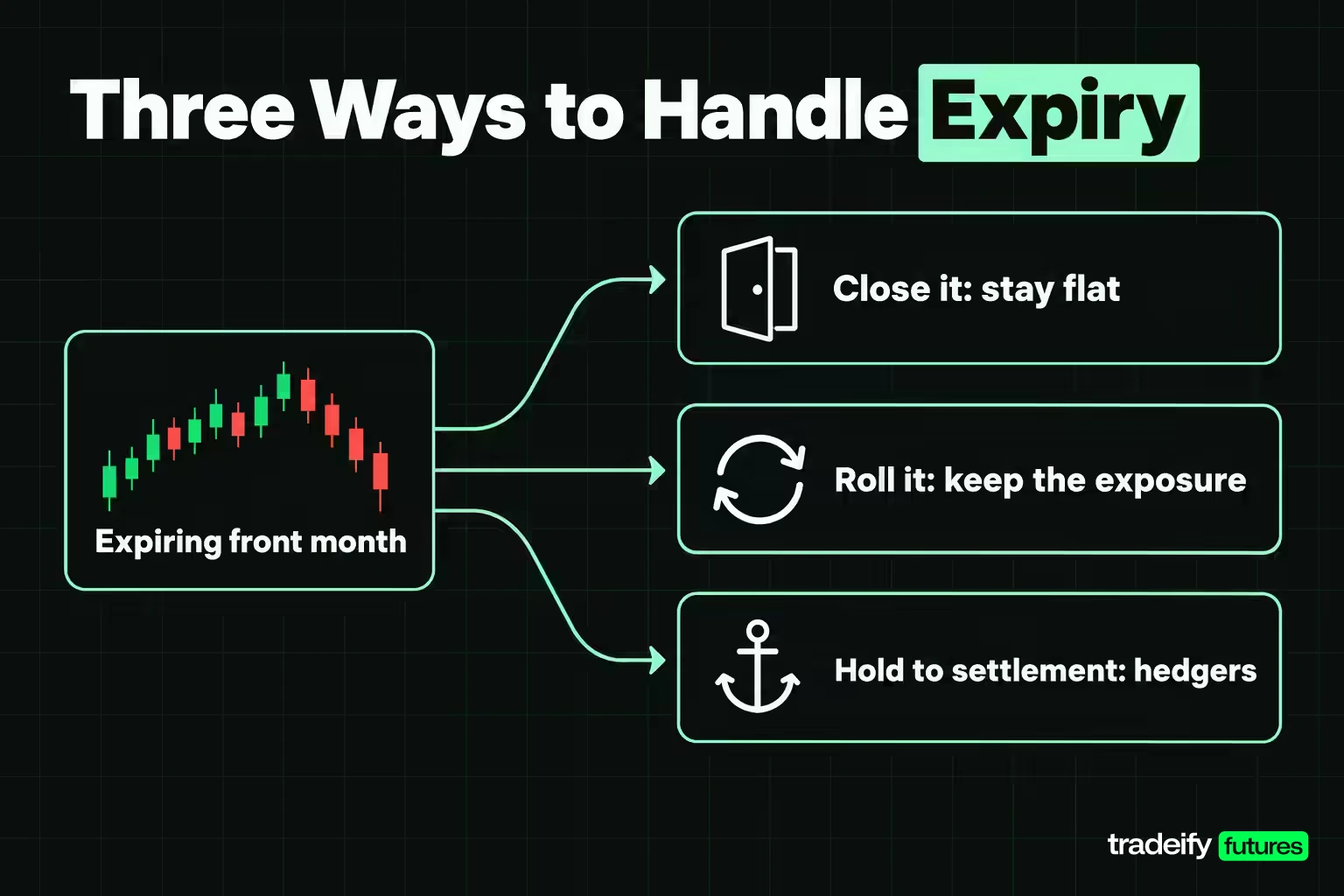
When the front month approaches expiration, a position in it has three possible endings.
- Close it. Offset the position in the expiring month and stay flat. This is the default for day traders, who are flat at the close anyway, and for anyone whose trade idea has run its course.
- Roll it. Close the expiring month and open the same position in the next month, ideally as one calendar spread order. This keeps the exposure alive.
- Hold it to settlement. Keep the position through the last trading day and let it cash settle or deliver. This suits hedgers and commercial users who want the settlement, and almost nobody else.
The choice depends on why you hold the position. A short-term trader does not need the expiring month at all once volume moves. A swing trader who wants to keep the exposure rolls. Only a trader who has arranged for delivery, or who wants the final cash settlement price, holds.
What happens if you do not roll
Doing nothing is a choice too, and it has predictable results.
In a cash-settled contract, the position closes at the final settlement price on expiration day. You lose control of the exit price. For ES, that price is a special opening quotation of the S&P 500 on the third Friday, which can differ from where the futures last traded.
In a physically delivered contract, the broker will usually liquidate the position for you before first notice day, at market. If the position survives that, you face delivery obligations and the costs that come with them.
On the platform side, your charts and DOM may still show the old month after it stops trading. Tradovate notes that selecting an expired contract can leave charts and market data blank, frozen or with gaps. A frozen chart on the old month is a common way traders find out the roll happened without them.
When Futures Contracts Roll in Equity, Energy, Metal and Grain Markets
Roll timing is set by each market's calendar and where its traders move.
Equity index futures. ES, NQ, YM and RTY expire quarterly in March, June, September and December. CME publishes a roll date for them, the Monday before the third Friday of the expiration month, and says the second-nearest month customarily becomes the lead month after it. For December 2026 that roll date is December 14, 2026, four days before the December 18 expiration.
Crude oil. CL lists every month and its front month rolls every month. Because trading ends around the 20th of the month before delivery, the shift happens mid-month. Tradovate describes rollover dates in general as timed to the liquidity shift, typically about a week before expiration, but crude shows the shift as a gradual climb. In early November 2026, January crude's share of the two nearest months' volume rose from 29.8% on October 30 to 34.9% on November 3, then slipped to 32.6% on November 4, 2026.
Metals. Gold lists many months, but volume clusters in a few of them. On November 4, 2026, December, February and April gold traded 232,561, 22,896 and 6,105 contracts, while January and March traded 355 and 244. The roll happens before first notice day at the end of the month before delivery, which means skipping the thin months in between.
Grains. Corn trades March, May, July, September and December. The front month rolls before first notice day at the end of the month before the contract month, not at the mid-month last trading day.
Witching days and index futures expiration
The third Friday of March, June, September and December is often called triple witching, when stock index futures, stock index options and stock options expire together. For 2026, the December event falls on December 18, the same day ESZ26 stops trading. Trading volume tends to rise around these dates as positions are closed and rolled.
For a futures trader, the practical point is timing. By witching day, the index futures front month has normally already moved to the next quarter. Anyone still trading the expiring contract that week is trading the thinner market.
How a Front Month Roll Works and What It Costs
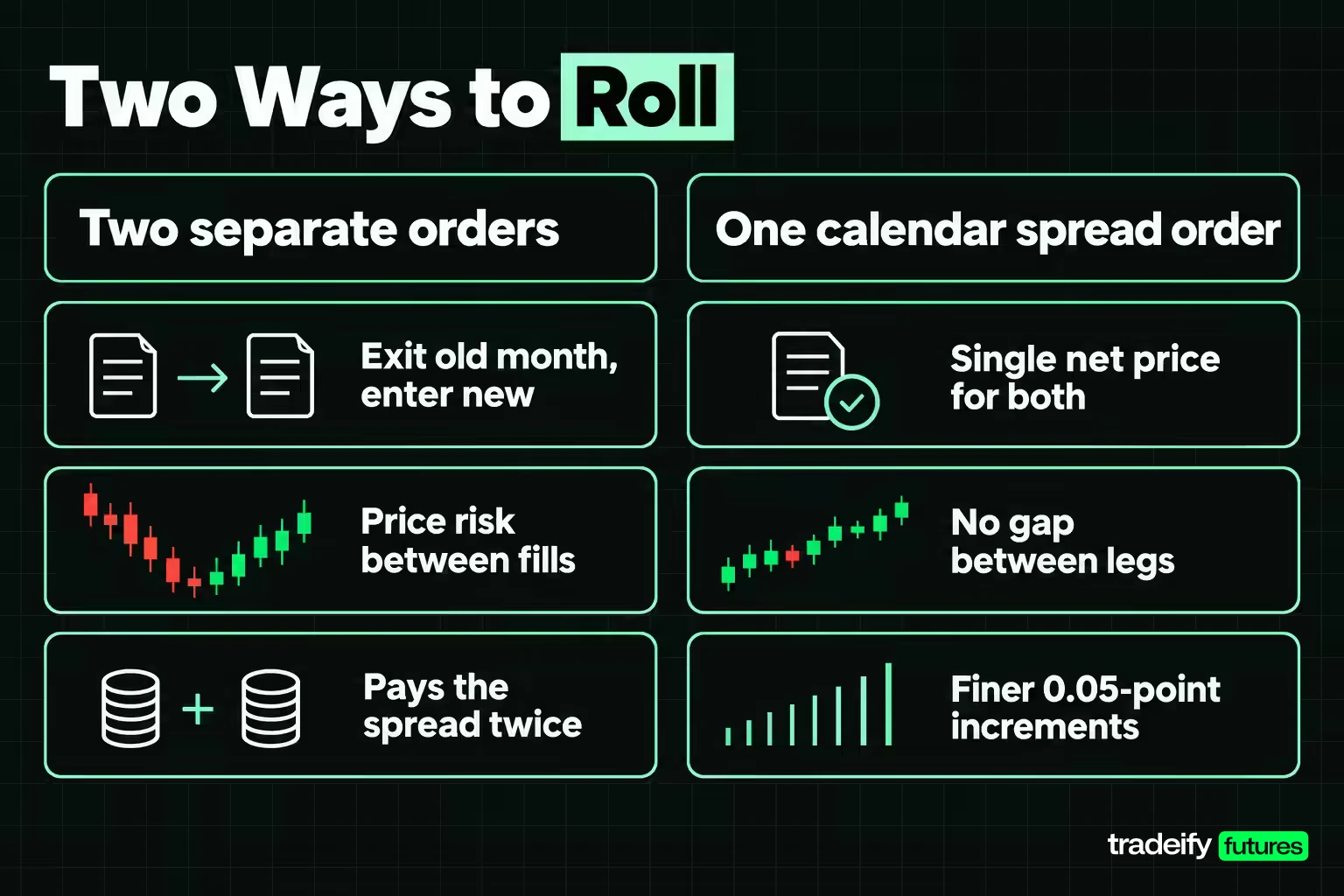
A roll is two trades: you exit the expiring month and enter the next one. The CFTC glossary calls it lifting a near futures position and re-establishing it in a more deferred delivery month.
You can execute those two legs in two ways.
- Two separate orders. Sell the old month, then buy the new one (or the reverse for a short). This is simple, but the market can move between fills, and each leg pays its own bid-ask spread.
- One calendar spread order. A calendar spread buys one month and sells another of the same contract at a single net price. Exchanges list these spreads directly. On ES the calendar spread trades in 0.05-point increments worth $2.50, versus the 0.25-point outright tick worth $12.50.
The arithmetic on that difference is illustrative but real. Giving up one outright tick on each of two separate legs costs 2 x $12.50 = $25.00 per contract. One tick of slippage on the spread order costs $2.50.
The costs of rolling
- Commissions and fees. A roll is two fills, so it pays commission twice. A position held all year in a quarterly contract rolls four times.
- Bid-ask spread and slippage. Paid on each leg if you leg in, or once on the spread.
- The price difference between months. This is not a fee, but it changes your numbers. On the November 4, 2026 settlement, March 2027 ES settled 74.75 points above December 2026, which is $3,737.50 per ES contract and $373.75 per MES. A long rolled at that spread re-enters at a higher price for the same exposure.
Roll yield when rolling futures contracts
When later months trade above the front month (contango), a long position that keeps rolling buys the next month at a higher price than it sold the old one. When later months trade below it (backwardation), the long rolls into a cheaper contract. The gain or drag from that pattern over many rolls is what traders call roll yield.
On November 4, 2026, crude was in backwardation: January settled $1.02 below December, $1,020 per contract. Equity index futures showed the opposite pattern that day, with March above December, which CME's basis course ties to financing costs running above dividend income. Roll yield matters to position holders over months. An intraday trader who is flat every night never pays or earns it.
Related lesson: The full rollover walkthrough
Selecting the Front Month Contract by Trading Platform
Selecting the front month contract works the same way on every platform: find the month with the volume, confirm its dates, then load that dated symbol. What changes is how the platform writes the symbol, whether it rolls your workspace automatically, and what that automatic roll leaves behind. One rule holds on every platform documented here: rolling a chart or workspace does not roll an open position.
| Platform | December 2026 ES symbol | Continuous symbol | What the automatic roll changes |
|---|---|---|---|
| TradingView | ESZ2026 | ES1! and ES2! | The continuous chart, on a volume rule set per symbol |
| Tradovate | ESZ6 | Not on Web or Mobile | Workspace modules, on by default, never positions |
| NinjaTrader Desktop | ES 12-26 | Merged history on charts | Workspace instruments after you confirm, not positions or strategies |
| Quantower | As your data connection lists it | Depends on the connection | Charts and drawings when you run Futures Rollover |
| Sierra Chart with Rithmic | ESZ6.CME | Not reliable with Rithmic | Nothing, the chart symbol stays put |
| TradeStation | ESZ26 | @ES for charts only | The continuous chart, using your rollover rule |
Selecting the front month in TradingView
TradingView's 1! symbol (ES1!, CL1!) is a continuous contract that tracks the front month, and 2! tracks the second month. TradingView's documentation says the switch is driven by volume: the main condition is the next contract's daily volume exceeding the current one. It sets a switching rule per symbol from historical averages, for example six business days before expiration, and applies it throughout history.
That means the chart can switch early or late compared with today's actual volume. TradingView's own example is gold: GC1! switched to the December 2022 contract on July 28, 2022, while the August contract did not expire until August 29.
To select the dated contract, type the full symbol with a four-digit year, such as ESZ2026. TradingView says 1! symbols can be traded only for CME and EUREX exchanges and 2! symbols cannot be traded at all, so check how your connected broker treats 1! before relying on it. Many traders keep ES1! for long-range analysis and trade from a dated chart.
Selecting the front month in Tradovate
Tradovate writes contracts as root, month code and last year digit (ESZ6). Automatic rollovers are enabled by default in the Tradovate Web app, so your chart and DOM modules switch to the current contract on their own. When saved contracts are due, an Automatic Rollover window lets you toggle each one in the Update column.
To move a module yourself, click the gear (View Settings) on any Chart or SuperDOM and choose Roll Forward or Roll Backward. To stop automatic rolling, turn on Prohibit Autoroll Contracts under Application Settings, Preferences, then log out and back in.
Two limits matter. Neither automatic nor manual rollovers move open positions. And Tradovate says continuous charts are not supported on its Web and Mobile apps, so every chart there is a dated contract.
Selecting the front month in NinjaTrader Desktop
NinjaTrader Desktop names contracts by month and year, so December 2026 ES is ES 12-26. Each instrument has rollover dates in its database. When today's date reaches the rollover date for the next contract month, the contract appears in Control Center, Tools, Database Management, and an Auto Rollover window appears when you restart. Clicking Rollover updates every checked instrument across all open workspaces, which you then need to save.
You can also roll a single window by typing the next expiry into its instrument selector. NinjaTrader warns that doing this before the database rollover date can show a gap or an extended bar, because the default merge policy (MergeBackAdjusted) joins the two contracts on the chart.
Open positions, working orders and NinjaScript strategies are not rolled. The Roll Position command in the Positions tab closes the position and opens a new one at market in the next contract. It cancels active ATM strategies, and commissions apply to both fills.
Selecting the front month in Quantower
Quantower has a Futures Rollover panel under the Misc section. You pick a connection (Rithmic, for example, or all connections) and a method:
- By Volume rolls when the next contract's daily volume surpasses the current one.
- Expired rolls contracts that have already expired to the current front contract.
- Expiring Soon rolls when the current contract expires within a number of days you set.
You can also right-click a chart and pick the next contract from the Rollover submenu. Quantower then offers to move your drawings by None, By last price, or By custom value, which matters because a level drawn on December prices sits in the wrong place on March prices.
Selecting the front month in Sierra Chart and R Trader with Rithmic
On a Rithmic connection, Sierra Chart uses the format symbol, dot, exchange, so December 2026 ES is ESZ6.CME. Sierra Chart's documentation says Rithmic symbols can be looked up in Rithmic's own R Trader software, which shows the listed months for each product.
Sierra Chart's continuous futures chart feature does not roll the chart's own symbol forward when a contract expires, and Sierra Chart says the feature cannot be reliably used with Rithmic data because Rithmic uses single-digit years. In practice, a Sierra Chart user on Rithmic changes the symbol by hand on each chart, DOM and quote board at every roll.
Selecting the front month in TradeStation
TradeStation uses a two-digit year for individual contracts, so ESZ26. Its continuous symbol is the root with an at-sign, such as @ES, and TradeStation says you cannot place an order or automate a strategy on that root continuous symbol. An at-sign in front of a dated contract, such as @ESZ26, plots continuous history while letting orders go to that specific contract.
TradeStation also lets you build custom continuous symbols that roll on volume, open interest, or a set number of days before expiration, first notice or delivery. That is a useful way to make the chart's roll match your written rule.
Continuous Charts and Roll Gaps
A continuous chart joins several contract months into one price history. At each switch, the new month usually trades at a different price from the old one, so an unadjusted continuous chart prints a jump that no trader actually experienced.
Platforms handle that gap in two ways:
- Unadjusted. The chart shows real prices for each month and a visible step at every roll.
- Back-adjusted. Older prices are shifted by the gap so the line is smooth. TradingView calculates the shift from the closes of the new and old contracts on the daily bar nearest the switch, and leaves back-adjustment off by default (the B-ADJ button turns it on). NinjaTrader Desktop merges back-adjusted history by default.
Neither is wrong. The trouble starts when a trader mixes them without noticing. Here is an illustrative case on ES with round numbers. A long is entered on the December contract with a stop 20 points below, a $1,000 risk per contract. The trader switches to March, which trades 75 points higher, and copies the stop at the same price. That stop is now 95 points below the market, a $4,750 risk on the same one contract.
The same thing happens to support and resistance lines, alerts and VWAP anchors drawn on one month and carried onto another. After a roll, rebuild levels on the new contract's own prices or use a platform tool that shifts drawings by the gap.
Related lesson: How continuous futures charts are built
Front Month Selection Worked Through With November 2026 Data
Applying the volume, open interest and calendar checks to CME's final settlement data for the November 4, 2026 session gives four different answers. These figures are a snapshot as of November 4, 2026, and they change every session.
E-mini S&P 500 front month, a clear answer
December 2026 ES traded 2,329,405 contracts and March 2027 traded 6,882. December held 99.7% of the two months' volume and had 1,958,622 contracts of open interest against 25,921. With expiration on December 18, ESZ26 is the front month, and it stays that way until volume moves in the week of the December 14 roll date.
Crude oil front month, a shifting answer
December 2026 crude traded 454,113 contracts against 219,870 for January 2027, so December still led. But CLZ26 stops trading on November 20, 2026, sixteen days later, and January's share of volume was already around a third. Open interest was converging too: 231,146 contracts in December against 203,974 in January. A trader opening crude in mid-November should expect January to take over before the last trading day.
Gold front month, where the nearest month is not the market
November 2026 gold was still listed but traded 17 contracts with open interest of 61. December 2026 traded 232,561. January 2027 traded only 355, while February traded 22,896. So the front month is December, and the next active month is February, not January. December gold's first notice day is November 30, 2026, so most traders roll to February before then even though trading continues to December 29.
Corn front month, where notice day comes first
December 2026 corn traded 191,398 contracts and March 2027 traded 118,515, giving March 38.2% of the two. Volume still favored December, but its first notice day is November 30, 2026, two weeks before its last trading day of December 14. The practical roll date is the notice day, not the expiration.
The common thread: volume tells you where the market is today, and the calendar tells you how long it will stay there. Neither one alone gives you the answer. In crude and corn, a trader who only looked at volume would still be in December, and a trader who only looked at expiration would roll too late.
Front Month Mistakes That Send Orders to the Wrong Contract
Most front month errors are workspace errors, not market errors. They tend to happen in roll week, when the trader is busy with the setup and assumes the platform took care of the contract.
Choosing the nearest calendar month by default
The nearest listed month can be nearly empty, as November gold was on November 4, 2026. Trading it means wide spreads and poor fills. Pick by volume and dates, not by proximity.
Ordering from a continuous symbol
Continuous symbols are built for charts. TradeStation blocks orders on its root continuous symbols, and TradingView allows 1! trading only on some exchanges. Even where it works, you may not know which month the order will reach. Name the dated contract in the order ticket.
Rolling the chart but not the rest
A chart on March and an order ticket on December produce fills that do not match the chart. Rolling one window by hand is the usual cause. After a roll, check every chart, DOM, quote board, alert and saved order template.
Forgetting alerts and automated strategies
An alert created on a dated contract watches that contract. After a roll, check that each alert points at the new month. NinjaTrader states that NinjaScript strategies are not rolled forward and must be rolled manually. An automated strategy left on the old month can stop trading or keep trading a thinning contract.
Ignoring the broker cutoff
The exchange may list a contract after your broker has moved it to liquidation only. Follow the earliest applicable deadline, not the exchange's last trading day.
Rolling backwards
Some platforms let you step back a month as easily as forward. Rolling back to an older contract near expiry puts you in the thinnest market on the board. A roll should always move to a later month.
A Pre-Session Front Month Checklist
Run this before the session on any product within about a month of expiration:
- Open the exchange calendar for the product and note the last trading day and first notice day.
- Add the current and next active months to one watchlist.
- Compare the prior session's volume, then today's.
- Confirm with open interest, spread and depth.
- Check your broker's or account provider's cutoff date.
- Confirm how your platform's automatic roll is set, and what it does not move.
- Point every chart, DOM, alert and order ticket at the same dated symbol.
- Record the switch date in your trading journal so next quarter's roll is a lookup, not a guess.
During the session, glance at the order ticket before each entry. If the month on the ticket differs from the month on the chart, stop and fix it before you click. Five seconds there is cheaper than working out afterward why a fill landed 75 points away from the chart.
Front Month Futures Contract FAQ
Is the front month always the nearest expiration
No. The front month is the nearest contract that still carries the bulk of the volume. On November 4, 2026, November gold was the nearest listed month but traded only 17 contracts, while December gold traded 232,561.
Should I use volume or open interest to select the front month
Use daily volume as the main signal and open interest as confirmation. Volume shows where trading is happening today. Open interest on exchange reports reflects the prior session, so it can lag during a fast roll.
Can I trade a continuous futures symbol like ES1!
Only on some platforms, so the dated contract is the safer choice. TradingView says 1! symbols can be traded only for CME and EUREX exchanges, and TradeStation does not allow orders on its root continuous symbols. Trading the dated contract, such as ESZ26, removes the doubt about which month gets the order.
When should I roll to the next futures contract
Roll when the next month takes the volume lead, and before the earliest deadline that applies to you. For physically delivered contracts, that deadline is usually first notice day. For equity index futures, CME's roll date is the Monday before the third Friday of the expiration month.
Does my platform's auto-roll move my open position
No. Tradovate and NinjaTrader both state that rolling a workspace does not roll open positions. You close the old month and open the new one yourself, or use a dedicated roll command that does both.
How do I carry a futures position forward to the next month
Close the position in the expiring month and open the same position in the next month, ideally with a single calendar spread order. The difference in price between the months comes with you, so recheck stops and targets on the new contract's prices.
Front Month Choice on Accounts That Close Daily
Front month selection gets simpler on any account that must be flat at the end of each session. With no position left open overnight, there is never a position to roll, so the only decision is which contract month to load before the next session opens. The volume, calendar and symbol checks still apply, because a thin or expiring month costs a day trader in spread and slippage on every entry.
On our accounts, all positions are closed by 4:45 PM ET each day, so a roll simply means choosing which contract month you trade in the next session. Our Help Center suggests trading the contract shown as the current Globex code on the CME calendar, avoiding contracts within about two weeks of expiration, and always rolling forward. Symbols use the last year digit on Tradovate, Rithmic and WealthCharts (ESH7) and the full year on TradingView and Tradesea (ESH2027), and TradingView 1! symbols such as ES1! are chart-only on our accounts. Evaluation and funded accounts are simulated.
Futures are leveraged, and losses can exceed what you expect, especially around expiration when liquidity thins. Rolling a position involves extra commissions, spreads and execution risk. Platform behavior and broker cutoffs change, so check current documentation before you trade. Evaluation and funded trading accounts are simulated, and this guide is general education, not trading advice.


