



TL;DR: Trading APIs let your code read market data and send orders, so the real question is what happens between signal and fill. REST handles requests, WebSocket streams prices, FIX serves institutions, and platform scripting runs inside software. In 20 sessions of ES and NQ 1-minute bars, a resting limit beat a market order only if a touch counted as a fill. When price had to trade through the limit, the misses and chases made it the costlier entry. Test in a simulator, log every fill, and put a risk gate inside the code.
A trading API is how a program, instead of a person, talks to a brokerage or trading platform. Your code asks for a quote, checks a position, or sends an order, and the provider's system answers in a format the code can read.
Most guides stop at that definition and a list of brokers. The harder part is what a trading API does to your execution. The moment a script fires an order, a backtest's tidy entry price meets a real queue, a real network and a real rate limit, and the script will not hesitate the way you might. This guide covers the definition, connection types, market data, providers and risks, then measures that signal-to-fill gap on 20 sessions of E-mini futures data so you can see which assumptions actually move the numbers.
What Is a Trading API
A trading API (application programming interface) is a documented set of requests a provider accepts from software. It has two halves.
- Read access returns information: quotes, historical bars, account balance, open positions, order status.
- Write access changes something: places, modifies or cancels an order.
The difference from a trading platform is not that a program clicks faster. A platform bundles reading, deciding and ordering into one screen operated by a person. A trading API splits them into separate, testable calls. Reading a quote is one request, sending an order is another, and asking what happened to that order is a third. Once those steps are separate you can log them, replay them and measure the time and price between each one.
When people ask what API means in stocks, the answer is the same idea applied to a stock brokerage account: a channel for code to pull prices and route share or option orders. Futures APIs work the same way, with contract symbols, month codes and tick values in place of share tickers.
Interactive Brokers describes its Web API as a RESTful interface over HTTPS that exchanges JSON messages, with authorization handled through OAuth 2.0. Public lists read access (balances, buying power, positions, order history) and write access (placing trades, setting size, price and duration) as the two halves of its trading API. Those descriptions match how almost every provider frames it.
How a Trading API Turns a Signal Into a Fill
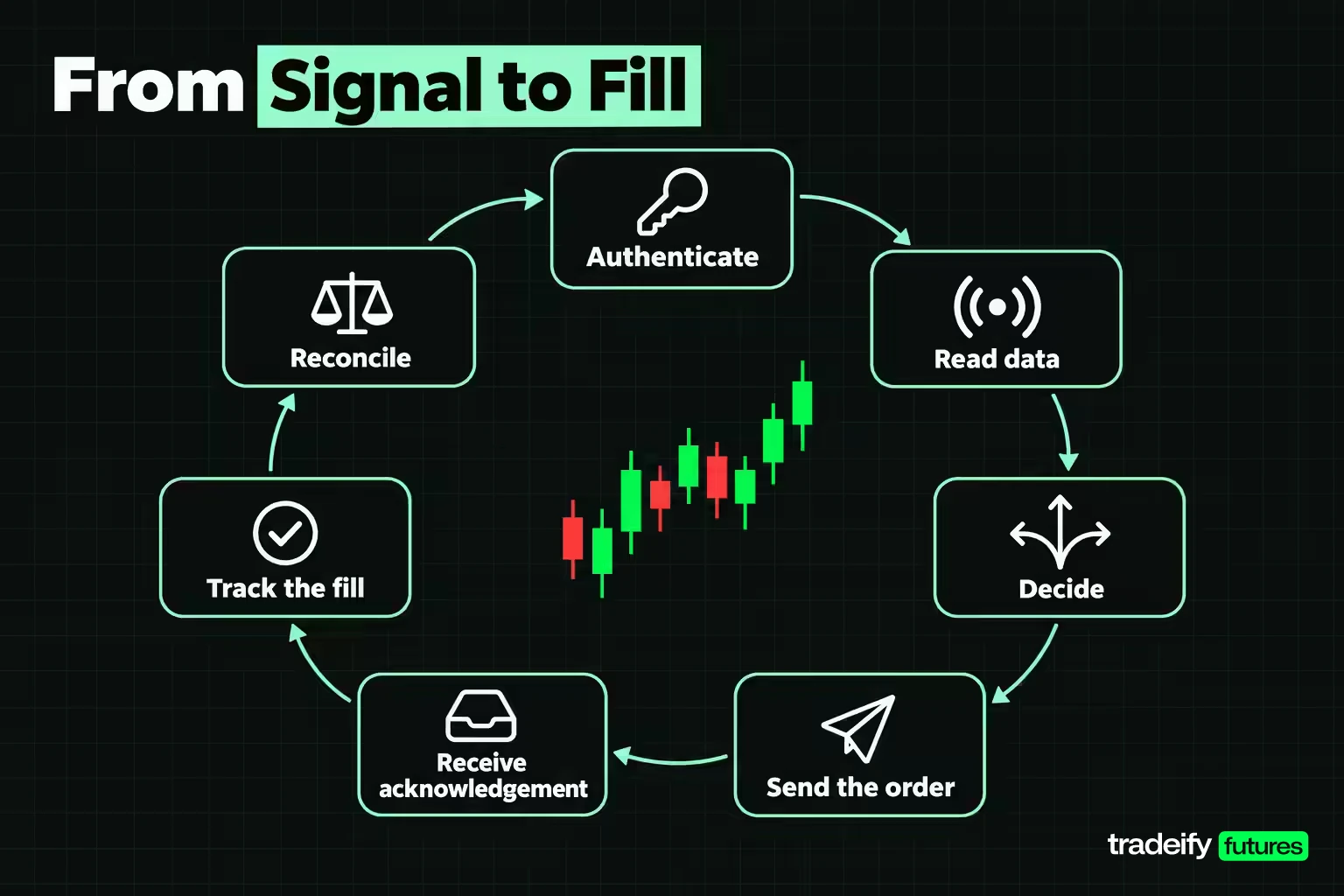
Automated trade execution through a trading API is a loop of small steps. Each one can succeed while the trade as a whole still goes wrong, so it helps to see them in order.
- Authenticate. The program exchanges credentials or a key for an access token. Tokens expire, so a long-running program needs a refresh plan.
- Read data. Prices arrive by request or by a streaming connection. The age of that data is the first hidden delay.
- Decide. The strategy logic turns data into a signal: buy, sell, or do nothing.
- Send the order. The program builds an order request (symbol, side, quantity, type, price, time in force) and sends it.
- Receive an acknowledgement. The provider accepts or rejects the order. Accepted is not the same as filled.
- Track the fill. A fill, partial fill or no fill arrives later, often on a separate stream.
- Reconcile. The program compares what it thinks it holds with what the account says it holds, and fixes any difference before the next decision.
Most first integrations spend their effort on authentication, data, logic and sending. The money is usually lost in the acknowledgement, fill and reconcile steps, when an order is accepted but not filled, filled twice because of a retry, or filled while the program thinks it is still flat.
Order types carry over from manual trading. Tradovate's API documentation says any order type available in its Tradovate Trader application can be placed through the REST API. TradeStation lists bracket, OCO (one-cancels-other) and OSO (order-sends-order) orders through its API. That matters because a bracket or OCO stop sits with the provider once it is accepted. A stop that lives only inside your script disappears when the script does.
Related lesson: Order types overview
Types of Trading API Connections
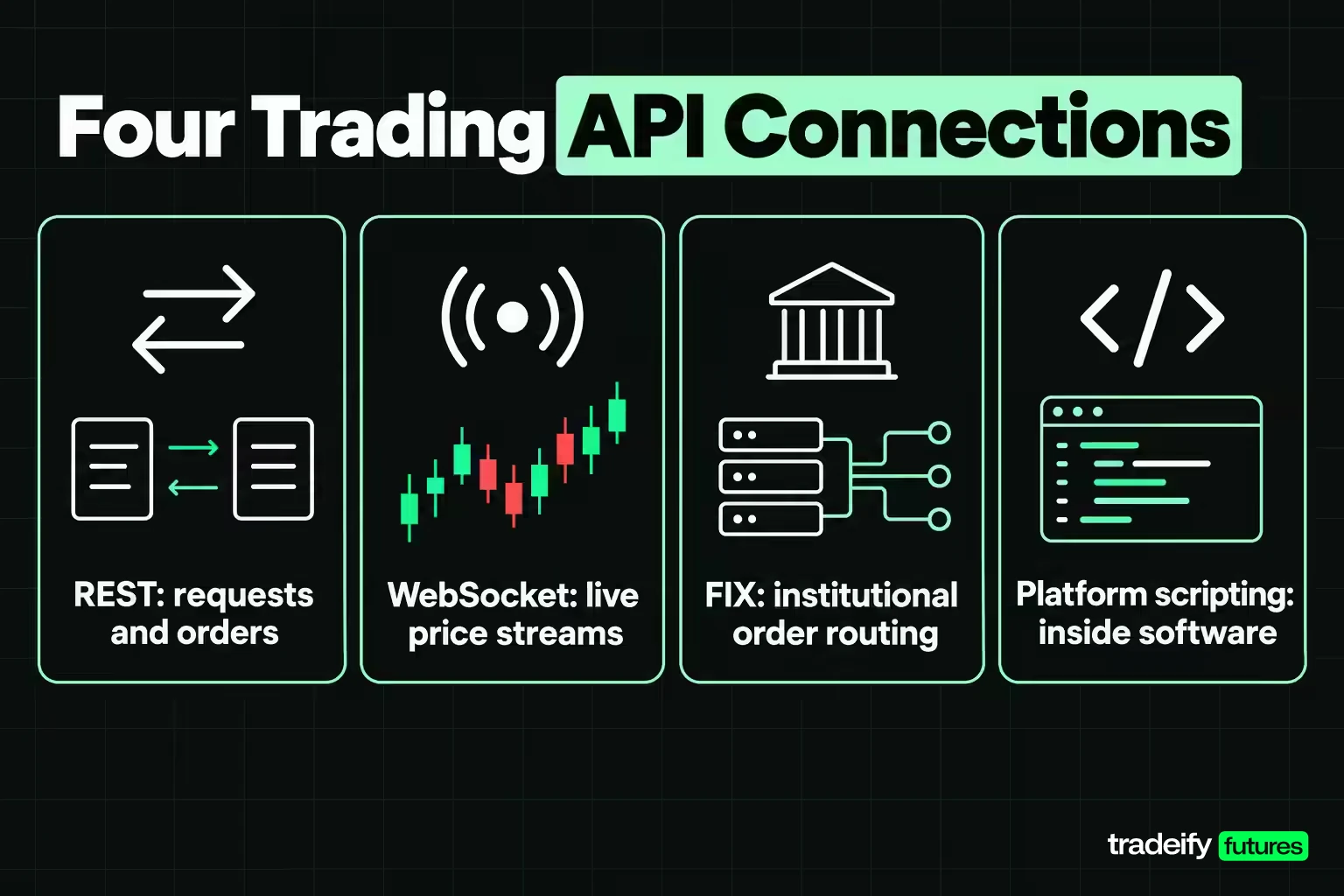
Trading API connections come in four broad types. The choice is a tradeoff between simplicity, immediacy and how much infrastructure you have to run yourself.
| Connection type | How it works | Best used for | Main tradeoff |
|---|---|---|---|
| REST | Request and response over HTTPS, usually JSON | Placing orders, account checks, historical data | Each call is a round trip, so it is poor for tick-by-tick prices |
| WebSocket | A persistent connection that pushes updates | Live quotes, order and position updates | The connection can drop silently and must be watched |
| FIX | A standard financial messaging protocol over a dedicated session | Institutional order routing at volume | Heavier onboarding and usually institutional access |
| Platform scripting | Code that runs inside a trading platform | Retail automation without running your own servers | Tied to that platform and its operating system |
REST and WebSocket are the default pair for retail trading APIs. Interactive Brokers describes its Web API as REST with WebSocket streaming for real-time market data and notifications, and Tradovate says its API can be reached by REST requests, by client libraries or through a WebSocket connection.
FIX (Financial Information eXchange) dates from 1992, when it was created for equity order messages between Fidelity Investments and Salomon Brothers. It is now the standard messaging language between institutions and brokers. Interactive Brokers offers a FIX connection over a VPN, extranet, leased line or cross-connect, which tells you who it is built for.
Platform scripting is the fourth route and the one many futures traders use first. NinjaScript is NinjaTrader's C# framework for indicators and automated strategies, and NinjaTrader says it runs only in the NinjaTrader 8 desktop application on Windows. You do not manage tokens or servers, but you also cannot move the code to another platform without rewriting it.
Market Data Through a Trading API
Market data through a trading API comes in three shapes, and mixing them up is a common source of bad backtests.
- Snapshots answer "what is the price right now" for one request. They are fine for a slow strategy and wasteful for a fast one.
- Streams push every update over a WebSocket. They are what a live intraday strategy should use.
- Historical bars feed research and backtests. Alpaca, for example, says its market data API offers real-time pricing and more than six years of historical data for stocks and crypto.
Data is often a separate product from order routing, with separate permissions and fees. Tradovate runs a dedicated market-data server alongside its live and demo trading servers. Exchange data agreements and fees apply to the data itself, not the API, so a program can be fully connected for orders and still receive delayed or missing prices.
Three checks before you trust a data feed:
- Timestamps. Know whether a bar is stamped at its open or its close. A one-bar misalignment creates look-ahead bias in a backtest.
- Delay. Confirm the feed is real-time for your account and exchange, not delayed.
- Continuity. Continuous futures series stitch contracts together. Fine for charts, but your orders go to a specific contract month.
Benefits of API Trading
The benefits of API trading are real, but they are narrower than marketing pages suggest. An API changes how consistently and how measurably you act. It does not create an edge.
| Area | Manual platform | Trading API |
|---|---|---|
| Reaction to a rule | Depends on attention and hesitation | Same response every time the condition is met |
| Record keeping | Whatever the platform's reports show | Every signal, request and fill can be timestamped |
| Monitoring | A few charts at once | Many instruments and conditions at once |
| Custom tools | Limited to built-in features | Your own filters, sizing and risk checks |
| Failure mode | Missed or late clicks | Bugs, disconnects and duplicate orders at machine speed |
The record-keeping row is the one most traders undervalue. Everyone has had a day where the fills felt worse than the chart. A script that logs signal time, order time and fill price turns that feeling into a number you can check, and sometimes the number says the fills were fine and the entries were the problem. The last row is the honest cost. A person who makes a mistake makes it once. A program with a bug can repeat it every bar until something stops it.
Related lesson: Trading bots and automation
Algorithmic Trading Through an API
Algorithmic trading through an API means the trading rules live in code and the API carries their orders. The path from idea to live orders usually runs through three stages.
- Research. Rules are tested on historical data, ideally with realistic costs and fills.
- Simulation. The same code runs against a paper or demo account in real time. This tests the plumbing: tokens, symbols, order states and reconnects.
- Live trading. The code trades at the smallest size it can, while its fills are compared with the simulated ones.
The strategy styles that fit retail API speeds are the ones whose edge survives a delay of a second or more: trend following, breakout rules, mean reversion on intraday or daily bars, scheduled rebalancing, and execution helpers that slice a large order into smaller ones. High-frequency trading is a different business. It competes on microseconds through exchange co-location, and an API reached over the public internet is not built for it. Many brokers and prop firms also restrict it.
A newer development is AI agents placing orders. tastytrade offers a self-hosted, open-source MCP (Model Context Protocol) server that lets a language model client drive its API, with order submission gated by a dry-run-first confirmation. Public also offers an MCP connection for AI agents. The transport underneath has not changed. What changes is who is writing the requests, which makes the safeguards in the next sections more important, not less.
Related lesson: Algorithmic trading
Trading API Brokers and Providers
Trading API providers differ most in which markets they reach, how you connect, and what you need before access is switched on. The table below reflects each provider's own API pages as read on November 4, 2026. Access rules and fees change, so recheck them before you build.
| Provider | Markets its API page lists | How you connect | Testing option stated | Access notes |
|---|---|---|---|---|
| Interactive Brokers | Stocks, options, futures, currencies, bonds, funds | Web API (REST plus WebSocket), FIX, TWS API | Not stated on the API page | Says its trading API is free to all IBKR clients |
| TradeStation | Stocks, options, futures | HTTP API usable from any language that makes HTTP requests | Simulator and sandbox with paper trading | Personal-use API key requested through TradeStation |
| Tradovate | Futures | REST, client libraries, WebSocket | Demo server for simulation | Requires a LIVE account with more than $1,000 equity, an API Access subscription and an API key |
| tastytrade | Equities, options, futures, futures options, crypto | REST and JSON | Not stated on the API home page | Offers a self-hosted MCP server for AI agents |
| Alpaca | Stocks and crypto, with futures and FX on its roadmap | Trading API with OAuth2 for third-party apps | Free paper trading for all users | Paper-only accounts open to anyone globally |
| Public | Stocks, ETFs, options, index options, bonds, crypto | Trading API with a Python SDK | Not stated on the API page | Says the API is free to use with no fees for API calls |
| NinjaTrader | Futures | NinjaScript in C# inside the NinjaTrader 8 desktop | Free trading simulator | Runs only in the Windows desktop application |
How to Choose a Trading API Provider
So which broker allows API trading? Every provider in the provider comparison table does, but "allows" hides the real filter. Three questions narrow the list fast.
- Does it reach your market? A stock-first API will not help a futures trader, and a futures API will not route equities.
- Is the documentation complete? Look for authentication, order placement, order status and rate limits. If rate limits are missing, expect to find them the hard way.
- What does access require? Some APIs are open with any account. Others need a funded live account, a subscription or an approval step.
Measuring the Signal to Fill Gap on API Orders
The signal-to-fill gap is the difference between the price that triggered your order and the price you actually got. Provider pages cannot tell you its size, because it depends on your signal, instrument, order type and timing. So this study measured it on real E-mini futures data.
How the API Order Study Was Set Up
- Data. Continuous front-month E-mini S&P 500 (ES) and E-mini Nasdaq-100 (NQ) 1-minute bars from the Yahoo Finance chart feed, downloaded November 5, 2026.
- Sessions. Regular trading hours only, 9:30 AM to 4:00 PM ET, across the 20 sessions from October 8 to November 4, 2026. That gives 7,790 signals per side in each market.
- Signal. A deliberately trivial one: at the close of every 1-minute bar, decide to enter long (and, separately, short). There is no strategy filter, so the result measures the cost of acting, not the quality of a signal.
- Market policy. The order fills at the open of the next bar.
- Limit policy. A limit rests at the signal bar's close for one bar. If the next bar opens through the limit, it fills at that better open. If it misses, the trade is chased at the following bar's open.
- Two fill rules for the limit. "Touch" credits a fill whenever the bar's range reaches the limit price. "Trade-through" credits a fill only when price trades beyond it, which is closer to what happens when you sit at the back of the queue.
- Units. Cost is measured in ticks from the signal price, positive meaning a worse entry. ES and NQ both tick in 0.25 index points, worth $12.50 on ES and $5.00 on NQ per contract.
Bars are the limit of this method. Fills are modelled from 1-minute open, high, low and close data, not from the order book, and the market policy assumes a fill at the open with no queue. Treat the direction of the results as more reliable than their exact size.
Market Order Versus Resting Limit Results
Average entry cost per signal in ticks, from this study's own measurement on Yahoo Finance 1-minute data, regular hours, October 8 to November 4, 2026:
| Market and side | Market order at next open | Limit with touch fills | Limit with trade-through fills | Fill rate with trade-through | Average chase after a miss |
|---|---|---|---|---|---|
| ES long | -0.04 | -0.19 | 0.34 | 91.0% | 7.04 ticks |
| ES short | 0.04 | -0.10 | 0.47 | 91.0% | 8.13 ticks |
| NQ long | 0.00 | -0.18 | 0.39 | 96.2% | 48.07 ticks |
| NQ short | 0.00 | -0.06 | 0.66 | 96.2% | 55.76 ticks |
Start with the market order column. Its average cost was close to zero on both contracts. The next minute's open is a draw from a distribution centred near the price you already saw, so on average a market order neither gained nor lost much against the signal price.
The limit columns are where the API fill model decides the answer. Under touch fills, the resting limit looked cheaper than the market order on every line, by 0.15 ticks on ES longs ($1.91 per contract) and 0.19 ticks on NQ longs ($0.93). Under trade-through fills, the same limit was more expensive on every line, by 0.37 ticks on ES longs ($4.67) and 0.44 ticks on ES shorts ($5.45), and by 0.38 ticks on NQ longs ($1.91) and 0.67 ticks on NQ shorts ($3.33).
Why Missed API Limit Orders Cost More Than They Save
In this study's data, the reason is the shape of the misses. Requiring trade-through dropped the ES fill rate to 91.0%, so about one signal in eleven missed. Each miss was then chased at a cost of 7.04 to 8.13 ticks on ES ($87.94 to $101.67) and 48.07 to 55.76 ticks on NQ ($240.37 to $278.81). Many small wins at the limit price lost to a few large chases.
That is the practical lesson for anyone automating entries through an API. A backtest that counts every touch as a fill can show a limit-entry edge that a live queue never delivers. It is tempting to believe the friendlier rule, because it makes the strategy look better. That temptation is exactly why it needs testing. Your own fills, logged by your own code, are the only way to know which rule your account lives under.
How API Latency Changes the Fill
Latency is the other half of the gap, and it is usually described badly. A slower connection does not mainly cost you direction, because price over seconds to minutes moves almost as often up as down. It widens the range of prices you might receive.
Average absolute price move after the signal, from this study's own measurement on Yahoo Finance 1-minute data, regular hours, October 8 to November 4, 2026:
| Delay after signal | ES ticks | ES dollars per contract | NQ ticks | NQ dollars per contract |
|---|---|---|---|---|
| 1 minute | 6.01 | $75.11 | 37.86 | $189.32 |
| 5 minutes | 13.52 | $168.96 | 85.92 | $429.61 |
| 15 minutes | 23.63 | $295.42 | 148.33 | $741.65 |
| 60 minutes | 45.22 | $565.27 | 280.22 | $1,401.08 |
Over one minute, the average signed move was -0.03 ticks on ES and -0.49 ticks on NQ, tiny next to the 6.01 and 37.86 tick average absolute moves. The width grew with roughly the square root of the delay: across every lag measured, the observed move stayed between 0.96 and 1.02 times what a square-root rule predicts from the one-minute figure.
Extending that rule below one minute is an extrapolation, not a measurement, because the data does not resolve seconds. On that basis, a 250 millisecond delay corresponds to about 0.39 ticks on ES ($4.85) and 2.44 ticks on NQ ($12.22) of extra dispersion. A full second corresponds to about 0.78 ticks on ES ($9.70) and 4.89 ticks on NQ ($24.44). For a strategy that holds for minutes, the fill model and the missed-limit chase cost more than ordinary internet latency.
Related lesson: Slippage explained
Trading API Risks and Failure Modes
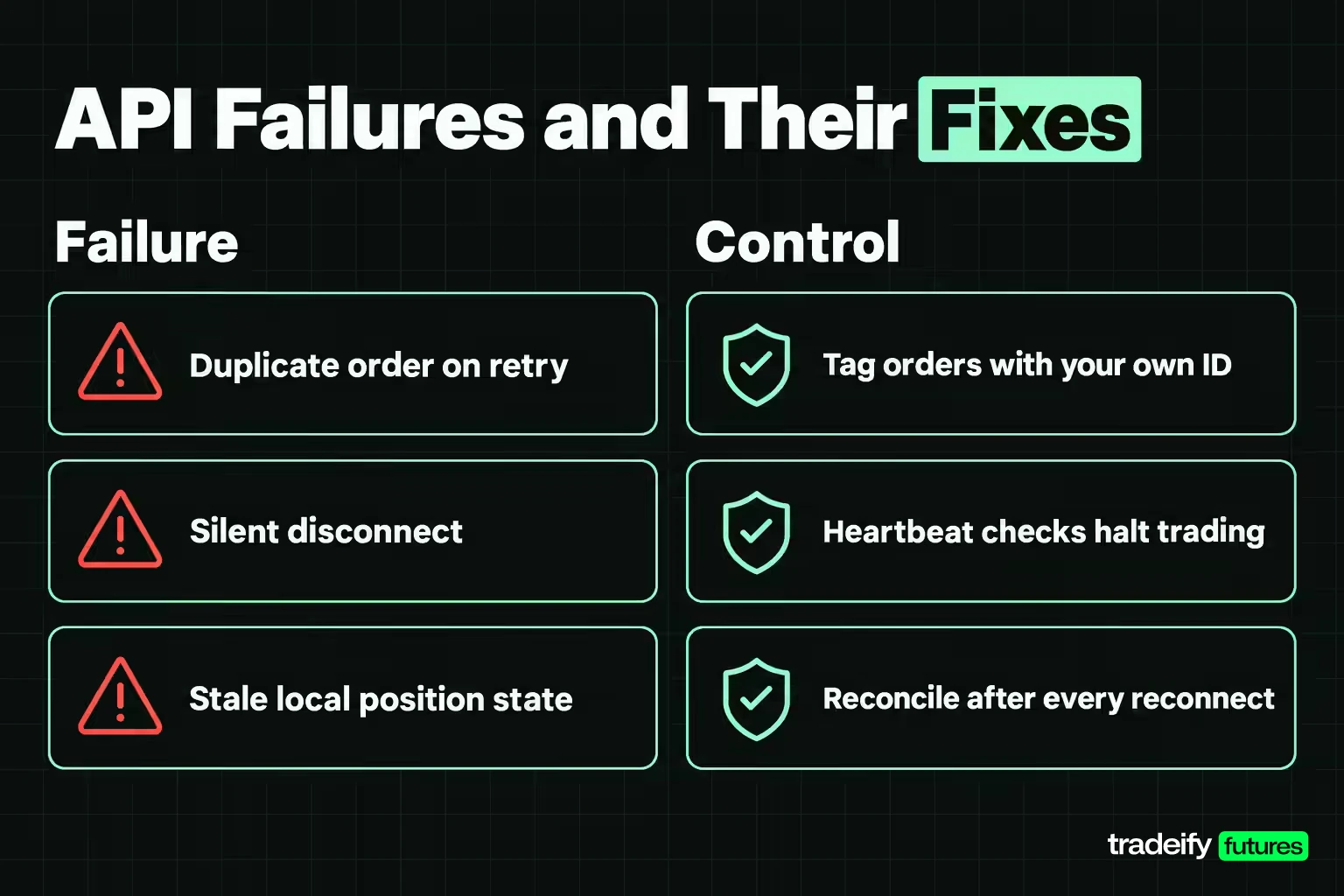
Trading API risks are mostly engineering risks that turn into position risks. These are the failures that show up most in live integrations, with the control for each.
| Failure | What happens | Control |
|---|---|---|
| Duplicate order on retry | A timeout makes the code resend an order that was already accepted | Tag each order with your own ID and check status before resending |
| Silent disconnect | The data stream stops but the program keeps acting on stale prices | Heartbeat checks that halt trading when updates stop |
| Rate-limit lockout | Too many requests and the provider refuses or delays calls | Count requests, batch reads, back off on errors |
| Stale local state | The program's idea of its position differs from the account | Reconcile positions from the provider after every restart or reconnect |
| Wrong contract | Orders go to an expired or illiquid contract month | Resolve the contract symbol each session and check volume |
| Leaked key | Someone else can trade or read the account | Store keys in a secrets manager, never in code, and rotate them |
| Stop only in the script | The script crashes and the protective stop vanishes | Use provider-held stops, brackets or OCO orders |
Rate limits deserve a specific note. Tradovate's documentation describes a time-penalty response for some operations: the request is not handled, and the client must wait the stated number of seconds and retry with a penalty ticket. A program that ignores that response and keeps retrying can lock itself out at the worst moment.
There are also limits no code fixes. Exchange halts, provider outages and fast markets can leave orders unfilled or filled far from the expected price. Automation removes hesitation. It does not remove market risk.
Trading API Documentation, Keys and Rate Limits
Trading API documentation is worth reading in a set order, because the parts that bite first are rarely on the landing page.
- Base URLs and servers. Tradovate, for example, separates a live server, a demo server for simulation and a market-data server. Pointing test code at the live URL is a classic first mistake.
- Authentication flow. Know how tokens are issued, how long they last and how to refresh them. Interactive Brokers uses OAuth 2.0 with private_key_jwt client authentication, where the client signs a token with its own private key instead of passing a shared secret.
- Rate limits and error codes. Find the request limits and what the provider returns when you exceed them, before your code meets them live.
- Request IDs. Alpaca returns a unique request ID in the header of every trading API response and asks developers to keep recent ones for support cases. Logging these makes disputes and debugging far easier.
- Versioning and change notes. Endpoints change. Subscribe to the provider's change notices so a deprecation does not surprise a live program.
API keys are the credentials of your account in machine form. Treat them like a password with trading authority.
- Keep keys out of source code and out of shared repositories.
- Use read-only keys for programs that only need data, if the provider offers them.
- Use separate keys for test and live accounts.
- Rotate keys on a schedule and immediately after any suspected exposure.
Getting Started With a Trading API as a Beginner
A trading API for beginners should be judged on how quickly you can place a correct simulated order, not on the length of its feature list. This order of work keeps the first month productive.
- Pick the market first, then the provider. Match the API to what you trade. A stock-first API is a dead end for a futures trader, however good its documentation.
- Open the test account. Use the provider's paper, demo or simulator account before any live credentials exist.
- Choose a language you can debug. TradeStation says its API works from any language that can make HTTP requests, including C#, C++, Python, Ruby and PHP. Interactive Brokers' TWS API supports C++, C#, Java and Python, and Public offers a Python SDK. Python is the common starting point because its data libraries are mature.
- Read before you write. Authenticate, fetch one quote, and fetch your account. Nothing else until those three work.
- Place one simulated order and follow it. Watch it go from accepted to filled, then cancel a resting order and confirm the cancel.
- Add logging before strategy logic. Record signal time, request time, fill time, fill price and quantity.
- Only then automate the rules, and keep the first live version at the smallest size the account allows.
Prebuilt libraries save time but add a layer you did not write. Before you trust any third-party wrapper, check that it is maintained, that it handles the provider's rate limits, and that it exposes order status rather than hiding it.
Related lesson: Backtesting a trading strategy
Trading API Best Practices Before a Live Order
Trading API best practices come down to assuming that every step can fail and deciding in advance what the program does when it does.
- Log everything with timestamps. Signal, request, acknowledgement, fill and cancel, plus the tick size and tick value, so every record converts to dollars.
- Make orders idempotent. Attach your own client order ID so a retry cannot create a second position.
- Keep protective orders on the provider's side. Brackets and OCO stops survive a crash that a script-managed stop does not.
- Put the risk gate inside the order path. Check daily loss, position size and open orders before every order, and refuse to trade when the account state cannot be read.
- Reconcile after every reconnect. Treat local state as a cache that may be wrong.
- Measure your own signal-to-fill gap. Two hundred logged signals is a small sample, but enough to catch a systematic half-tick cost.
- Test your fill assumptions. If your backtest counts touches as limit fills, rerun it requiring trade-through and compare.
- Keep a manual kill switch. One action that flattens positions and cancels orders, which you have tested.
- Track API changes. Read the provider's change log on a schedule.
Trading APIs on Prop Firm Accounts
Trading APIs on prop firm evaluation or funded accounts add a second rulebook on top of the provider's. Daily loss limits, trailing drawdowns, flat-by times and position limits are enforced by the firm, and an automated program that keeps sending orders after a limit is touched can breach a rule faster than a person would. Firms also set their own rules on which API connections, bots and copy tools are allowed at all.
That makes a risk gate inside the order path a requirement rather than a nice extra. The code should know the account's loss limit, its contract limit and its required flat time, and it should stop trading before any of them, not at them.
On our accounts, the Tradovate API is available only on LIVE funded accounts, not on evaluation or Sim Funded accounts. Bots and algorithms are allowed when you can prove you are the sole owner of the strategy, it is not shared with other traders or firms, and it is not a high-frequency trading bot. Every position must also be closed by 4:45 PM ET on regular days.
Trading API FAQ
What does API mean in stocks?
API stands for application programming interface. In stocks it means a broker channel that lets software read prices and account data and place share or option orders without a person clicking. The same idea applies to futures, with contract symbols and tick values in place of tickers.
Which broker allows API trading?
Many brokers do, including Interactive Brokers, TradeStation, Tradovate, tastytrade, Alpaca and Public, each with different markets and access rules. Choose by the market you trade first, then by documentation quality and access requirements. Some require a funded live account or an API subscription before keys are issued.
Is the NinjaTrader API free?
NinjaScript, NinjaTrader's automation language, comes built into the NinjaTrader 8 desktop platform as a C# framework rather than as a separately sold API product. NinjaTrader also offers a free trading simulator to test strategies. What live automated trading costs depends on the NinjaTrader plan and connection you use, so check its current pricing.
Can ChatGPT write a trading algorithm?
A language model can draft strategy and API code quickly, and some brokers now offer MCP servers so AI agents can work with their APIs. It cannot tell you whether the strategy has an edge, and generated code often contains look-ahead bias, wrong contract details or missing error handling. Test anything it writes on historical data and in a simulator before it touches a live account.
Do trading APIs cost money?
Access is often free with an account, while market data, platform plans and API subscriptions can carry fees. Interactive Brokers and Public both say their trading APIs are free to use, while Tradovate requires an API Access subscription. The larger cost is usually execution: the gap between the price your code assumed and the price it got.
This article is educational and is not investment advice. Futures and other leveraged products can produce losses larger than expected, and automated trading can multiply mistakes quickly. The study figures are historical measurements of stated rules on 1-minute bar data, not records of live trading. Funded and evaluation accounts at prop firms are simulated trading accounts. Provider details, access rules and fees change, so verify them with each provider before you build.


