.svg)

.svg)
.svg)



TL;DR: The best trading tools cover six jobs: charting, execution, market data, news, journaling, and risk control. A lean stack might pair TradingView or a platform-native chart with a broker-supported execution platform, an economic calendar, and a journal such as TradesViz or TraderSync. Test every tool in simulation, confirm data and order-routing compatibility, and keep only tools that improve a measured decision. More screens, indicators, and subscriptions do not make a trading process safer or more profitable.
You miss an entry, so you buy a faster alert. Then you take too many alerts, so you add a filter. A month later, the screen looks impressive, the subscription total does too, and the original execution problem is still sitting there.
That is where traders get caught. A useful tool should remove a repeated failure from your process. It should not give you a more complicated way to avoid defining the process.
The best trading tools earn their place by helping you prepare, execute, control risk, or review. This guide sorts the main categories, shows the failure mode each one can address, and gives you a smaller stack you can judge from actual trade records.
What Makes Trading Tools Worth Using
A useful tool should answer a repeatable question. Where is the setup? What is the maximum planned loss? Is a scheduled report close? Did the execution match the plan?
Notice the sequence. First comes the decision. Then comes the tool. If you cannot name the decision, you cannot tell whether the software improved it or merely gave you more information to react to.
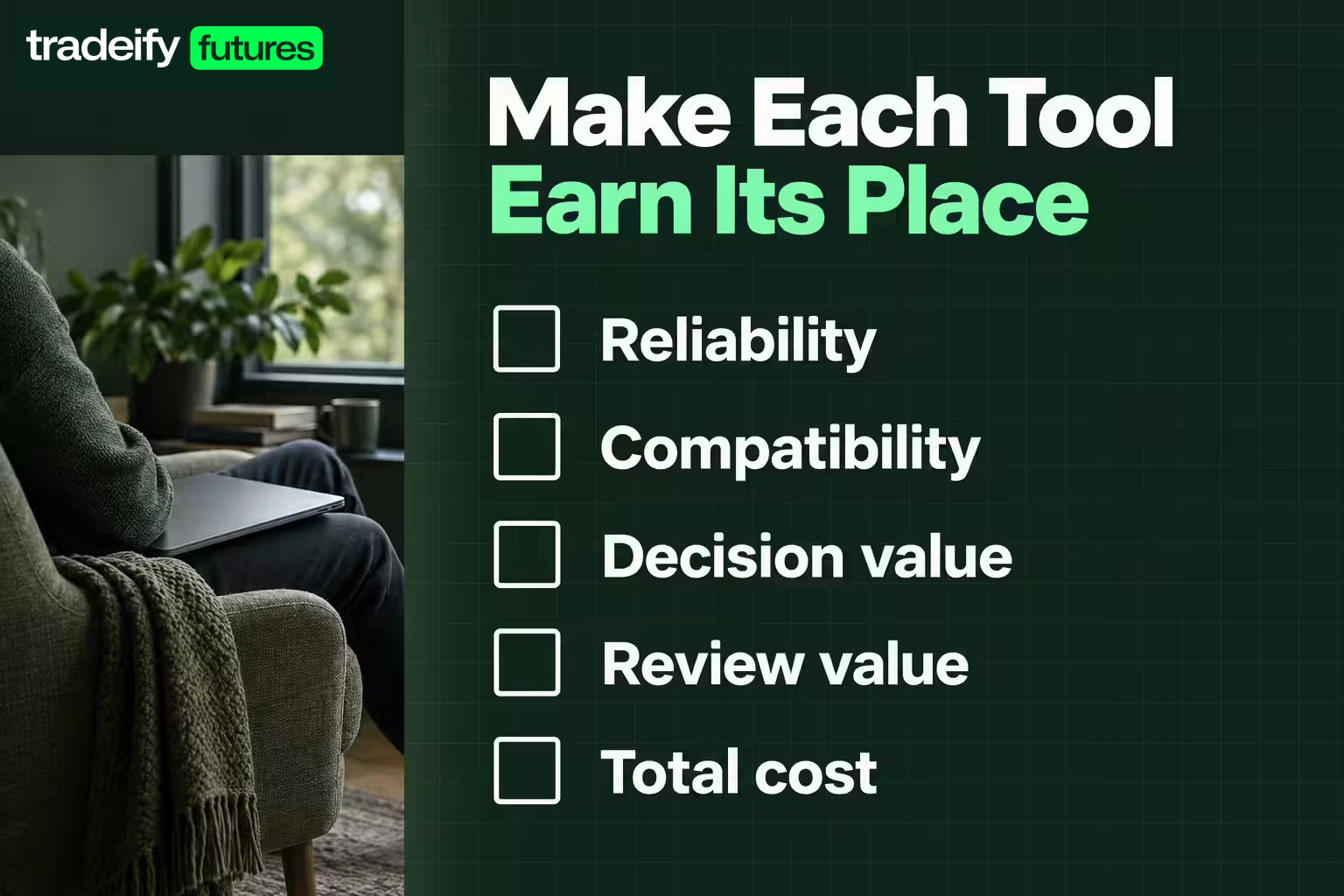
Judge trading tools on five practical tests:
- Reliability: The tool stays available during the sessions you trade.
- Compatibility: It supports your broker, data feed, account type, market, and operating system.
- Decision value: It makes a specific choice faster or clearer.
- Review value: It records enough detail to test whether your process works over a meaningful sample.
- Total cost: The benefit is worth the subscription, exchange-data, add-on, and switching costs.
Speed alone is not enough. A scanner that produces 200 alerts per hour may look productive. If your plan qualifies three of them and you chase ten, the tool made the real problem easier to repeat.
The pass condition should be specific: the tool helps you spot qualified setups without increasing off-plan trades. Your journal decides whether it passed.
Best Trading Tools for Charting
Charting software is the workbench. It should let you mark levels, compare time frames, save layouts, and see the data needed for your setup without turning the screen into a control panel.
TradingView is a broad browser, desktop, and mobile charting option with alerts, community scripts, and coverage across multiple asset classes. NinjaTrader combines futures charting, analysis, simulation, and execution tools. Quantower supports multi-asset analysis and connections to a range of brokers and data providers.
The best choice depends on the actual workflow. A futures trader who needs depth-of-market tools and platform-native order entry may value different features than a swing trader who wants watchlists and cloud-synced charts.
Imagine price reaches a level you marked before the session. The chart has done its first job: it showed the observation. Your setup rules still have to interpret the location, wait for confirmation, define the invalidation, and decide whether an order is allowed. A sharper chart does not collapse those decisions into one.
Before paying, test these tasks:
- Open and save the exact chart layout you plan to use.
- Confirm the symbols and contract months are easy to find.
- Check whether the data is real time, delayed, or billed separately.
- Build one alert that matches a real setup condition.
- Recreate the layout on the backup device.
Best Trading Tools for Market Data
Charts are only as useful as the data behind them. Futures traders may need exchange-specific real-time data. Stock traders may care about consolidated quotes, depth, news, or short-sale information. Options traders may need a reliable chain, implied volatility, and Greeks.
Start with the data available through your execution platform. Add a separate feed only when you can state the gap it fills. Paying twice for similar data is common, especially when charting, brokerage, and add-on subscriptions overlap.
CME Group publishes contract information and market-data resources for its futures products. Its economic release calendar can also help futures traders identify scheduled events that may affect volatility.
Treat data quality as a risk issue. If quotes freeze, reconnect before acting. If two feeds disagree, do not assume the price that supports the desired trade is correct.
Best Trading Tools for Execution
Execution software is where analysis becomes an order. The important features are not decorative. They are order-type support, stable connections, clear position data, visible protective orders, and a workflow that reduces input mistakes.
Look for:
- Bracket or attached-order support when compatible with your plan.
- Clear quantity, average price, realized profit and loss, and open risk.
- A fast way to cancel working orders.
- Simulation that resembles the live interface.
- Connection and rejection messages you can understand.
- A supported backup path if the main device fails.
Hotkeys can reduce clicks, but they can also send the wrong order faster. That happens fast.
Test quantity controls, confirmations, and cancellation behavior in simulation. A clean loss caused by the strategy is part of trading. An oversized loss caused by a hotkey error is a process failure, and the fix belongs in the workflow before the next live order.
Funded traders should also confirm that a platform, connection, data feed, and order type are permitted by the account provider. Rules can differ, and a third-party feature being available does not mean it is allowed for every account. When possible, submit orders through the actual broker or provider-supported platform. You can chart in TradingView while placing the order through Tradovate, for example. If a third-party bridge or API fails, the resulting execution issue may sit outside the prop firm's support scope.
Best Trading Tools for News and Calendars
News tools should help you avoid surprise, not tempt you to react to every headline.
For scheduled U.S. releases, the Bureau of Labor Statistics calendar lists publication dates for employment, inflation, and other labor data. The Federal Reserve calendar lists meetings, speeches, and releases. These primary calendars are useful anchors because they show the source event rather than a repost.
Build a simple pre-session check:
- Note scheduled releases during the planned trading window.
- Mark which markets may be affected.
- Decide in advance whether to pause before or after the event.
- Confirm the account rules that apply during news.
- Record any execution changes caused by volatility.
The calendar does not predict direction. It tells you when your normal assumptions about liquidity, spread, and slippage may be less dependable.
Best Trading Tools for Journaling
A journal turns confidence into evidence. Without one, a trader can remember the clean winners, blur the avoidable losses, and judge a strategy from the last three trades.
TradesViz and TraderSync are examples of dedicated journals with trade imports, tagging, and analytics. A spreadsheet can also work if it captures the fields you actually review.
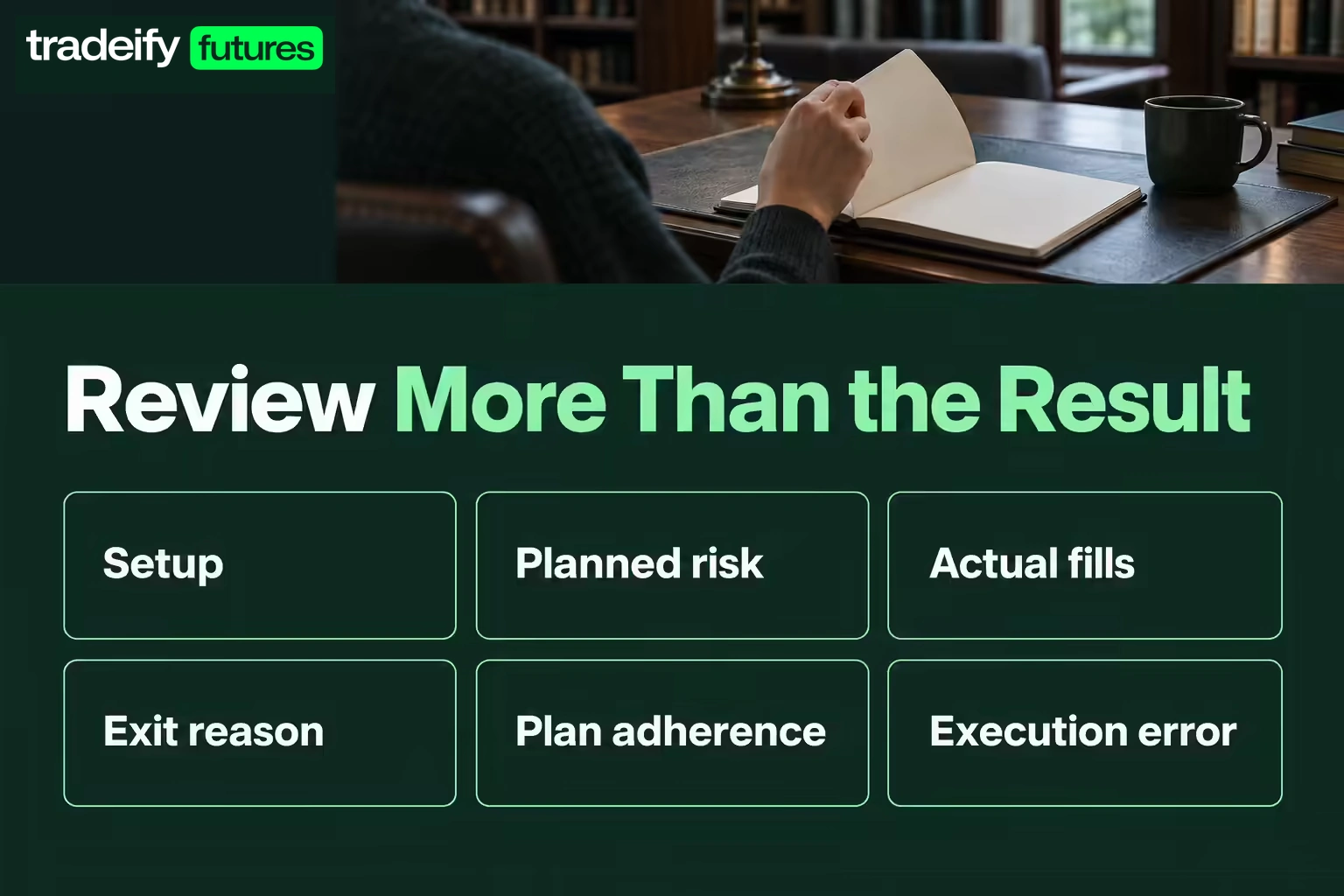
At minimum, record:
- Market, date, session, and setup.
- Planned entry, stop, target, and risk.
- Actual fills and exit reason.
- Screenshot before and after the trade.
- Whether the trade followed the plan.
- One tag for the main execution error, if any.
Separate strategy performance from execution quality. A valid setup can lose. A rule-breaking trade can win. Mixing those outcomes teaches the wrong lesson.
Best Trading Tools for Risk Control
The strongest risk tool is a decision made before the pressure starts. Once a trade is moving against you, the temptation is to give it more room, reduce the importance of the level, or call the next support area the real invalidation.
A written rule cuts off that negotiation. Software can support it with order brackets, daily-loss alerts, position-size calculators, or platform limits.
A position-size calculation needs three inputs: planned account risk, entry price, and invalidation price. The distance to invalidation determines the quantity. Reversing that order by choosing size first can make the stop fit the desired exposure instead of the market thesis.
Useful controls include:
- A maximum loss per trade.
- A daily stop that ends the session.
- A maximum number of attempts on one idea.
- A rule for reducing size after abnormal slippage or connection problems.
- A hard check that every live order has the intended quantity.
Tools support discipline. They do not remove futures risk, prevent losses, or guarantee compliance with funded-account rules. If the protective order is missing, the quantity is wrong, or the account limit is unclear, the correct action may be no trade.
Trading Tools for Research and Testing
Backtesting tools can help test whether a rule had an edge in historical data. They cannot prove that the same result will occur in future conditions.
Use a test that matches the intended trade. Include realistic commissions, slippage, session times, contract changes, and enough trades to reduce the effect of a lucky streak. Keep an untouched out-of-sample period when possible.
Then forward-test in simulation. This exposes problems that a clean backtest may miss, such as unclear entries, slow decisions, alert fatigue, and fills that were assumed too generously.
The practical sequence is:
- Write the rule in plain language.
- Test it on historical data.
- Check an out-of-sample period.
- Forward-test in simulation.
- Review rule-following and results separately.
- Change one variable at a time.
How to Build a Trading Tools Stack
Start with four functions, not four brands:
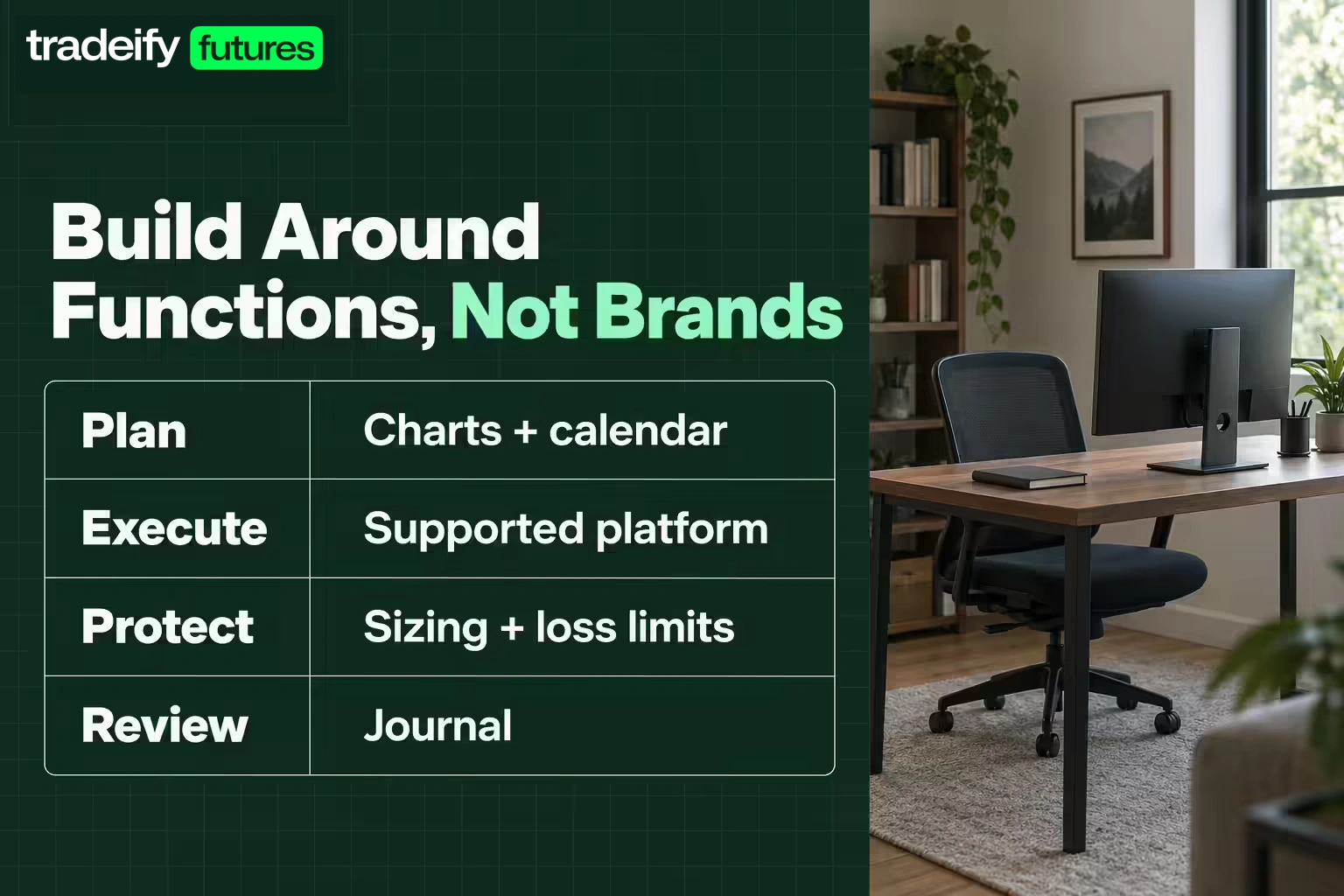
- Plan: charts plus a primary economic calendar.
- Execute: one supported order-entry platform.
- Protect: position sizing and precommitted loss limits.
- Review: a journal with screenshots and tags.
Run that stack for 20 to 30 qualified trades before adding another subscription. The sample does not have to prove that you found a permanent edge. It needs to show where the process is breaking.
If missed scheduled releases keep appearing in the journal, a better calendar alert may help. If review detail is weak, automated imports may help. If the only issue is that waiting feels boring, another indicator will probably make the chart busier without making the setup better.
When testing a new tool, define one pass condition. For example, an alert tool passes only if it identifies qualified setups without creating more impulsive entries. Remove it if the decision does not improve.
Common Trading Tools Mistakes
The first mistake is tool collecting. Buying overlapping chart packages can feel productive while delaying the harder work of defining a setup.
The second is trusting default settings. Indicator periods, session templates, data types, and simulated fills may not match the market or rule set you trade.
The third is outsourcing judgment. An alert is an observation, not confirmation. The trader still needs a valid setup, an invalidation point, correct quantity, and permission under the account rules.
The fourth is having no failure plan. Know how to flatten or manage a position if the main platform, computer, internet connection, or data feed fails. Test the backup while no money is at risk.
Choose Trading Tools by the Decision
The best trading tools are the ones you can explain in one sentence. This chart marks the setup. This calendar flags scheduled risk. This platform sends and manages the order. This journal checks whether the process held up.
Build the smallest stack that covers those jobs. Then take one concrete next step: write the job beside every tool you currently pay for. If you cannot connect a tool to a repeated preparation, execution, risk, or review decision, pause it for the next test sample.
Test the remaining stack in simulation, review the records, and add something only when the journal shows a specific gap.
Futures and leveraged trading involve substantial risk and can produce losses quickly. Simulated performance has limitations and does not guarantee live results. Funded-account access, permitted platforms, and rule compliance depend on the provider and account terms, so verify them before trading.
.svg)
.svg)
.svg)
.svg)







.webp)