



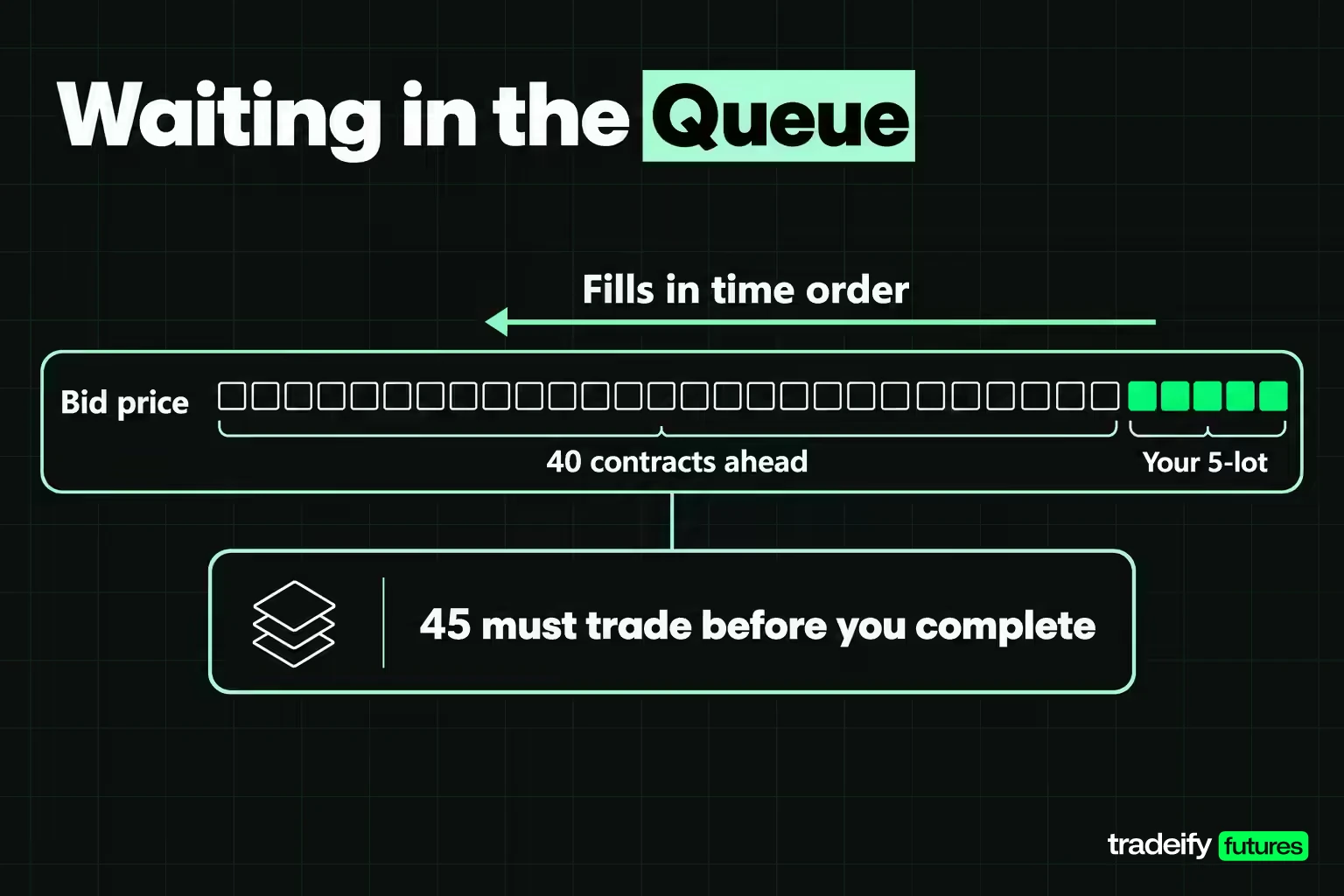
TL;DR: Limit orders let you set the worst price you will accept, and in return the order may fill late, only in part, or never. A limit order fills at your price or better, but only after the size queued ahead of you at that price has traded. On a FIFO book, a 5-lot joining 40 contracts at the bid needs 45 to trade there before it completes. If a missed fill only costs you a trade, a limit works; if it leaves you stuck in a position, use a market or stop order.
Limit orders are the order type most traders are told to use "for better fills," and most traders find out the catch the same way. Price trades at the level, the chart shows a print at your number, and your order is still sitting there unfilled while the move leaves without you.
That is not a platform bug. It is how limit orders are built, and once you can see the mechanics, the frustration turns into a decision you can make on purpose. This guide covers what a limit order is, where it actually sits once you send it, what has to happen before it fills, and how to decide when a limit is the right tool and when it is the wrong one. The worked examples use E-mini S&P 500 futures, because a futures order book makes the mechanics visible, but the logic carries over to stocks and other exchange-traded markets.
What Is a Limit Order
A limit order is an instruction to buy or sell at a specific price or better. The SEC's investor site puts it in two lines: a buy limit order can only be executed at the limit price or lower, and a sell limit order can only be executed at the limit price or higher. FINRA describes the same order as one used by investors who know the price they want, and notes that it is often used when getting the right price matters more than getting a quick execution.
CME Group's own definition for futures is just as direct. A limit order lets the buyer set the maximum purchase price and the seller set the minimum sale price. Any portion that can be matched right away is executed immediately, and the rest stays on the book until it is executed, cancelled, or expires.
So the limit price is your worst acceptable price, not a promised one. You are buying price certainty and paying for it with fill certainty. A market order makes the opposite trade: it promises execution and makes no promise about the price.
Three things a limit order is not:
- Not a queue position. Entering a price does not put you at the front of that price. If other orders are already resting there, you are behind them.
- Not a cap on loss. A limit order controls the price you get in or out at. It says nothing about where price goes after you are filled.
- Not a stop order. A stop order waits for a trigger and then becomes a market order. A limit order is live from the moment the exchange accepts it.
Related lesson: Order types overview
How Limit Orders Work in the Order Book
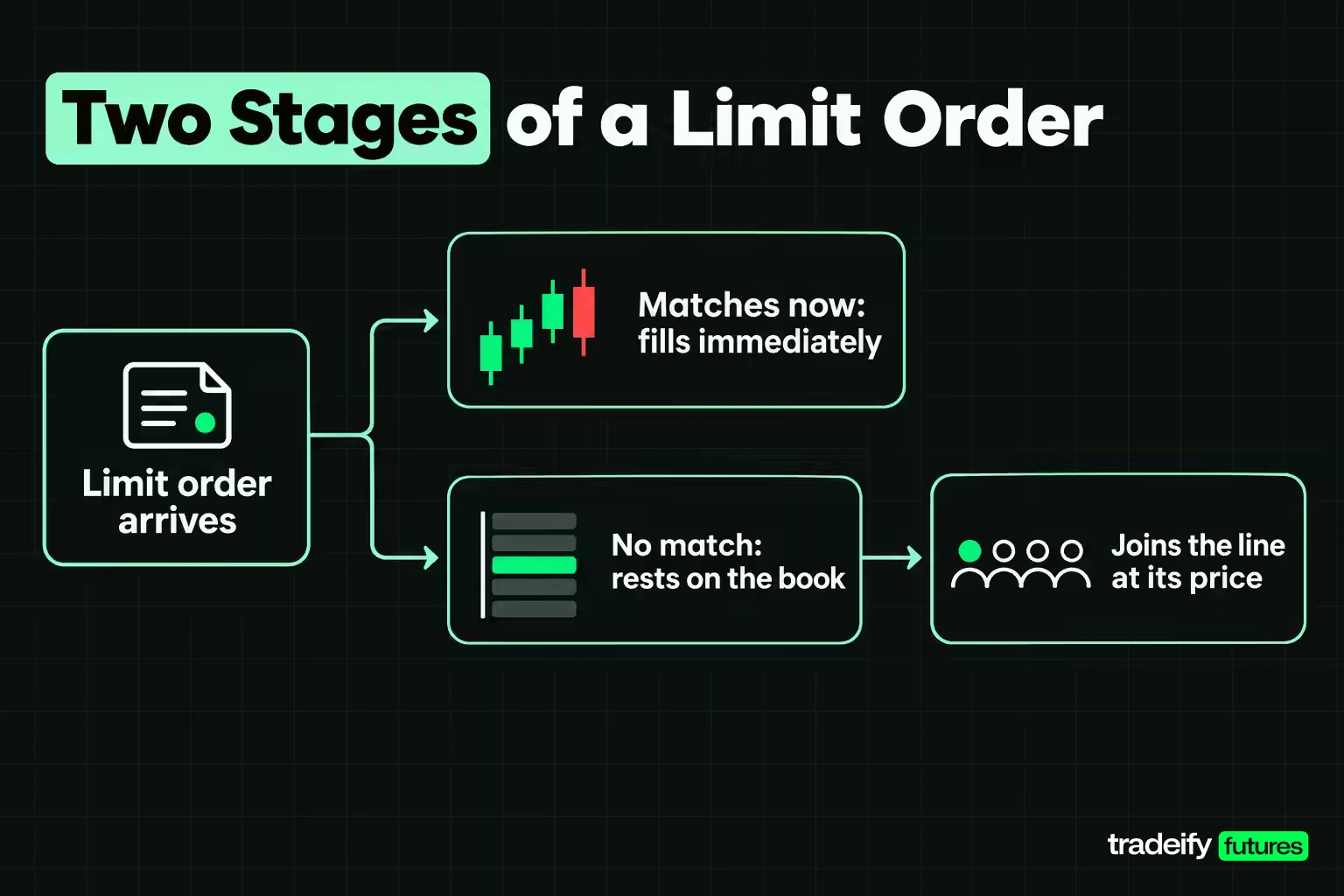
A limit order works in two stages. When it arrives, the exchange first checks whether any of it can trade right now against orders already resting on the other side. Whatever can match at your price or better fills immediately. Whatever cannot match is placed on the order book at your limit price, where it waits.
That waiting part is where most of the confusion lives. An order book lists every resting order that has not traded, grouped by price. Your new limit order does not replace anything at its price. It joins the line.
Price priority and time priority
Exchanges fill resting limit orders by price first. A higher bid gets filled before a lower bid, and a lower offer gets filled before a higher one. Among orders at the same price, the exchange needs a second rule, and on many futures markets that rule is time.
CME Globex calls it FIFO, first in, first out. Under FIFO, resting orders at a price are matched in timestamp order only, earliest first. CME's own FIFO example shows a 50-lot sell order arriving at a price where several buy orders rest: the first two orders in line are filled completely, the third gets a partial fill, and every order behind it gets nothing.
How a limit order loses its place in line
CME lists exactly what costs a resting order its timestamp priority under FIFO: increasing the working quantity, changing the price, or changing the account number. Any of those sends the order to the back of the line at its price.
The practical reading is blunt. Adding size to a resting limit order costs you the place you had. Nudging the price a tick to "help it fill" restarts you at the back of a new line, which is the exact moment most traders feel the pull to do it: price is close, the order has not filled, and waiting feels like losing. Reducing the quantity is not on CME's list, so cutting size on a resting order does not cost priority under that rule.
FIFO is not the only matching rule
CME supports several matching algorithms, and each product is assigned one. Alongside pure FIFO, the published set includes pro rata allocation, where an incoming order is split across resting orders in proportion to their size and timestamp is not taken into account, plus variants with lead market maker allocations and a configurable split between FIFO and pro rata.
That changes what matters for a limit order. Under FIFO, being early is the whole game. Under pro rata, being large matters more, and a small resting order gets a small share of each fill. Most retail platforms do not display the matching rule for the contract in front of you, so check your exchange's documentation before assuming arrival order decides your fill.
Related lesson: How the order book works
Buy Limit, Sell Limit and Other Limit Order Types
Every limit order is either a buy limit or a sell limit, and the side decides where it normally sits relative to the current market. Fidelity's description is the standard one: a buy limit is usually set at or below the current market price, and a sell limit is usually set at or above it.
| Limit order | Usual placement | Fills when | What it means |
|---|---|---|---|
| Buy limit | At or below the current bid | Sellers trade at your price or lower | Pay this much and no more |
| Sell limit | At or above the current ask | Buyers trade at your price or higher | Take this much and no less |
| Buy limit at or above the ask | Through the spread | Immediately, against resting offers up to your price | A marketable limit order |
| Sell limit at or below the bid | Through the spread | Immediately, against resting bids down to your price | A marketable limit order |
A limit order placed through the spread is not a mistake. It is called a marketable limit order, and it is the honest middle ground between a market order and a passive limit. It trades right away against whatever is resting at prices up to your limit, and any part it cannot fill at those prices waits on the book instead of chasing further.
Limit-based variants you will see on a ticket
Several order types are built on top of a limit price. The names vary by broker and platform, so treat this as a map, not a list of what every platform offers.
- Stop-limit order. Sits off the book until a trade happens at the trigger price, then enters the book as a limit order at your limit price. It controls price after the trigger and can miss entirely if price runs past the limit.
- Market-limit order. A CME Globex type that executes at the best available price, and if it can only partly fill, the rest becomes a limit order resting at that price.
- Fill and kill (FAK) or immediate or cancel (IOC). Executes whatever it can immediately at your limit or better and cancels the rest. Nothing rests on the book.
- Fill or kill (FOK). Must fill in full immediately or the whole order is cancelled. CME builds it as a FAK with a minimum quantity equal to the full order size.
- All or none (AON). A broker condition, common in stocks, that only fills the order if it can be completed in full.
- Display quantity order. Shows only part of a larger limit order. CME's example is a buy of 100 contracts with a display quantity of 10: no more than 10 shows at a time, and each refill joins the back of the line at that price.
Related lesson: Stop-limit orders
Limit Order Examples With Futures Math
The fastest way to see how limit orders behave is to run the same trade three ways on one book. These examples use the E-mini S&P 500 future (ES). CME specifies the contract at $50 per index point with a minimum tick of 0.25 index points, so one tick is worth $12.50 per contract. The Micro E-mini (MES) is one tenth of that size: $5 per point, $1.25 per tick.
The book below is illustrative, with round prices chosen to make the arithmetic checkable. It is not a market quote.
| Side | Price | Resting contracts |
|---|---|---|
| Offer | 7,000.50 | 30 |
| Offer | 7,000.25 | 3 |
| Bid | 7,000.00 | 40 |
The spread is one tick, 7,000.00 bid and 7,000.25 ask. You want to buy 5 contracts.
Buying 5 ES with a market order
A market buy takes the 3 contracts offered at 7,000.25, then the next 2 at 7,000.50.
| Fill | Price | Contracts |
|---|---|---|
| First fill | 7,000.25 | 3 |
| Second fill | 7,000.50 | 2 |
| Average | 7,000.35 | 5 |
The average price is 7,000.35. That is 0.10 points, or 0.4 ticks, above the ask you saw, which costs $5.00 per contract and $25.00 across the order. You are filled immediately and completely. Whether $25.00 is a fair price for that certainty depends on the trade.
Buying 5 ES with a marketable limit at 7,000.25
In the same illustrative ES book (7,000.00 bid, only 3 contracts offered at 7,000.25, the next offers at 7,000.50), a buy limit for 5 contracts at 7,000.25 takes the 3 contracts at the ask. The other 2 do not fill, because the only offers left are at 7,000.50 and your limit says no higher than 7,000.25. You now hold 3 contracts with 2 still working at 7,000.25. No slippage on what filled, but you have a smaller position than planned, and you need to decide now what happens to the other 2.
Buying 5 ES with a passive limit at the bid
A buy limit at 7,000.00 joins the bid. Nothing fills right away. If it fills, you save one tick against lifting the offer: $12.50 per contract, $62.50 on 5 contracts.
The catch is the line. Under FIFO your 5 contracts sit behind the 40 already resting at 7,000.00, so 45 contracts have to trade at that price before your order completes.
| Contracts traded at 7,000.00 | Contracts still ahead of you | You are filled | Still working |
|---|---|---|---|
| 25 | 15 | 0 | 5 |
| 40 | 0 | 0 | 5 |
| 42 | 0 | 2 | 3 |
| 45 | 0 | 5 | 0 |
| 60 | 0 | 5 | 0 |
Read the second row twice. After 40 contracts trade at 7,000.00, the line ahead of you is gone and you have still received nothing. Price can tick down to 7,000.00, print 30 contracts and bounce, and the chart will show a trade at your level while your order sits untouched. A print at your price is an observation. A fill needs volume through your place in line.
Limit order price ladder and what each tick saves
The further from the ask you rest a buy limit, the better the price if it fills and the less likely it is to fill. Measured against lifting the 7,000.25 ask in the same illustrative book:
| Buy limit price | Distance from the ask | Saved per ES contract | Saved on 5 ES | Saved per MES contract |
|---|---|---|---|---|
| 7,000.00 | 1 tick, 0.25 points | $12.50 | $62.50 | $1.25 |
| 6,999.75 | 2 ticks, 0.50 points | $25.00 | $125.00 | $2.50 |
| 6,999.50 | 3 ticks, 0.75 points | $37.50 | $187.50 | $3.75 |
| 6,999.25 | 4 ticks, 1.00 points | $50.00 | $250.00 | $5.00 |
| 6,999.00 | 5 ticks, 1.25 points | $62.50 | $312.50 | $6.25 |
The savings column is real money. It is also exactly why the fill gets harder down the table: price has to travel further, and every resting order ahead of you at that price has to clear first. The cost of a limit that never fills does not appear in any column, because it is the move you missed, and nobody can price that in advance.
How to Place a Limit Order
Placing a limit order takes a minute, and most limit order problems start with something skipped on the ticket. The labels differ by platform, but the decisions are the same on a broker order ticket and on a futures DOM.
- Pick the right contract. On futures that means the right contract month, normally the front month that carries the volume. On stocks it means the right symbol.
- Choose the side. Buy or sell. Check it twice when entering an exit, because a sell limit placed under the bid fills immediately.
- Set the quantity. Size it to your risk plan, and look at the resting size at your price so you know how far back in line you are joining.
- Set the limit price on the tick grid. ES moves in 0.25-point steps, so a price such as 7,000.10 is not a valid level. Very aggressive limit prices can also be rejected: CME's price banding rejects buy orders far above the last price and sell orders far below it.
- Choose the time in force. CME Globex treats an order as a day order unless you specify otherwise. Choose GTC, GTD or an immediate-or-cancel type only on purpose.
- Add conditions if you need them. Fidelity's ticket, for example, offers all or none. Futures platforms may offer brackets that attach a stop and a target once the entry fills.
- Review and send. Preview the order, confirm side, price, size and duration, then place it.
- Manage it after it rests. Watch the traded volume at your price, decide in advance what you will do with a partial fill, and cancel the order the moment the reason for it is gone.
On a DOM ladder the same steps collapse into clicks. Clicking a price in the bid column places a buy limit there, and clicking in the ask column places a sell limit. That speed is useful, and it is also how traders end up with a resting order they forgot about. The last step matters as much as the first.
Limit Orders vs Market Orders
Limit orders and market orders trade one certainty for another. A market order guarantees execution but not the price; the SEC's investor site adds that the last traded price is not necessarily the price a market order gets. A limit order guarantees the price, or better, but not the execution.
Even market orders are rarely unprotected on futures exchanges. CME runs a "market order with protection" that fills only within a set range, and any part it cannot fill inside that range rests on the book as a limit order at the edge of the range. In other words, the exchange quietly turns the end of a runaway market order into a limit order.
| Situation | Usual choice | Reason |
|---|---|---|
| Deep, tight market and you need in now | Market order | Slippage is small and fill certainty is worth more than a tick |
| Thin top of book and your size is larger than it | Limit order | The best offer will not cover you and the next level costs more |
| Exiting a losing trade fast | Market or stop order | Getting out matters more than the price |
| Taking profit at a planned level | Limit order | You are not in a hurry and the level is the reason for the trade |
| Trading into a news release | Marketable limit or no trade | Market orders can fill far from the quote and passive limits can miss entirely |
| Scaling in at several prices | Several limit orders | The position gets built at your prices, not the market's |
The pattern behind the table is one question: if this order does not fill, what does it cost you? If the answer is "I miss a trade and can wait for the next one," a limit order fits. If the answer is "I stay in a position I wanted out of," a limit is the wrong tool no matter how good the price looks.
Related lesson: Market orders
Limit Orders vs Stop and Stop-Limit Orders
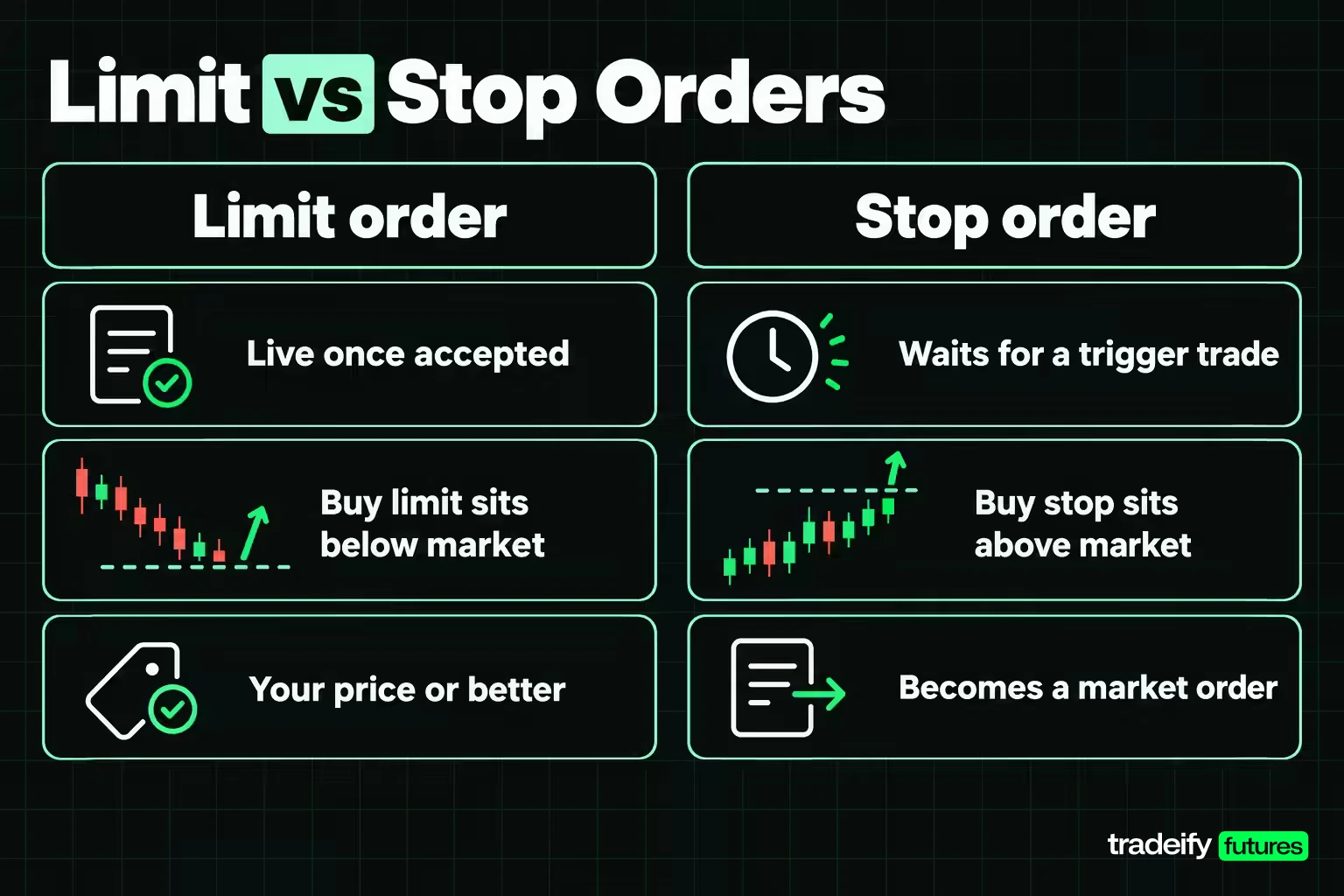
Limit orders and stop orders differ in what turns them on. A limit order is live the moment it is accepted and can fill as soon as the market reaches its price. A stop order waits.
CME's description for futures is precise: a stop order does not go on the book when accepted. It has to be triggered by a trade at the trigger price. A buy stop's trigger must be above the last trade price and a sell stop's below it, which is the opposite of where limits normally sit. Once triggered, a stop becomes a market order (on CME, a market order with a protection range), while a stop-limit enters the book as a limit order at your limit price.
| Order | Where it usually sits | What activates it | Price you can get | Main risk |
|---|---|---|---|---|
| Buy limit | At or below the market | Live immediately | Your limit or lower | No fill |
| Sell limit | At or above the market | Live immediately | Your limit or higher | No fill |
| Sell stop | Below the market | A trade at the trigger | The next available prices | Slippage past the stop |
| Sell stop-limit | Below the market | A trade at the trigger | Between trigger and limit | No fill if price runs past the limit |
The stop-limit row is the one that hurts people on exits. Suppose a long position has a sell stop-limit with a trigger at 6,990.00 and a limit at 6,989.00 (illustrative prices). If the market drops straight through 6,989.00 without trading enough there, the order sits unfilled on the book and the position stays open. A plain stop would have closed it at a worse price. The stop-limit protected the price and left the risk in place.
That is the useful way to separate them, and it is worth deciding before the trade, not while price is falling toward your trigger. Limit orders are tools for price. Stop orders are tools for getting out, or getting in, once price proves something. A stop-limit tries to be both and can fail at the second job.
Related lesson: Stop orders
Advantages of Limit Orders
The main advantage of limit orders is that you decide the price before the market does. Vanguard frames it as price protection: you set the maximum purchase price or the minimum sale price. Beyond that, a few benefits matter most to active traders.
- No fill worse than your price. On a thin book or a fast tape, a market order takes whatever is there. A limit order will not, so slippage on the part that fills is zero by design.
- You can earn the spread instead of paying it. A passive buy limit at the bid that fills has bought one tick better than lifting the ask. On ES that is $12.50 per contract per fill, a real number when it repeats across hundreds of entries.
- Planned exits run without you clicking. A sell limit at a profit target fills when buyers reach it, even if you are watching a different chart.
- Scaling in or out at chosen prices. Several limit orders at different levels build or trim a position at your prices rather than in one market-order burst.
- A brake on impulse entries. Choosing a price in advance forces a decision about where the trade makes sense. If price never comes back to that level, the trade you wanted did not set up, and that is information too.
- Control during volatile periods. Fidelity notes that a limit order makes you less subject to a rapid swing that might hit a market order, while still warning that a rapid swing can make you miss the trade.
None of those benefits survive a limit order that never fills. Every advantage on the list assumes the price you chose was realistic.
Disadvantages of Limit Orders
The main disadvantage of limit orders is that they can fail silently. Nothing tells you the order was a bad idea; it simply does not fill while the market moves on. Vanguard lists the two standard risks: partial or no fill if price does not reach your limit, and limited availability, where even a market that reaches your limit cannot fill you if there is not enough size or price moves away first.
- Missed moves. The trade you were right about can run without you because it stopped one tick short of your price.
- Partial fills. You end up with 3 contracts out of 5, a position sized for nobody's plan.
- The fills you do get can be the worst ones. A passive buy limit fills most easily when sellers keep coming, which is exactly when price is about to keep falling. A limit that fills in a straight line down deserves a second look.
- Stale orders. A resting order placed for one reason stays on the book after the reason is gone, and fills later into a market you no longer want.
- Extra commissions on partial fills. Fidelity points out that an order completed in pieces can be charged a commission on each piece if each transaction carries a fee.
- Wrong tool for urgent exits. When the priority is getting out, an exit that depends on a limit price can leave you holding the position.
None of this makes limit orders bad. It makes them a tool with a specific failure mode, and the failure is not getting filled.
Related lesson: Partial fills
Why a Limit Order Does Not Fill
When a limit order does not fill, the cause is usually one of a short list, and the first three explain most cases. Vanguard's "limited availability" point covers the core of it: price reaching your limit is not the same as enough size trading there to fill you.
| What you see | Likely cause | What to check |
|---|---|---|
| Price traded at my level and I got nothing | Orders ahead of you at that price absorbed the volume | Traded volume at your price versus resting size ahead of you when you joined |
| Price touched my level and reversed | Only orders earlier in line filled before buyers or sellers dried up | Whether price traded through your level, not just at it |
| Order working for hours with no fill | Your price is away from the market | Your limit versus the current bid and ask |
| Partial fill and the rest sat | Not enough volume traded at your price | Your plan for unfilled size: cancel it or leave it |
| I moved my order and still got nothing | Changing price or adding size reset your time priority | Whether the modification put you at the back of a new line |
| Order rejected on entry | Price not on the tick grid, or outside the exchange's price band | The contract's tick size and how far your price is from the last trade |
| Order rejected or not accepted by the platform | Platform or account restriction such as a position limit or a personal risk setting | The platform's rejection message |
| Order expired | The time in force ended, usually a day order at the session close | The duration you chose on the ticket |
Two habits that explain most missed limit fills
The most useful habit for diagnosing limit orders is watching the volume traded at your price, not the price itself. A buy limit is only certain to fill once price trades through it, below your level, because then every resting order at your price, including yours, must have been taken out first.
The second habit is writing down two numbers: the fill you expected and the fill you got. Over twenty or thirty limit orders, a pattern usually shows up. Either your limits are a tick or two too ambitious and you are missing trades that worked, or they are so close to marketable that you are paying the spread anyway. Both are fixable once they are on paper.
Limit Order Duration and Time in Force
Every limit order has a lifespan, set by its time in force. CME Globex supports these durations for futures:
| Time in force | How long the limit order lives |
|---|---|
| Day | Until the end of the trading day, then it expires. CME assumes every order is a day order unless told otherwise |
| Good till cancel (GTC) | Until completely filled, cancelled, or the contract expires |
| Good till date (GTD) | Until filled, cancelled, the date you set, or contract expiry |
| Fill and kill (FAK) | Fills what it can immediately and cancels the rest |
| Fill or kill (FOK) | Fills in full immediately or is cancelled entirely |
FINRA describes the same two basic choices for stocks: day orders expire at the end of the trading day, and good 'til canceled orders stay in effect until executed or cancelled. In practice brokers cap GTC orders. Vanguard says its good-till-canceled orders last up to 60 calendar days, while Fidelity says its GTC orders stay active for up to 180 days. Two well-known brokers, two different numbers, which is the reason to read your own broker's terms.
What a long-lived limit order keeps and risks
A GTC limit on CME keeps its timestamp from one session to the next, as long as you do not make a change that costs priority. That is an advantage for queue position.
The risk is that it also sits on the book through news, session opens and volatility you were not thinking about when you placed it. Futures GTC orders also end when the contract expires, so an order on an expiring month does not roll forward by itself. And in products with daily price limits, CME accepts GTC or GTD orders outside the day's limits in most products, but they cannot trade until price comes back within the limits.
For a day trader, a day order is usually the cleaner default. It cannot surprise you tomorrow.
Related lesson: Good-til-canceled orders
Price Gaps and Limit Orders
A price gap is a jump between one trade and the next, usually across a session close, a weekend or a major release, with no trading in between. Fidelity names the usual culprit: price moving substantially between the close and the open, overnight or over the weekend. Gaps affect limit orders differently depending on which way price jumps.
Take an illustrative ES market that last traded at 7,000.00 before a break, with three resting orders, and a reopen at 6,970.00.
| Resting order before the gap | What happens at a 6,970.00 reopen |
|---|---|
| Buy limit at 6,980.00 | Marketable on the reopen and can fill at 6,970.00, better than the limit |
| Sell limit at 7,020.00 | Price moved away from it, so it stays unfilled |
| Sell stop at 6,990.00 | Triggered and fills near 6,970.00, about 20 points or $1,000 per ES contract worse than the stop |
A buy limit can only fill at its price or lower, so when price gaps through it in the buyer's favor, the fill can be better than the limit. That is still worth thinking about, because a gap that large often comes with a reason you did not plan for. Vanguard gives the stop-order version in stock terms: a stock that closes at $100 and gaps down to $90 fills a $95 stop-loss at $90.
So a limit order is the safer of the two around a gap in one specific sense: it will never fill worse than its price. It can still leave you without the position you wanted, and a stop-limit exit gapped through will leave you in the position you wanted out of.
A Limit Order Routine for Futures Day Traders
A good limit order routine is mostly done before you click. These checks take seconds and catch most of the problems traders blame on their platform.
- Read the spread and the size. Note the bid, the ask and the resting size at your price. If you are joining a line of 40 contracts, you know you need more than 40 to trade there before you are filled.
- Answer the no-fill question. Decide whether a missed fill costs you a trade or leaves you stuck in a position, and choose the order type from that answer.
- Pick the duration on purpose. For intraday trading a day order is usually the right one.
- Log expected versus actual. Write down the limit, the quote when you sent it, the fill price and the filled size. Twenty entries show a pattern memory will not.
- Do not chase a missed fill. If price leaves without you, moving the limit after it is a new trade at a worse price, not the same trade a little late. Re-check the setup before sending it.
- Clean up when flat. Cancel every working order in the contract when the trade is over, so an old limit cannot open a new position you did not plan.
On our accounts, our Help Center's order types guide covers market, limit, stop, stop-limit, trailing stop, OCO and OSO orders, and notes that a limit order is only guaranteed a fill when the market trades through it. That guide's general tip is to check the spread before a market order and use a limit if the spread is wider than 2 ticks. All positions must be closed by 4:45 PM ET on regular days, with no overnight holds. Bracket orders are not available while using Tradovate Group Trading.
Limit Orders FAQ
How does a limit order work?
You set a price, and the exchange fills any part that can trade at that price or better immediately. The rest rests on the order book at your price. On FIFO markets it then waits behind earlier orders at that price and fills only when enough volume trades there.
What is a stop order vs a limit order?
A limit order is live immediately and fills only at your price or better. A stop order waits off the book until a trade happens at its trigger price, then becomes a market order. A limit controls price; a stop prioritizes getting the order done once price reaches a level.
What is the 7% rule for selling stocks?
It comes from Investor's Business Daily, which teaches investors to cut losses at 7-8% from the purchase price. For a $50 stock that means selling around $46.50. That exit is normally a stop order rather than a sell limit, because a sell limit sits above the market and only fills when price rises to it.
How long will a limit order last?
It lasts as long as its time in force. A day order expires at the end of the session, and on CME Globex an order is a day order unless you choose otherwise. GTC orders last until filled or cancelled, subject to broker caps such as Vanguard's 60 calendar days or Fidelity's 180 days.
Can a limit order fill at a better price than the limit?
Yes. A buy limit can fill at its price or lower and a sell limit at its price or higher. A marketable limit buy that arrives when offers rest under its limit fills at those offer prices, and a resting limit can fill at a better price after a gap.
Does a limit order guarantee a fill?
No. A limit order guarantees the price, not the execution. Price must reach your level and enough volume must trade there to get through the orders ahead of you, or the order can sit unfilled or only partly filled.
This guide is educational and is not financial or trading advice. Futures are leveraged, and losses can exceed what you expect or the money in your account. All prices, order books and fills shown are illustrative examples, not market data. Funded and evaluation accounts at prop firms are simulated, and order handling, matching rules and time-in-force options vary by exchange, broker and platform, so confirm the details for the account you trade.


