



TL;DR: Stop limit orders trade fill certainty for price control, so decide first which failure you can afford. Once the stop price trades, the order becomes a limit order that fills at your limit or better. In a fast break it can fill partly or not at all, leaving the position open. On 3 MES, a zero-offset stop limit turned a $75.00 planned loss into $150.00 in the worked example. Each tick of offset costs $1.25 per MES contract and makes a fill more likely.
Price breaks your level, your stop triggers, and you are still in the trade. If that has happened to you, there is a good chance the order was a stop limit order doing exactly what it was told.
A stop limit order is a stop order and a limit order joined into one instruction. You give it two prices. The stop price decides when the order wakes up, and the limit price decides the worst price you will accept once it does. That second price protects you from a bad fill, and it can also leave you holding a position you meant to exit. This guide explains how stop limit orders work, how they differ from stop and limit orders, how to set the stop price and limit price, and what the trade-off costs in dollars on a futures position.
What Is a Stop Limit Order
A stop limit order is a conditional order with two prices. It waits until the market trades at the stop price, then turns into a limit order at the limit price.
The SEC's investor bulletin on order types describes it this way: once the stop price is reached, the order becomes a limit order that will be executed at a specified price or better. FINRA Rule 5350 uses the same structure for stocks, defining it as an order that becomes a limit order at the limit price when a transaction occurs at or above the stop price for a buy, or at or below it for a sell.
The two prices answer two different questions.
- Stop price. When should the order become active? For a protective stop, this is where your trade idea is wrong.
- Limit price. What is the worst price you will accept once it is active? On a sell this is a floor. On a buy it is a ceiling.
The two numbers do not have to match. The SEC gives the example of a sell stop limit with a stop price of $3.00 and a limit price of $2.50. That order becomes an active limit order if the market reaches $3.00, but it can only fill at $2.50 or better.
So a stop limit order buys price control and gives up execution certainty. A plain stop order makes the opposite trade. Every choice about stop limit orders comes back to one question: which of those two risks is cheaper for the position in front of you?
Related lesson: Order types overview
How Stop Limit Orders Work Step by Step
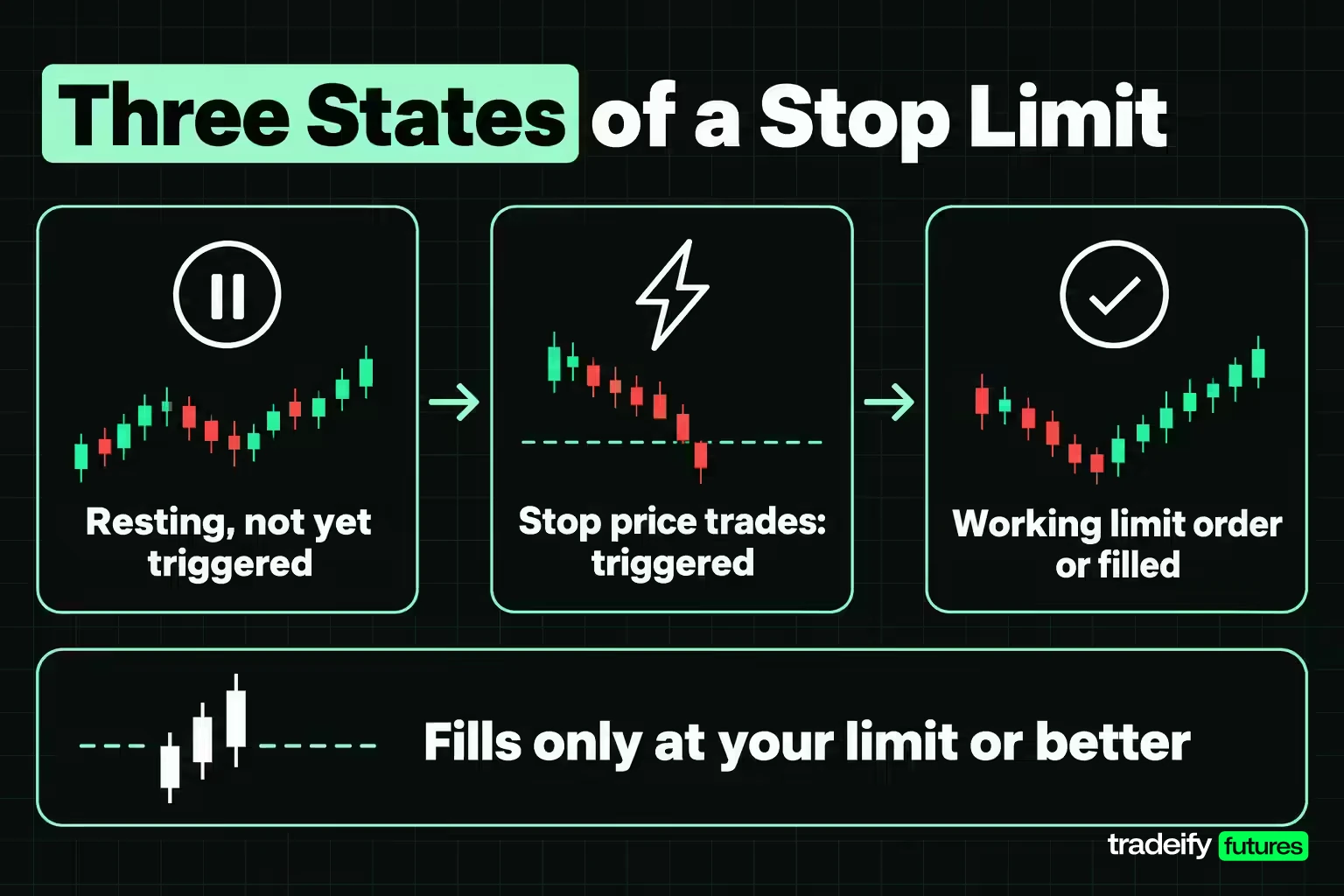
A stop limit order moves through three states, and knowing which state it is in tells you what it can and cannot do.
- Resting, not yet triggered. You submit the order with a side, a quantity, a stop price and a limit price. On CME Globex a buy stop-limit's trigger must sit above the last traded price and a sell trigger below it. Until the trigger trades, the order is not a live bid or offer in the book.
- Triggered. When the market trades at the trigger price, the order enters the book as a limit order at your limit price. CME's documentation says the order can then fill at any price level between the trigger and the limit.
- Working or filled. Any quantity that cannot fill stays on the book as a limit order at the limit price. It keeps working until it fills, you cancel it, or its time in force expires.
Why a triggered stop limit does not chase price
This is the mechanic that catches people. Once a sell stop limit triggers, it becomes a sell limit at your limit price, and a sell limit only fills at that price or higher.
If the market has already fallen below your limit by the time your order is live, your sell limit is now an offer sitting above the market. It does not follow price down. It waits, and it fills only if buyers lift price back up to your limit. A buy stop limit behaves the same way in reverse when price spikes through its ceiling.
The order has not failed. It refused a worse price, which is exactly what you told it to do. The cost of that obedience is a position that is still open.
What counts as reaching the stop price
The trigger is usually a trade, not a quote. CME says stop-limit orders are activated when the trigger price is traded in the market. In stocks, the SEC notes that venues and firms use different standards: some use only last-sale prices to trigger stops, while others use quotation prices.
That difference explains a common complaint. You see a bid at your stop on the ladder, but no trade prints there, and the order never elects. Check which standard your broker and platform apply before you rely on a level that is often quoted but rarely traded.
Related lesson: Stop orders
Stop Orders, the Trigger Half of a Stop Limit
A stop order is an instruction that sits dormant until a stop price is reached, then becomes a market order. The SEC notes that a stop order is also called a stop-loss order.
Direction decides where the stop goes.
- Sell stop. Entered below the current market. Traders use it to limit a loss or protect a profit on a long position.
- Buy stop. Entered above the current market. Traders use it to limit a loss or protect a profit on a short position, or to enter as price breaks higher.
The weakness of a plain stop is in the SEC's own wording: the stop price is not the guaranteed execution price. It is a trigger. Once the order becomes a market order, it takes whatever liquidity is available, and in a fast or thin market that can be well past your stop.
Futures add a safety rail here. On CME Globex the stop market variant is a stop order with protection. It enters as a market order with a protection price limit set a product-specific number of points beyond the trigger, and CME says those protection points usually equal half of the product's non-reviewable range. Any quantity that cannot fill inside that range rests at the protection limit instead of filling at an extreme price.
So a futures stop market has a floor on how bad the fill can get, but the fill is still not yours to choose. A stop limit order replaces the exchange's protection range with your own limit price, which is tighter and fully in your control.
Limit Orders, the Price Half of a Stop Limit
A limit order sets the maximum price you will pay to buy or the minimum price you will accept to sell. CME's description is direct: buy limits execute at or below the limit price, sell limits execute at or above it, and a limit order stays on the book until it is executed, cancelled or expires.
Three traits of limit orders carry straight into stop limit orders.
- Price or better. You never fill worse than your limit. You can fill better if the market offers it.
- No guarantee of a fill. The SEC states that limit orders do not guarantee execution. If price never trades at your limit, nothing happens.
- Partial fills. If there is only enough volume at your price for part of your size, the rest keeps working.
Market orders vs limit orders and where stop limits fit
A market order says fill me now. A limit order says fill me only at this price or better. Market orders fit when being in or out matters more than the exact price, such as exiting a position that has gone wrong in a liquid contract. Limit orders fit when the price matters more than the timing, such as entering at a level you planned or taking profit at a target.
A stop limit order is simply a limit order that waits for a trigger before it goes live.
Related lesson: Limit orders
Stop Limit vs Stop vs Limit Orders
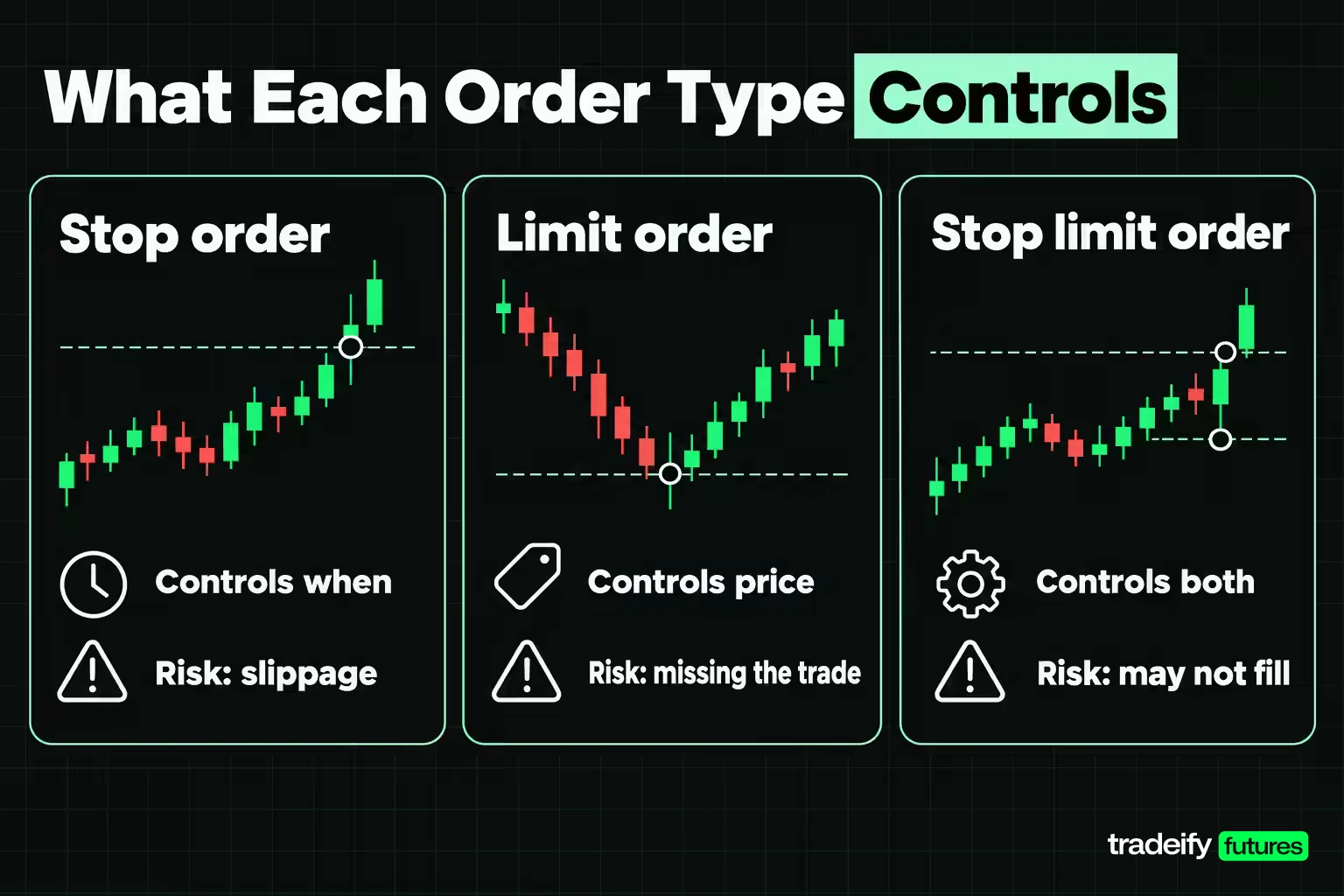
The three order types differ on two points: when the order becomes active, and how it fills once it is.
| Feature | Stop order | Limit order | Stop limit order |
|---|---|---|---|
| When it becomes active | When the stop price trades | Immediately on submission | When the stop price trades |
| What it becomes | A market order (stop with protection on CME Globex) | Already a limit order | A limit order at your limit price |
| Fill price | Next available price, can slip past the stop | Your limit or better | Your limit or better |
| Fill guaranteed | Close to certain in liquid markets, not guaranteed | No | No |
| Main risk | Slippage in fast or thin markets | Missing the trade | Being left in the position unprotected |
| Typical use | Protective exits where getting out comes first | Planned entries and profit targets | Exits or breakout entries where price comes first |
A simple way to remember it: a stop order controls when, a limit order controls price, and a stop limit order controls both, at the cost of possibly not filling.
The choice between a stop limit and a stop order is the one that matters most for protective exits.
- Choose a stop order when an open position is the bigger danger. That includes larger size, accounts with hard loss limits, and fast markets around scheduled data.
- Choose a stop limit order when a bad fill is the bigger danger and a missed exit is survivable. That includes thin contracts, wide spreads, and entries where you would rather miss the trade than chase it.
- Choose neither when you expect price to gap. No order type removes gap risk, so the real decision is position size or being flat.
A Stop Limit Example on Three Micro Contracts
Saying a stop limit "may not fill" is easy. Seeing what that costs on a real-sized position is more useful. This example uses the Micro E-mini S&P 500 future (MES), where one index point is worth $5 and the minimum tick of 0.25 points is worth $1.25 per contract, per CME's contract specs. All prices are illustrative round numbers, not market quotes, and commissions are left out.
Imagine a trader long 3 MES at 7,000.00 with a stop price of 6,995.00. That is 5 points, or 20 ticks, which is $25.00 per contract and a planned loss of $75.00 if every contract exits exactly at the stop.
The same five-point break is run through five different instructions.
| Scenario | Order instruction | What filled | Average exit | Total loss |
|---|---|---|---|---|
| Orderly break | Stop market | 3 at 6,994.75 | 6,994.75 | $78.75 |
| Fast break, thin bids | Stop market | 1 each at 6,994.50, 6,993.75 and 6,993.00 | 6,993.75 | $93.75 |
| Fast break | Stop limit, limit 6,993.75 | 2 filled, third exited later at 6,990.00 | 6,992.75 | $108.75 |
| Fast break | Stop limit, limit 6,995.00 | 0 filled, all 3 exited later at 6,990.00 | 6,990.00 | $150.00 |
| Break that reverses | Stop limit, limit 6,993.75 | 2 filled, third closed at 7,001.00 | 6,996.42 | $53.75 |
Reading the five stop limit outcomes
Each outcome in the MES stop limit example comes from the same five-point break and the same 6,995.00 stop price.
- Orderly stop market. One tick of slippage, $1.25 per contract, and a loss of $78.75. That is $3.75 beyond the $75.00 plan, which is a fair price for a certain exit.
- Fast stop market. The order sweeps three price levels for an average of 6,993.75. That is 1.25 points, 5 ticks or $6.25 per contract past the stop, and $18.75 of slippage on the position.
- Stop limit with a five-tick offset. Two contracts fill at 6,994.50 and 6,993.75. The third finds no bid at or above the limit and is left open. If it is worked out at 6,990.00, the loss is $108.75, which is $15.00 worse than simply accepting the stop market slippage.
- Stop limit with zero offset. With the limit at the stop price, the order can only fill if price trades back up to 6,995.00. In a break that keeps going, nothing fills. Exiting at 6,990.00 turns a $75.00 plan into a $150.00 loss, $56.25 worse than the fast stop market and double the plan.
- The reversal. This is the case stop limit users hope for. Price runs the stop, then snaps back. The two filled contracts exit near the low, but the third is closed at 7,001.00 for a total loss of $53.75, which is $40.00 better than the fast stop market.
The same trigger produced results from a $53.75 loss to a $150.00 loss. What separated them was the limit price chosen before the trade, and how the market behaved after the trigger. Neither order type wins every time. You are choosing which failure you would rather own.
How to Set a Stop Limit Order
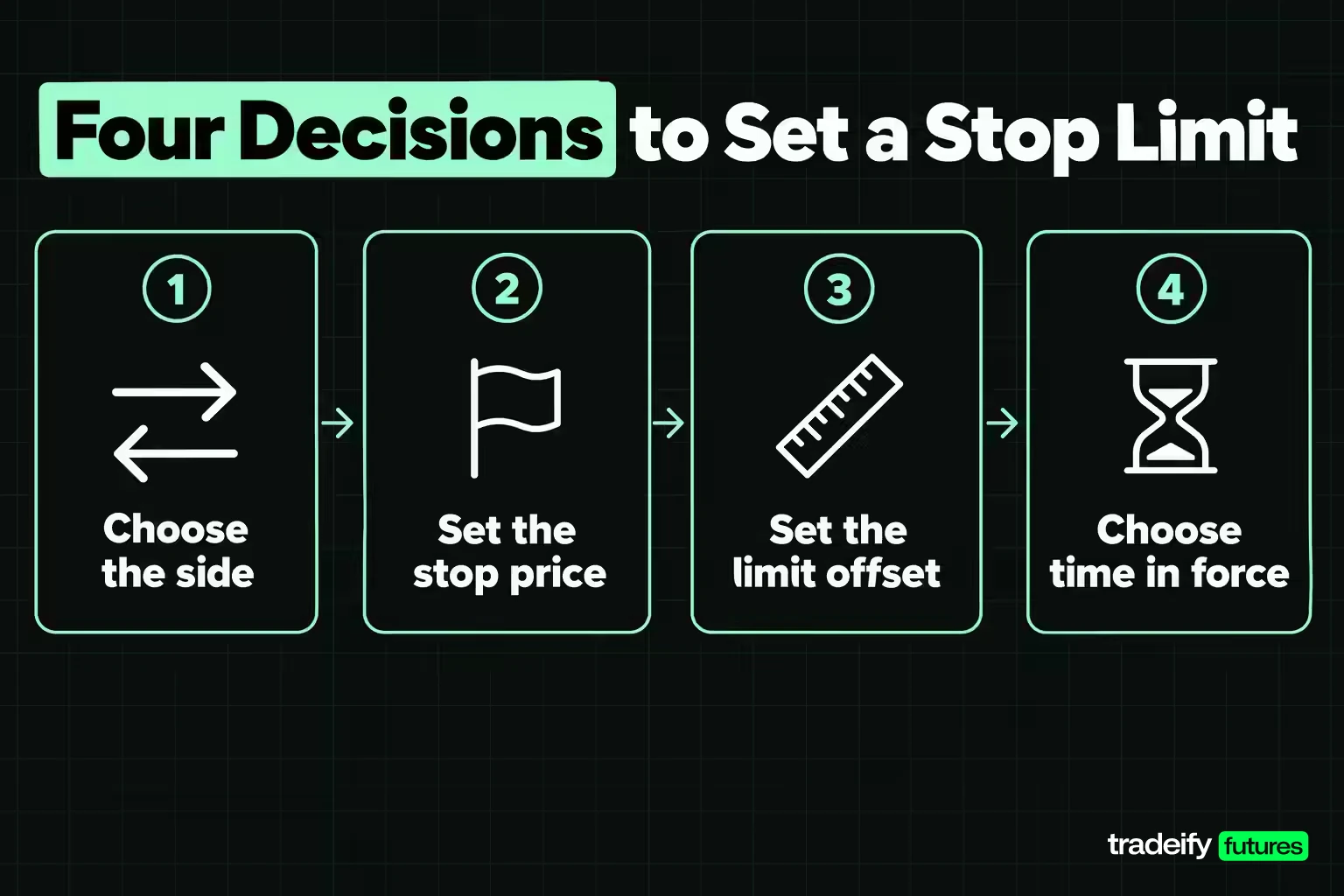
Setting a stop limit order takes four decisions, made before the order goes in, not after the trigger fires.
- Choose the side. A sell stop limit protects a long position, so its stop price goes below the market and its limit price at or below the stop. A buy stop limit protects a short or enters on an upside break, so its stop price goes above the market and its limit at or above the stop.
- Set the stop price. Put it where the trade idea is invalidated, not at an arbitrary dollar amount. Short-term swings can trigger a stop that sits too close, a risk the SEC flags directly.
- Set the limit price with a deliberate offset. The offset is the distance between the stop price and the limit price. It is the most important number on the order.
- Choose the time in force. CME Globex treats orders as Day orders unless you say otherwise, and Day orders expire at the end of the day. A Good-Til-Canceled order stays active until it fills, you cancel it, or the contract expires.
After you submit, confirm the order shows as working in your orders panel with the prices you intended. An order you think is there and an order that is actually there look the same in memory.
Choosing the offset between stop price and limit price
A wider offset makes a fill more likely and makes your worst fill worse. A narrower offset does the opposite. On a long MES position with a 6,995.00 stop, here is what each tick of offset costs if the order fills at the limit.
| Offset | Limit price | Distance below stop | Cost per contract | Cost on 3 contracts |
|---|---|---|---|---|
| 0 ticks | 6,995.00 | 0.00 points | $0.00 | $0.00 |
| 1 tick | 6,994.75 | 0.25 points | $1.25 | $3.75 |
| 2 ticks | 6,994.50 | 0.50 points | $2.50 | $7.50 |
| 3 ticks | 6,994.25 | 0.75 points | $3.75 | $11.25 |
| 4 ticks | 6,994.00 | 1.00 points | $5.00 | $15.00 |
| 5 ticks | 6,993.75 | 1.25 points | $6.25 | $18.75 |
Zero offset sounds disciplined and is usually the riskiest choice. It accepts only the trigger price or better, which in a fast break is a price the market has already left. Most "my stop limit never fills" stories come from an offset smaller than the contract's normal movement through a level.
Size matters too. The same five-tick offset is $6.25 per contract on MES and $62.50 per contract on the E-mini S&P 500 (ES), where a tick is $12.50. Convert the offset into dollars on your own contract before you accept it.
Related lesson: Tick size and tick value
Setting a buy stop limit to enter a breakout
Buy stop limit orders are also an entry tool. Imagine MES trading at 7,000.00 and a trader who wants to buy only if price breaks above 7,004.00, but refuses to chase more than four ticks. A buy stop at 7,004.00 with a limit of 7,005.00 does that. It caps the entry at 1.00 point above the trigger, $5.00 per contract.
If the breakout gaps straight through 7,005.00, the order does not fill. On an entry, that is usually the cheaper failure. Missing the entry does not make the next price a good entry. It makes it a different trade.
Stop Limit Pros and Cons
Stop limit orders solve one problem well and create another. Both sides belong in the decision.
Advantages
- A known worst price. If the order fills, it fills at your limit or better. The SEC frames this as the main benefit: you control the price at which the order can be executed.
- Protection from spikes and thin books. A sudden air pocket in liquidity cannot fill you far below your limit.
- Disciplined breakout entries. A buy stop limit enters on strength without chasing an extended move.
- Automation. The order waits for your level, so you do not need to react by hand.
Disadvantages
- No fill guarantee. If price moves through and away from your limit, nothing fills.
- Unprotected positions. A triggered stop limit that does not fill leaves your position open with no stop behind it.
- Partial fills. Part of your size can exit and the rest stay open, which is often worse than either full outcome.
- Larger losses than planned. When the market keeps going, the eventual manual exit can be much worse than a stop market fill would have been.
- More monitoring. You need a backup plan for the unfilled case, which partly defeats the point of an automated exit.
The short version: stop limit orders protect your fill price, not your account. When those two goals conflict, decide in advance which one wins, because the market will not wait while you decide.
Stop Limit Risks and Limitations
The main risk of a stop limit order is not a bad fill. It is no fill at the moment you most wanted out.
Gaps can leave a stop limit unfilled
Gaps are where the trade-off bites hardest. Imagine a stock that closes at $50.00 with a sell stop limit at a stop of $48.00 and a limit of $47.50. If it opens at $45.00 after bad news, the stop triggers, but there are no buyers at $47.50 or higher. The order sits unfilled. A plain stop order would have sold near $45.00, $3.00 below the stop, but it would have sold.
Futures that trade nearly around the clock gap less often between sessions, but fast moves around scheduled releases can behave like gaps. Prices can jump several levels between trades.
Partial fills split your position
A limit order fills only against volume at your price or better. If there is only enough for part of your size, the remainder keeps working as a limit order. You are now partly out, partly in, and the open part has lost its protection.
Stop limits that get rejected or never trigger
Two quieter failures cause real damage because traders do not notice them in time.
- Price banding rejections. CME Globex processes stop orders against price banding. If the limit price sits farther from the trigger than the banding parameter allows, CME rejects the order. A rejected stop protects nothing.
- Trigger standards. If your broker triggers on trades and price only quotes your level, the order never activates.
Diagnosing a stop limit order that did not fill
| Symptom | Likely cause | What to change |
|---|---|---|
| Stop price traded, nothing filled | Price moved past the limit before the order could fill | Widen the offset, or use a stop market when the exit must happen |
| Part of the position closed, part still open | Not enough volume at or better than the limit | Size to the liquidity at that level, or work the remainder out right away |
| Order never appeared as working | Rejected, for example by exchange price banding | Check order status right after submitting, and keep the limit closer to the trigger |
| Price touched the level, order never triggered | Trigger needs a trade, and only a quote appeared there | Confirm the trigger standard your platform uses |
| Position open with no stop after a trigger | The stop condition fired and the limit never filled | Re-establish protection by hand immediately |
Related lesson: Partial fills
Using a Stop Limit as a Stop Loss
A stop limit order can act as a stop loss, but it is a conditional one. It limits the price of your exit, not the size of your loss.
That distinction answers whether stop-loss orders are a good idea. A stop loss is worth using because it turns an exit decision into a rule you set while calm. The question is which kind. A stop market stop loss is the safer default when the priority is getting out. A stop limit stop loss makes sense when a wide fill is the larger threat and you are watching the position closely enough to step in if it does not fill.
Two habits make a stop limit stop loss safer.
- Use an offset wider than normal noise. A protective stop limit with zero or one tick of offset is close to no stop at all in a fast market.
- Keep a plan for the unfilled case. Decide in advance that if the limit does not fill, you exit at market. Write it down, because the moment price runs past your limit is the worst moment to start thinking about it.
Protecting a short with a buy stop limit
Protection works the same way on a short position, mirrored above the market. Imagine a trader short 2 MES at 7,000.00 with a buy stop at 7,006.00 and a limit at 7,007.00. The planned loss at the stop is 6.00 points, $30.00 per contract. The worst filled case is 7.00 points, $35.00 per contract or $70.00 on 2 contracts. If price spikes through 7,007.00 without trading back, the short stays open.
Trailing stop limit orders
A trailing stop moves the stop price with the market. The SEC describes a trailing stop order as a stop or stop limit order whose stop price trails the market by a set percentage or dollar amount, and stays fixed when price moves against you.
A trailing stop limit adds a limit offset to that moving stop. Imagine a long MES at 7,000.00 with a 4.00-point trail. If price peaks at 7,012.00, the stop trails up to 7,008.00. With a two-tick offset, the limit sits at 7,007.50. The same no-fill risk applies, so a trailing stop limit protects profit only if the pullback trades at or above the limit.
Related lesson: Trailing stop orders
Sizing and Risk Planning With Stop Limits
Stop limit orders belong in a risk plan only if the plan already covers what happens when they do not fill. It is an easy test to skip, because the unfilled case feels unlikely until the day it happens.
Size for the unfilled case
Plan size around the bad version of the order, not the good one. Imagine a trader with a personal $200 daily loss limit, long 3 MES. If a stop limit does not fill and price runs 10 more points past the stop before a manual exit, that is $150.00 on top of the planned loss. If that combination would breach the daily limit, the position is too big for a stop limit exit, or the exit should be a stop market.
Choosing a stop limit or stop market by market conditions
- Liquid contracts in active hours. Stop market slippage is often a tick or two, roughly what an offset would cost anyway, so the stop market's certainty usually wins.
- Thin contracts or quiet hours. A stop market can slip several ticks. A stop limit with a sensible offset caps that.
- Scheduled data releases. Price can jump levels in a second. Neither order type is reliable, so reduce size or be flat.
- Protecting open profit. A stop limit that does not fill gives back profit rather than adding to a loss, which is a smaller harm, but still a harm.
Stop limit settings on trading platforms
Check what your platform does by default. Many platforms attach a stop market unless you change the stop type, and some let you set the limit offset as a number of ticks. Server-side orders also matter, since a stop held only on your own computer can stop working if your connection drops.
On our accounts, the Help Center's order types guide lists the same stop-limit risks covered here: no fill guarantee, a position that stays open despite the stop price being hit, and possibly larger losses than planned. On Tradovate, the default stop type is Stop Market, and you can pick Stop Limit and set its limit offset in the "Stop Limit" box. R Trader Pro keeps stop orders on Rithmic's servers if your internet drops. All positions on our accounts must be closed by 4:45 PM ET on regular days, and our funded accounts are simulated.
Changing and Canceling a Stop Limit
A stop limit order can usually be changed or canceled any time before it fills. Once triggered, the working limit part can still be changed or canceled until it fills.
- Change the prices. Most platforms let you drag a working order to a new price on the price ladder or edit it in the orders panel. Move a protective stop only in the direction that reduces risk, never further away to avoid being stopped out.
- Cancel the order. Cancel it from the orders panel or the price ladder. Canceling an order does not close your position. If you cancel a protective stop limit, you are now in an open position without protection.
- Let it expire. A Day order expires at the end of the trading day. A Good-Til-Canceled order stays active until it fills, you cancel it, or the contract expires. Check which one you set, especially on protective stops you expect to carry.
- Pair it with a target. A stop limit order linked to a profit target as a one-cancels-the-other (OCO) order cancels the other side automatically when one fills. Without that link, a filled target can leave an orphaned stop working.
Related lesson: One-cancels-the-other orders
Stop Limit Order FAQ
What is a buy stop order?
A buy stop order is an order to buy that becomes active when price rises to a stop price above the current market. Traders use it to protect a short position or to enter when price breaks higher. As a stop market it fills at the next available price. As a buy stop limit it fills only at or below its limit price.
What is a trailing stop loss?
A trailing stop loss is a stop whose stop price follows the market by a set distance as the trade moves in your favor. It stays fixed when price moves against you, so it locks in part of the move. It can be a stop market or a stop limit, and the stop limit version carries the same no-fill risk.
Are stop-loss orders a good idea?
For most active traders, yes, because they set the exit before emotion has a vote. They do not guarantee the loss you planned, since fills can slip or, with a stop limit, not happen at all. The useful question is which stop type fits the position and the market.
How do I cancel a limit order?
Cancel it from your platform's working orders panel or by removing it from the price ladder. Canceling only removes the order and does not close any open position. Check the order status afterwards to confirm the cancel went through before it could fill.
What happens if a stop limit order does not fill?
The order keeps working as a limit order at your limit price, and your position stays open. It fills only if price comes back to your limit. Decide in advance whether you will then exit at market or widen the limit.
Should the stop price and limit price be the same?
Usually not. A limit equal to the stop price only fills at the trigger or better, which a fast move has often already left behind. A small offset of a few ticks gives the order room to fill while still capping the worst price.
Practicing Stop Limit Orders Before You Rely on Them
The cheapest place to learn how a stop limit order behaves is a simulator or replay session, not a live fast market. Place a sell stop limit with zero offset and another with a four- or five-tick offset below the same level, then watch which one fills when price breaks through quickly.
Log the fill you expected and the fill you got on every stop limit exit. After twenty or thirty exits, the log shows whether your offset is too tight for the contract you trade, which memory alone will not tell you.
This article is educational and not financial advice. Futures and other leveraged products can lose more than you expect, and no order type, including stop and stop limit orders, guarantees that a loss stays at the amount you planned. All prices and fills above are illustrative. Funded and evaluation accounts are simulated, and results in a simulated account do not predict live results.


