



TL;DR: Stop orders wait off the book until a trade prints at your stop price, then become market or limit orders. The stop price is a trigger, not a fill price, so fast markets and gaps can fill you worse. An illustrative 5-point MES stop on 3 contracts plans $75 but loses $93.75 after 5 ticks of slippage. A stop market order favors getting out, while a stop-limit order caps the price but may leave you in the trade.
What Are Stop Orders
Stop orders are conditional orders to buy or sell that sit dormant until the market trades at a price you choose, called the stop price. Until that happens, nothing is working in the market on your behalf. That gap between "I have a stop" and "I have an order in the book" is where most stop order surprises start.
FINRA Rule 5350 gives the formal definition. A stop order is an order to buy (or sell) that becomes a market order when a transaction occurs at or above (below) the stop price. A stop limit order becomes a limit order at your limit price under the same trigger. The SEC's investor bulletin adds that a stop order is also called a stop-loss order, which is the name most traders use when the stop protects an open position.
Stop Orders Compared With Market and Limit Orders
The easiest way to see what a stop order is comes from comparing it with the two orders it turns into.
| Order | When it becomes active | What controls the fill | Main risk |
|---|---|---|---|
| Market order | Immediately | Best available prices in the book | You may pay more or receive less than the last price |
| Limit order | Immediately, resting at your price | Your price or better | The market may never trade at your price |
| Stop order | Only after a trade at the stop price | Converts to a market order (stop market) or limit order (stop-limit) | Fill can differ from the stop price, or never happen for a stop-limit |
A market order guarantees execution but not price, as Investor.gov puts it. A limit order guarantees price but not execution. A stop order adds a third dimension: timing. It answers "when should this order exist?" and leaves the price question to whichever order type it converts into.
On CME Globex, where most US futures trade, a stop order that has been accepted does not go on the book at all. It waits on the exchange's side until a trade at the trigger price activates it. That is why a stop order has no queue position and cannot be seen by other traders in the order book.
Related lesson: Order types overview
How Stop Orders Trigger and Fill
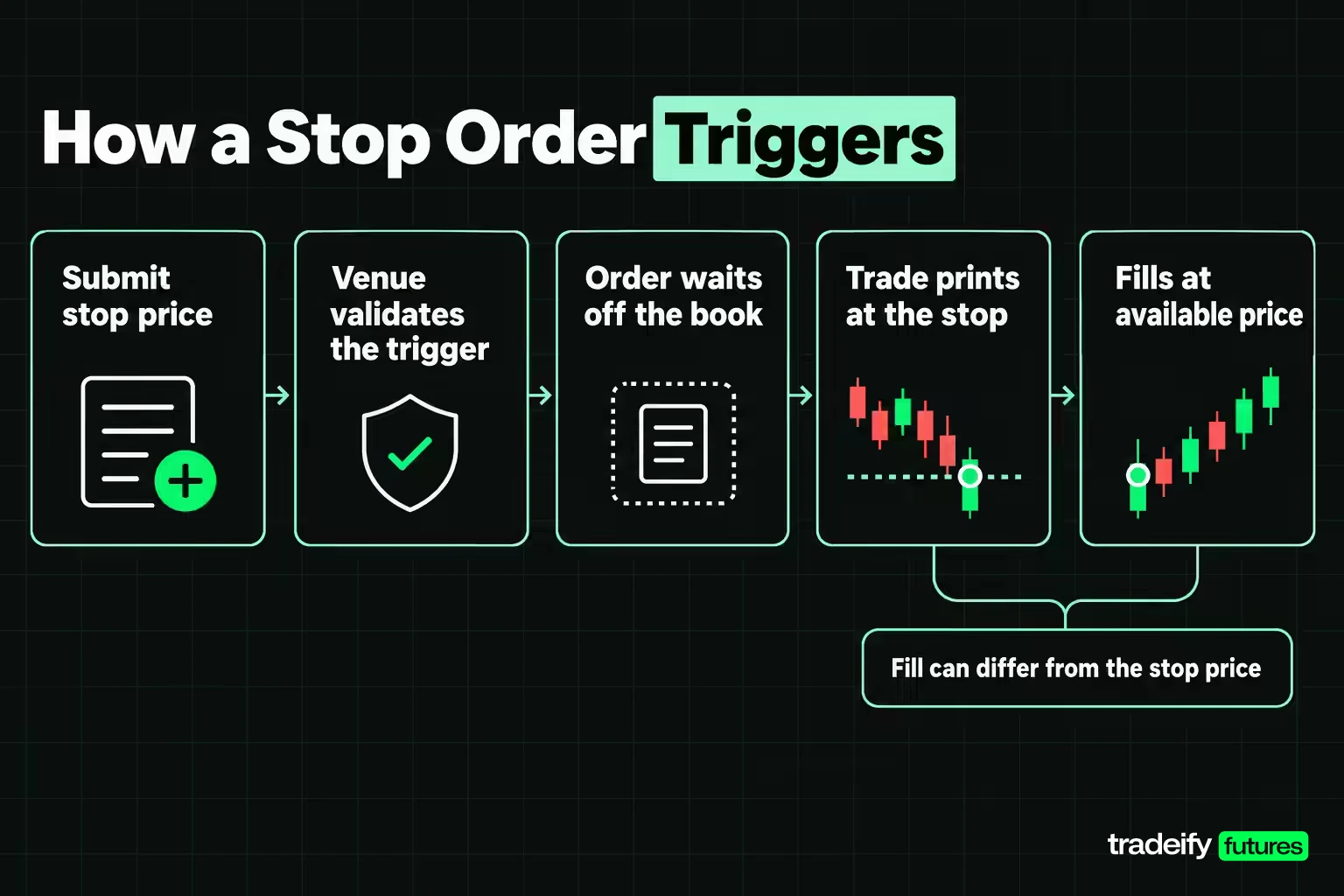
A stop order moves through five stages, and most surprises happen between the third and fourth.
- You submit a buy stop or sell stop with a stop price, a quantity and an order type for the conversion (market or limit).
- The venue validates the trigger. On CME Globex, during normal continuous trading, a buy stop must be above the last trade price and a sell stop must be below it.
- The order waits. It is accepted but not in the book, so it is not competing for fills.
- A trade prints at or through the stop price. The order is elected (activated) and enters the book as a market order or a limit order.
- The new order fills against whatever liquidity is there. You get a fill confirmation, and the fill price may differ from the stop price.
The Stop Order Trigger Is a Trade, Not a Quote
Under FINRA Rule 5350, the trigger for a stop order in a security is a transaction at the stop price. A bid or offer sitting at your level does not count. CME's description of futures stops uses the same idea: the stop must be "triggered by a trade in the market" at the price you submitted.
Not every venue works this way. The SEC bulletin notes that some trading venues and firms use last-sale prices to decide whether a stop price has been reached, while others use quotation prices. FINRA allows brokers to offer quote-triggered orders, but under Supplementary Material .01 they cannot be called stop orders and the trigger has to be disclosed before you place one. If your platform's stop fired before any trade printed at your level, check which trigger it uses.
What a Stop Order Becomes After It Triggers
Once elected, a stop market order behaves like a market order and takes the best available prices until it is filled. A stop-limit order becomes a limit order at your limit price and can only fill at that price or better.
On CME Globex the stop market version is called a stop order with protection. It enters the book as a market order, but only within a protection range measured from the trigger price. Any quantity that cannot fill inside that range rests as a limit order at the edge of the range. A stop-limit on CME fills at any price between the trigger and the limit, and the unfilled remainder rests at the limit price.
Related lesson: Market orders
Types of Stop Orders
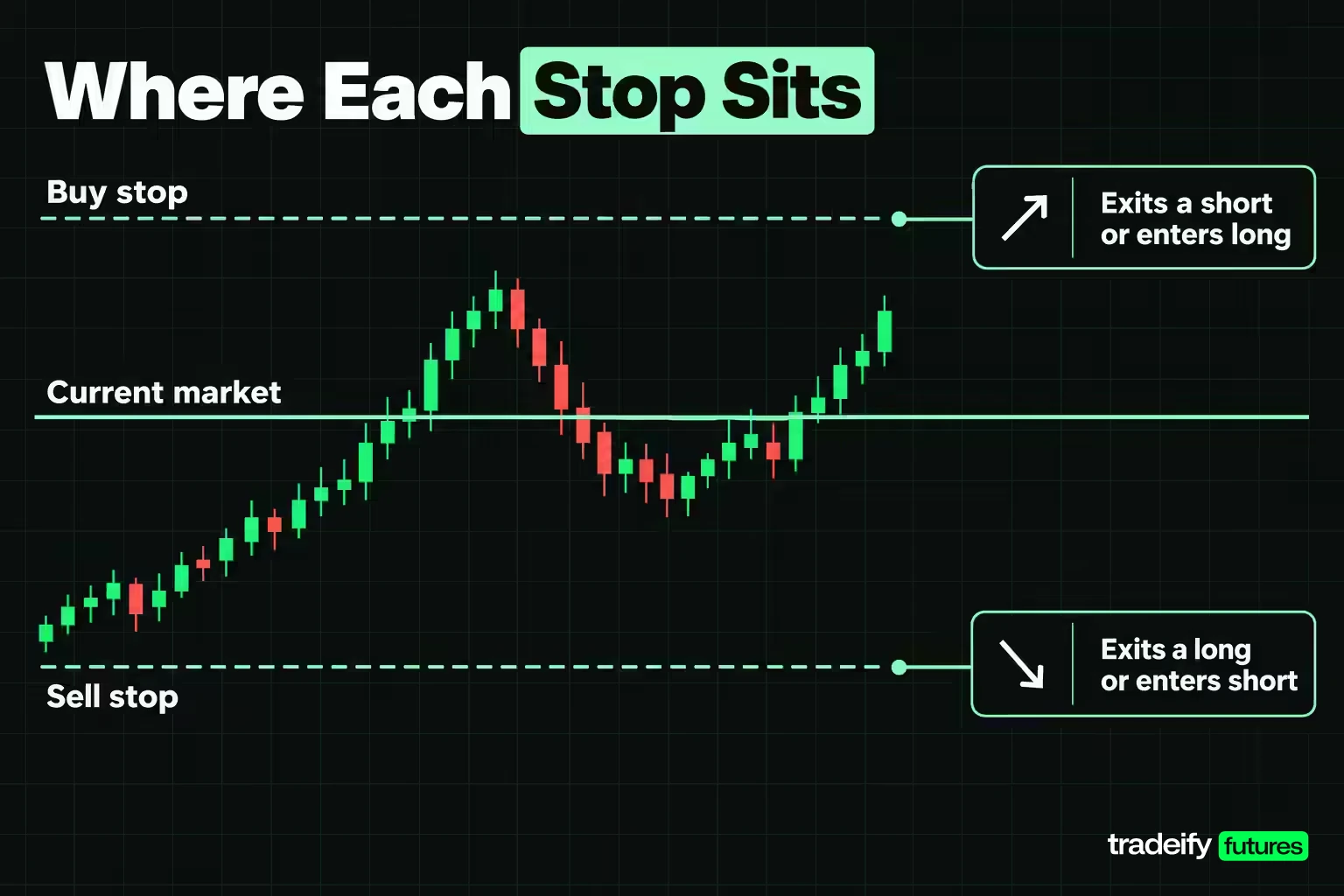
Stop orders come in a handful of forms, and each one does a different job.
| Stop order type | Where it sits | Typical job | What it becomes when triggered |
|---|---|---|---|
| Sell stop | Below the current market | Exit a long, or enter short on a break lower | Market order (or limit, if stop-limit) |
| Buy stop | Above the current market | Exit a short, or enter long on a break higher | Market order (or limit, if stop-limit) |
| Stop market | Either side | Get out once the level trades, whatever the price | Market order |
| Stop-limit | Either side | Get out or in only within a price you accept | Limit order at your limit price |
| Stop with protection (CME) | Either side | Exchange version of the stop market with a price boundary | Market order bounded by protection points |
| Trailing stop | Follows the market at a set distance | Protect open profit while a move continues | Market or limit, depending on the version |
A buy stop order is the one that confuses new traders most. It is an instruction to buy only after price rises to a level above the market. Traders use it in two ways: to cap the loss on a short position, and to enter long only if the market proves it can trade through a level.
A trailing stop is a stop order whose stop price moves. The SEC bulletin's example uses a stock bought at $20 that rises to $22, where a $1 trailing stop is placed. The stock peaks at $24, so the stop ratchets to $23 and stays there as price falls. The shares sell once $23 trades, although the execution price may differ from $23.
Related lesson: Trailing stop orders
Where to Place Stop Orders
Stop order placement starts with one fixed rule: buy stops go above the current market and sell stops go below it. A buy stop priced below the market, or a sell stop priced above it, would already be satisfied the moment it was sent. CME Globex rejects such an order during continuous trading. Other platforms may warn you, block it, or treat it differently, so check how yours handles it.
Inside that rule, the stop price should come from your trade idea, not from a dollar amount you would like to lose. Ask what price would prove the idea wrong. For a long entered on a bounce from support, that is usually a level beyond the support, not at it. For a breakout entry with a buy stop, the invalidation is often a move back inside the range.
How to Calculate a Stop Order Distance in Dollars
Once you have the level, convert it to dollars before you trade:
stop distance in points × point value × contracts = dollar risk
On the Micro E-mini S&P 500 (MES), each index point is worth $5 and the minimum tick is 0.25 points, or $1.25. A 5.00-point stop on 3 MES risks $75.00 before slippage. The same 5.00-point stop on 3 E-mini S&P 500 (ES) contracts, at $50 per point, risks $750.00. The level is identical; the risk is ten times larger.
You can also work backwards from a maximum dollar risk. Illustrative numbers: with a $100 maximum on 3 MES, $100 / ($5 × 3) = 6.67 points. Round down to the nearest tick, 6.50 points (26 ticks), and the planned risk is $97.50. If your invalidation level is further away than that, the answer is fewer contracts, not a tighter stop.
Related lesson: Tick size and tick value
When to Use Stop Orders
Stop orders are useful when you need something to happen at a price you may not be watching, or may not want to act on in the moment. The second case matters more than it sounds: the moment a loss reaches your level is exactly when hesitating feels most reasonable.
- Cap a loss on an open position. A sell stop under a long, or a buy stop above a short, turns your exit plan into an order before emotions get a vote.
- Protect open profit. Moving a stop behind price, or using a trailing stop, keeps part of a gain if the move reverses.
- Enter on a break. A buy stop above resistance, or a sell stop below support, puts you in only if the market trades through the level. You give up a better price in exchange for evidence.
- Enforce a plan while away from the screen. A resting stop works whether you are at the desk or not, within the limits of how your platform holds it.
There are also times a stop order is the wrong tool. If the level you have in mind is where everyone else's stops are likely sitting, such as a round number or an obvious swing low, the trigger may arrive with a burst of other stops and a thin book. If a scheduled release is minutes away, the risk is less about where the stop is and more about how far past it the fill may land. In those spots, reducing size or being flat before the event can be the cleaner decision.
Related lesson: Stop-loss orders and placement
Stop Order Examples on Micro E-mini Futures
These stop order examples use MES with round, illustrative prices. They are constructed to show the mechanics, not taken from a real session, and they exclude commissions and fees.
Sell Stop Exit on a Long Position
You are long 3 MES at 6,000.00 with a sell stop at 5,995.00. If the exit filled exactly at the stop, the loss would be 5.00 points, 20 ticks, $25.00 per contract and $75.00 on the position.
- Orderly decline. A trade prints at 5,995.00, the stop triggers, and all 3 contracts sell at 5,994.75. That is 1 tick of slippage, $3.75 extra, and a $78.75 total loss.
- Fast decline. The book thins as price breaks. Your 3 contracts fill at 5,994.50, 5,993.75 and 5,993.00, an average of 5,993.75. That is 1.25 points (5 ticks) of slippage, $18.75 extra, and a $93.75 total loss.
Both outcomes are the stop working as designed. It got you out. It just could not promise the price, and the $15.00 difference between the two rows came from the market, not from anything you did.
Buy Stop Entry on a Breakout
The market is trading at 6,005.00 inside a range with a high of 6,009.00. You only want to be long if price trades through the high, so you place a buy stop at 6,010.00 rather than buying now. Price trades 6,010.00, the stop triggers, and you fill one tick higher at 6,010.25.
The temptation on a breakout is to chase with a market order after the move has already run. The buy stop removes that decision. Your idea is wrong if price falls back inside the range, so the protective sell stop goes at 6,006.00. The planned risk is 4.25 points, 17 ticks, or $21.25 per contract.
Now change the order to a buy stop-limit at 6,010.00 with a 6,010.50 limit. If the breakout jumps and the first trade above the range prints at 6,011.50, the order is elected but the limit is already behind the market. You do not get filled. For an entry, that can be an acceptable outcome, because a missed trade costs nothing.
Buy Stop Protecting a Short Position
You are short 2 MES at 6,000.00 and the idea fails if price trades 6,004.00. A buy stop at 6,004.00 caps the planned loss at 4.00 points, $20.00 per contract and $40.00 on the position. The same slippage rules apply in reverse: in a fast rally the buy stop fills above 6,004.00, not at it.
Why Stop Orders Slip
Stop orders slip because the stop price only decides when the order becomes active. Once it converts, the fill depends on what liquidity is left in the book at that moment. The SEC bulletin puts it plainly: the execution price can deviate significantly from the stop price.
Four conditions widen the gap.
- Distance to liquidity. The nearest bid below a sell stop may be one tick away in a deep market and several ticks away in a thin one.
- Speed. In a fast move, other orders, including other triggered stops, take the nearest liquidity before yours arrives.
- Gaps. If the market reopens away from your stop, or jumps on a release, there may be no trading at your price at all.
- Thin hours and products. Less resting size means each contract you sell moves further down the book.
How a Price Gap Hits a Stop Order
Vanguard's stock-order guide gives the classic case: a stock closes at $100 and opens at $90, and a stop-loss at $95 executes at $90.
Futures work the same way across a session break or a sudden repricing. Illustrative numbers: long 1 MES at 6,000.00 with a sell stop at 5,990.00, a planned $50.00 loss. The market reopens with a first trade at 5,970.00. The stop triggers, but the fill lands near 5,970.00, a 30.00-point loss of $150.00. That is three times the plan, and $100.00 of it came from the gap, not from your stop placement.
This is why the CFTC requires a specific warning in futures risk disclosures: placing contingent orders, such as a stop-loss or stop-limit order, will not necessarily limit losses to the intended amounts, since market conditions may make it impossible to execute such orders.
Related lesson: Slippage explained
Stop Orders vs Stop-Limit Orders
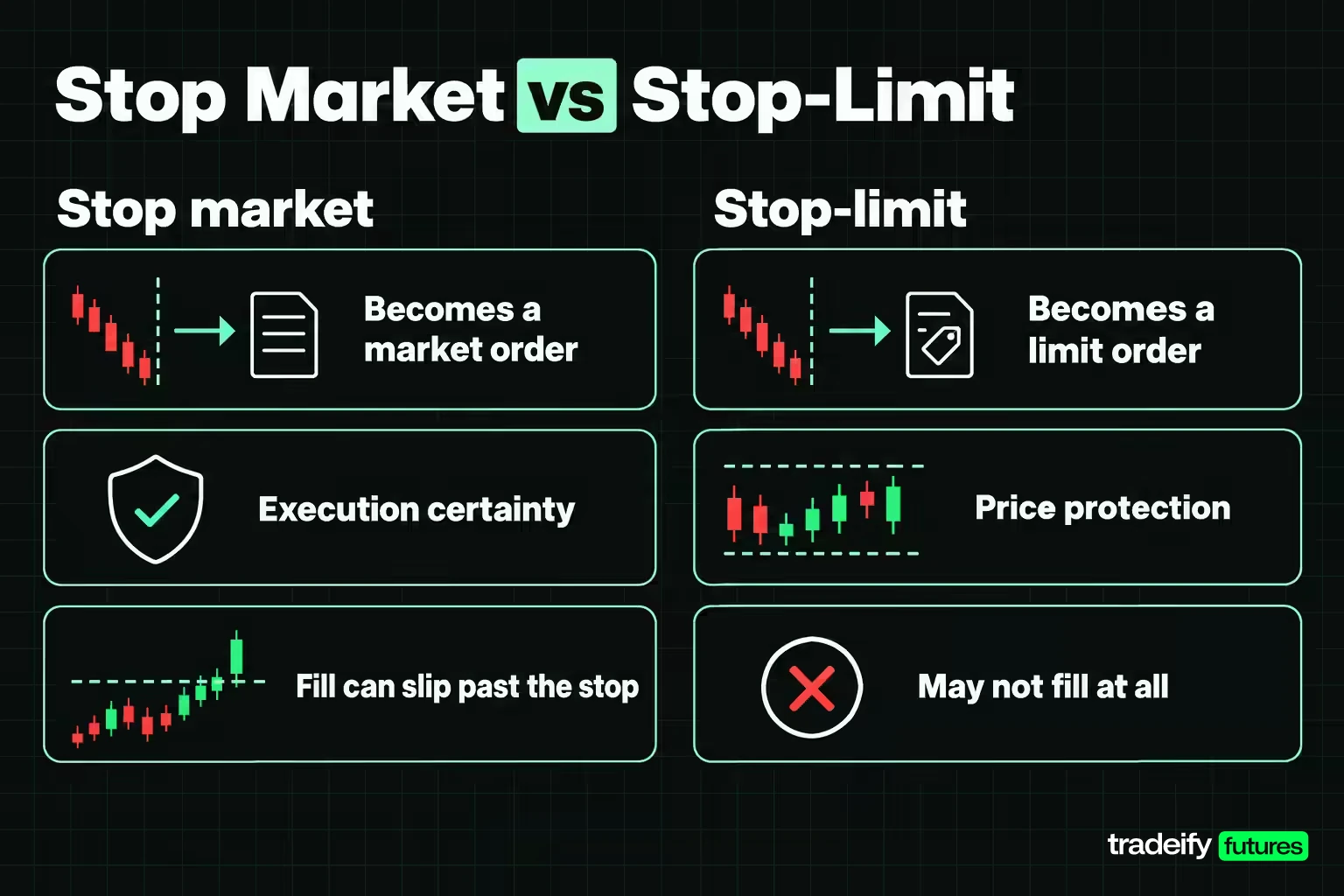
Stop orders and stop-limit orders share a trigger and differ in what happens next. A stop market order gives you execution certainty and price uncertainty. A stop-limit order gives you price protection and execution uncertainty.
The SEC's example: a sell stop-limit with a $3.00 stop and a $2.50 limit becomes an active limit order once $3.00 trades, but can only execute at $2.50 or better. If the stock drops straight through $2.50, the order sits there unfilled and you still own the shares.
Here is the same choice priced on the fast decline from the MES sell stop example (long 3 MES at 6,000.00, stop at 5,995.00). The stop-limit version uses a 5,994.00 limit, so the most slippage it accepts on the filled part is 1.00 point, 4 ticks, or $5.00 per contract.
| Order and outcome | Fills | Total loss | Compared with stop market |
|---|---|---|---|
| Stop market, fast decline | 5,994.50, 5,993.75, 5,993.00 | $93.75 | Baseline |
| Stop-limit, market keeps falling | 1 at 5,994.50, 2 exited later at 5,990.00 | $127.50 | $33.75 worse |
| Stop-limit, market recovers | 1 at 5,994.50, 2 closed later at 5,999.00 | $37.50 | $56.25 better |
| Stop market, orderly decline | 3 at 5,994.75 | $78.75 | Not the same market path |
In the fast decline only one contract fills at 5,994.50, because the next trades are below the 5,994.00 limit. The other two contracts stay open. What happens next depends entirely on the market, not on your plan. If price keeps falling, you end up exiting worse than the stop market would have. If price snaps back, you get lucky. A stop-limit is not the safer version of a stop; it swaps price risk for fill risk.
Choosing Between a Stop and a Stop-Limit
Ask which costs more if it goes wrong: a worse fill or no fill.
- For protective exits in liquid futures, a stop that does not fill can turn a defined loss into an open-ended one, so many traders use stop market orders for exits.
- For entries, a missed fill usually costs nothing, which makes stop-limit orders a natural way to avoid chasing a breakout.
- If you do use a stop-limit to exit, decide in advance what you will do with any unfilled contracts.
Related lesson: Stop-limit orders
How Exchanges and Brokers Handle Stop Orders
Exchange and broker rules shape stop order outcomes as much as your stop price does. When a stop fill looks wrong, the explanation is usually one of these rules rather than anyone hunting your order. Three CME Globex mechanisms matter most for futures traders.
Stop With Protection on CME Globex
CME's stop order with protection is designed to keep a triggered stop from filling at an extreme price. Once the trigger trades, the order becomes a market order with a protection price limit equal to the trigger price plus or minus a set number of protection points. CME says those points usually equal half of the product's non-reviewable range.
CME's own example uses a sell stop with protection on 10 ES with a 1,330.00 trigger and 3.00 protection points, giving a protection limit of 1,327.00. After the trigger trades, 2 lots fill at 1,329.00, 3 at 1,328.50 and 3 at 1,328.00. The next bid is 1,326.75, below the limit, so the remaining 2 lots rest in the book at 1,327.00 instead of filling.
So even a stop market order on CME can leave part of your position open in a violent move. The protection saves you from a disastrous print, and in exchange it does not promise a complete fill.
Price Banding and Stop Order Rejections
CME also validates order prices against a price band. For stop orders, if the buy or sell price is farther from the trigger than the banding parameter allows, the order is rejected. In practice, a stop-limit with a limit set very far from its stop price, often done to make a stop-limit behave like a market order, may be refused at entry. A rejected stop protects nothing, so confirm it appears in your working orders.
Trigger Validation by Market State
CME checks the trigger against the last trade price during continuous trading, or against the settlement price if there is no last trade. In the pre-open and no-cancel states, it validates against the settlement price. A stop that looks valid against a chart price can still be rejected if the reference price is different.
Broker Rules for Stop Orders in Stocks
In securities, FINRA Rule 5350 says a broker may accept stop orders but is not obligated to. Brokers that offer quote-triggered versions must label them differently and disclose the trigger. The practical step is the same in every market: read your broker's order-type page to learn what triggers your stop and which sessions it works in.
Related lesson: Price limits and limit moves
Advantages and Limitations of Stop Orders
Stop orders turn a plan into an order that runs without you, and they trade price certainty away to do it.
| Advantages of stop orders | Limitations of stop orders |
|---|---|
| Turn an exit or entry plan into an order before the decision gets emotional | The stop price is a trigger, not a guaranteed fill price |
| Work while you are away from the screen | Fast markets, thin books and gaps can fill far from the stop |
| Define planned risk in points and dollars before entry | Short-term noise can trigger a stop that a wider level would survive |
| Let you enter only after the market proves a level | Stop-limit versions can leave you unfilled and still in the trade |
| Can be linked to targets in brackets and OCO groups | Exchange banding or platform rules can reject an order you assumed was working |
The SEC bulletin flags the main limitation for anyone choosing a level: short-term fluctuations in price can activate a stop order. A stop placed just inside normal noise gets hit often, and each hit costs the spread and slippage on the way out.
The core advantage is behavioural as much as mechanical. A resting stop decides in advance, which makes it harder to talk yourself into "one more tick" while a loss grows. The limitation is the mirror image: a stop only knows the price you gave it, so a badly chosen level gets enforced just as faithfully as a good one.
Stop Orders in Brackets, OCO and Trailing Setups
Stop orders are often attached to other orders rather than placed alone.
- Bracket. An entry with a stop and a profit target attached. Illustrative: buy at 6,000.00, target 6,010.00, stop 5,995.00. When the entry fills, both exits go live.
- OCO (one-cancels-the-other). The two exits are linked, so if the target fills the stop is cancelled, and the other way round. Without the link, a forgotten stop can open a new position after the trade is already closed.
- Trailing stop. Illustrative: long 1 MES at 6,000.00 with a 4.00-point trail, so the first stop sits at 5,996.00. If price reaches 6,010.00, the stop rises to 6,006.00, keeping 6.00 points ($30.00) before slippage if the move reverses.
Related lesson: Bracket orders
Common Stop Order Mistakes
Most stop order losses that feel unfair trace back to one of these.
- Treating the stop price as the exit price. Plan for slippage, especially around releases and session opens.
- Placing stops exactly at obvious levels. Round numbers and clear swing lows attract clusters of stops. Placing yours a few ticks beyond the obvious level costs a little more when it is hit and can avoid being hit by the cluster.
- Setting the stop too tight for the product's normal movement. If ordinary noise reaches the level, the stop will trigger on trades that never proved you wrong.
- Choosing the stop from a dollar figure instead of the chart. Pick the invalidation level first, then size the position to fit it.
- Using a stop-limit with no plan for the remainder. If the limit does not fill, you are still in the trade.
- Setting a stop-limit's limit absurdly wide. On CME this can be rejected by price banding, which leaves you with no stop at all.
- Not checking the order after placing it. Rejected, wrong-side and expired stops all look fine in your head. Confirm the order is working.
- Moving the stop further away as price approaches it. It feels like giving the trade room. It is really turning a defined loss into an undefined one.
Related lesson: Liquidity sweeps and stop runs
Stop Orders and Prop Firm Account Rules
Many futures traders first use stop orders in a simulated evaluation or simulated funded account. The order types work the same way, but fills in simulation are modelled, so slippage there is not a reliable forecast of slippage in a live, thin or fast market.
Account rules also run separately from your stop orders. A daily loss limit or trailing drawdown is measured by the account provider, and a stop that slips or a stop-limit that does not fill can push an account through a rule your planned stop was meant to respect.
On our accounts, the default stop type in the Tradovate Web app's SuperDOM is a Stop Market order, and you can switch it to Stop Limit, Trailing Stop or Trailing Stop Limit. Tradovate ATM strategies attach a stop loss and profit target as an OCO bracket once your entry fills, though brackets are not supported while using Group Trading. R Trader Pro holds stops, brackets and OCO orders on Rithmic's servers if your internet drops. Our trailing drawdown is enforced in real time, so your stop is your plan, not the account's limit.
Stop Orders FAQ
What is a stop buy order in trading?
A stop buy order is an order to buy that activates only after the market trades at or above a price set above the current market. Traders use it to cap the loss on a short or to enter long once a level breaks. Once triggered, it fills like a market order, so the price can be higher than the stop.
What is the difference between a market order, a limit order and a stop order?
A market order fills right away at the best available price. A limit order fills only at your price or better and may not fill at all. A stop order waits until a set price trades, then becomes a market or limit order, so it controls timing rather than price.
Can a stop order fill at a worse price than the stop price?
Yes. The stop price is only the trigger, and a stop market order then takes whatever liquidity is available. In fast markets or gaps the fill can be several ticks or more away from the stop.
Why did my stop order not trigger when price touched my level?
Many venues trigger stops on a trade at the stop price, not on a bid or offer there, so a quote at your level may not elect it. The chart may also use a different data feed, or the order may have been rejected or expired. Check your working and cancelled orders first.
Can I place a stop-loss order in a brokerage app?
Most brokerage apps list stop and stop-limit orders, but availability, triggers and the sessions where stops work vary by firm. FINRA rules let a broker decline stop orders altogether. Check the order-type page in your own app before relying on one.
How do you calculate a stop-loss?
Choose the price that would prove the trade wrong, then multiply the distance in points by the point value and the number of contracts or shares. On MES, a 5-point stop on 3 contracts at $5 per point risks $75 before slippage. If that is more than you want to risk, trade fewer contracts.
Stop orders are tools for managing risk, not guarantees. Futures are leveraged, and losses can exceed what you planned when markets gap or move fast. Simulated and funded evaluation accounts run on simulated fills that can differ from live trading. This article is educational only and is not trading or investment advice.


