



TL;DR: A bracket order sends an entry with a stop-loss and profit target attached, linked so the first exit to fill cancels the other. The exits go live only after the entry fills, and the stop is a trigger, not a guaranteed price. On 2 MES, a 6-point stop and 12-point target risk $60.00 to make $120.00, before costs. Exit legs sized differently from the entry are the costliest mistake, because they can open a new position.
A bracket order is one order ticket that carries three instructions: get in here, get out here if I'm wrong, and get out here if I'm right. It exists to solve a timing problem. The best moment to decide your loss and your target is before the position is open, while the numbers are still theoretical. Once you're staring at open P&L, "give it a bit more room" starts to sound reasonable.
This guide covers what each leg does, how a bracket order behaves from submission to exit, what it costs in dollars on a futures contract, and the quantity mistakes that turn a protected trade into an unplanned one.
What Is a Bracket Order
A bracket order is an entry order with two opposite-side exit orders attached: a stop-loss below and a profit target above for a long, or the mirror image for a short. Interactive Brokers describes it as "bracketing" an order with two opposite-side orders, designed to help limit your loss and lock in a profit.
The name describes the shape. On a long, the entry sits between a lower sell stop and a higher sell limit. On a short, the entry sits between a higher buy stop and a lower buy limit. The two exits enclose the trade like brackets around a word.
The two exits are linked one-cancels-the-other (OCO). Whichever exit fills first closes the position and cancels the other one. Without that link, a filled target would leave a live stop sitting under a position that no longer exists.
A bracket order does not make a trade better. It makes your plan explicit and automatic. You still choose the entry, the stop and the target. The bracket simply carries out those choices without waiting for you to click, or to hesitate.
In Indian broker apps, "BO" is shorthand for bracket order. Zerodha's support pages describe its former BO as an intraday-only order that entered a new position along with a target and a stoploss, with the second exit cancelled automatically when the first executed. The structure is the same idea under a different label.
Related lesson: Order types overview
The Three Legs of a Bracket Order
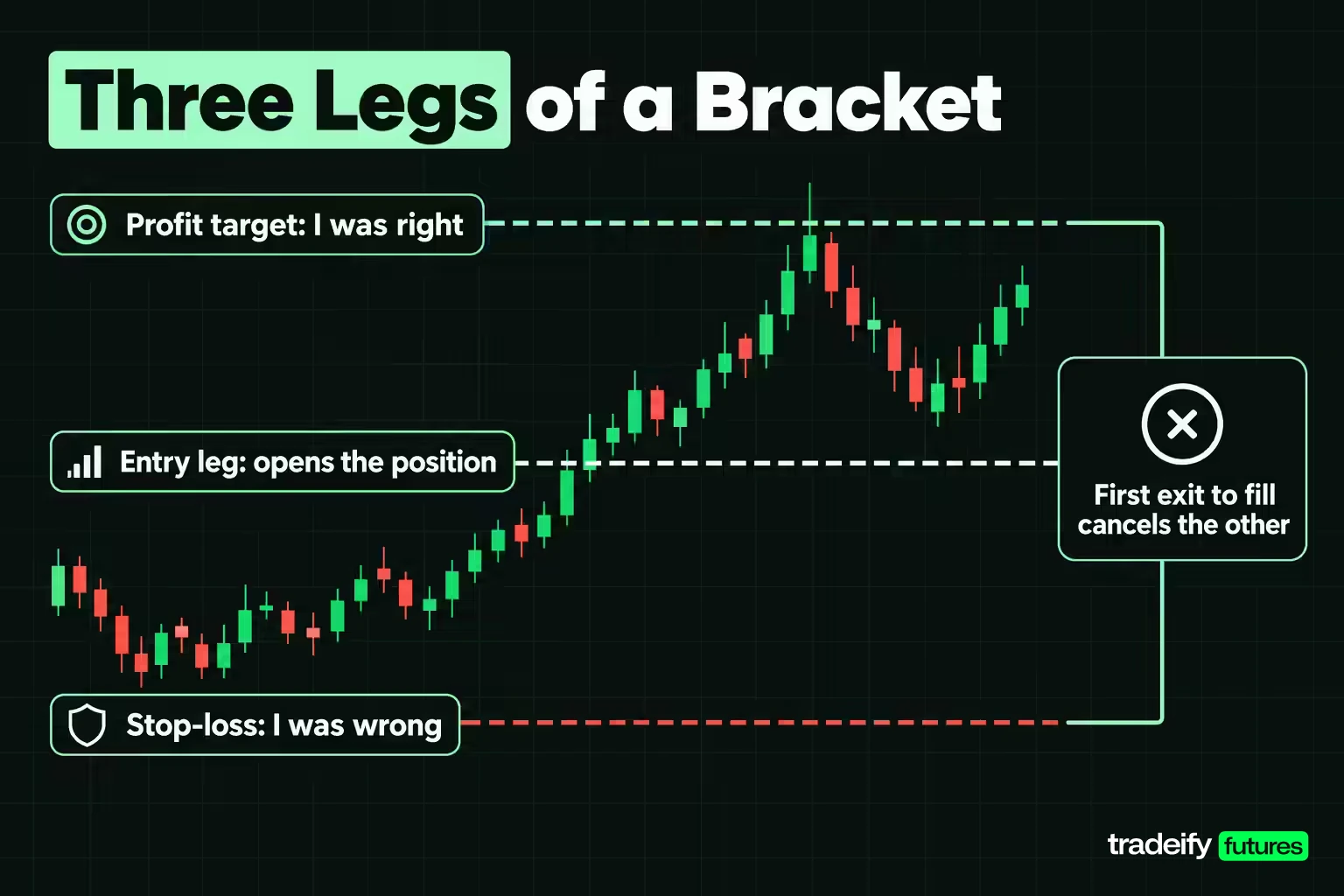
Every bracket order has three legs. Each one uses a different order type, and each one fails in a different way.
The entry leg
The entry leg opens the position. It can be a market order (fill now at the best available price), a limit order (fill only at your price or better) or a stop order (fill once price trades through a level, common for breakout entries).
The entry type decides whether the bracket order ever becomes a trade. A market entry fills almost immediately, so the exits go live right away. A limit or stop entry may never fill, and then nothing else happens. The exits never activate, and you are left with an unused set of instructions rather than a protected position.
The stop-loss leg
The stop-loss leg is your "I was wrong" exit. On a long it is a sell stop below the entry. On a short it is a buy stop above it.
Most platforms use a stop market order here. The SEC's investor bulletin on order types is blunt about what that means: the stop price is a trigger, not a guaranteed execution price, and the fill can deviate significantly from it. On CME Globex futures, a stop order with protection can only execute inside a protection range around the trigger, and any quantity that can't fill there rests on the book at the protection limit.
So the stop leg sets your planned loss, not your actual loss. The gap between the two is slippage, and it belongs in your math before the trade, not in your journal as a surprise after it.
The profit-target leg
The profit-target leg is your "I was right" exit, normally a limit order. On a long it is a sell limit above the entry. On a short it is a buy limit below.
A limit order gives you price certainty and no fill certainty. The SEC bulletin notes a limit order is not guaranteed to execute; price has to reach it, and in practice your order has to reach the front of the queue at that price. A target that price touches but doesn't trade through may not fill.
Direction and quantity rules for the three legs
The legs are not interchangeable. Each exit has to sit on the correct side of the entry and carry the correct quantity.
| Position | Entry leg | Stop-loss leg | Profit-target leg |
|---|---|---|---|
| Long | Buy (market, limit or stop) | Sell stop below the entry | Sell limit above the entry |
| Short | Sell (market, limit or stop) | Buy stop above the entry | Buy limit below the entry |
On quantity, Interactive Brokers states that the high-side and low-side bracket orders match the original order quantity. That is the rule to check on any platform. If the entry is two contracts, each exit is two contracts. Anything else is a different trade from the one you planned.
Related lesson: Stop orders
How a Bracket Order Works From Entry to Exit
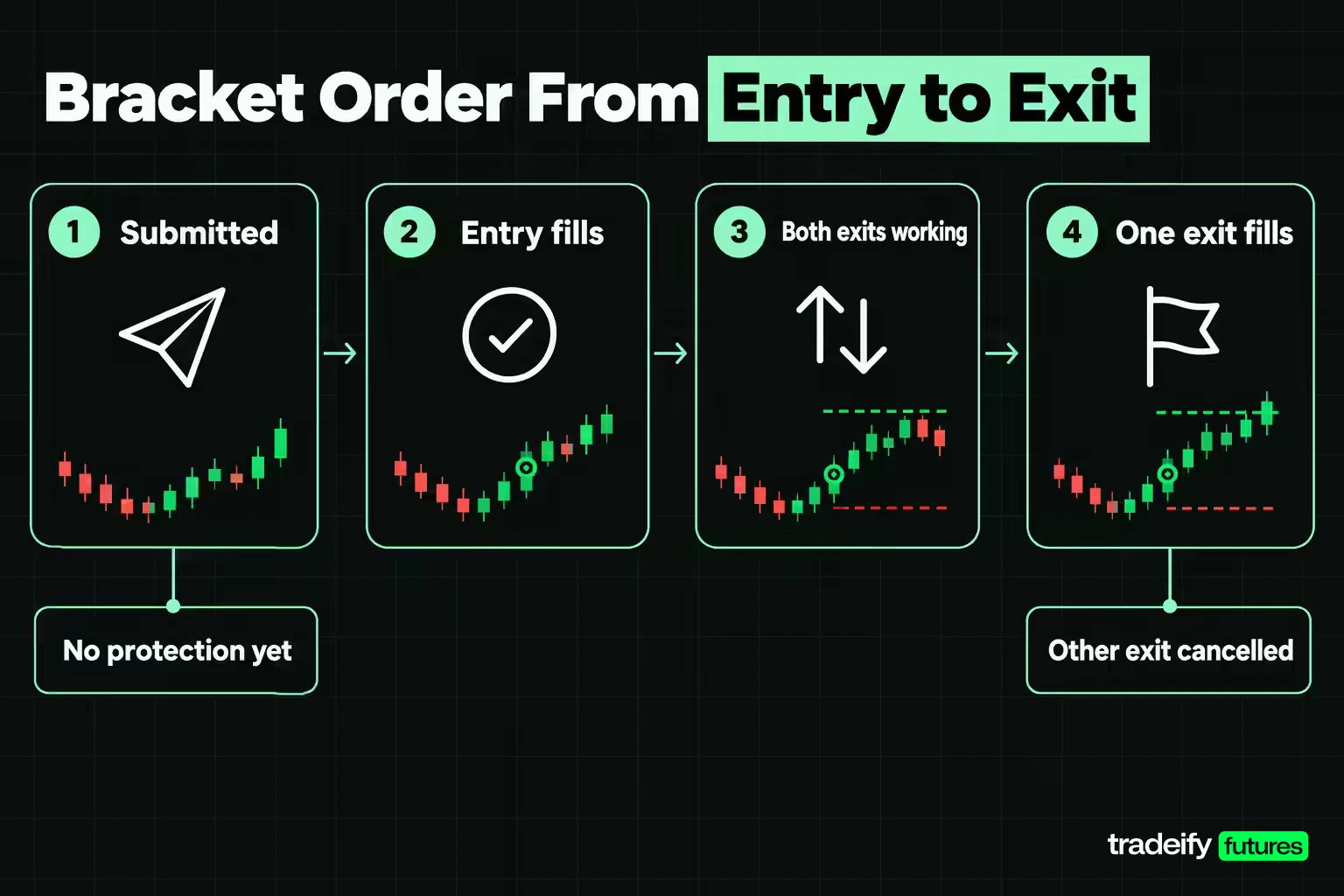
A bracket order moves through four stages. Knowing which stage you're in tells you what is actually protecting you.
- Submitted. You send the entry with the stop and target attached. If the entry is a limit or stop order, it works on the book or waits for its trigger. The exits are not yet protecting anything because there is no position.
- Entry fills. The fill activates the exits. Depending on the platform, the exits are either sent at this moment or were already held in a dormant state and are now released.
- Both exits working. The stop-loss and profit target sit on opposite sides of price. You have a position with a defined worst planned outcome and a defined best one.
- One exit fills. The position closes, and the linkage cancels the surviving exit. You are flat, with no working orders left in that bracket.
This sequence matches the OSO-plus-OCO pattern many platforms use: the entry is the parent, and its fill "sends" a linked OCO pair as the children. Tradovate's ATM Strategies, as described in its platform guide, work exactly this way. Predefined stop and target orders are placed automatically once the entry fills, and filling either one cancels the other.
Partial fills inside a bracket order
Partial fills are where bracket orders get messy. If your two-contract entry fills one contract and the rest keeps working, the exits need to cover one contract, then two once the second fills.
Platforms handle this differently. NinjaTrader documents that its ATM Strategy parameters start when the entry is "partially or completely filled," and that an extra fill applied to an active strategy updates the stop and target from 1 contract to 2 contracts. A platform or broker that sizes exits to the original order quantity at submission behaves differently. Check which one you're using before you send size into a thin market.
Where a bracket order's OCO link is held
On futures, the bracket linkage usually isn't an exchange feature. CME Globex lists its futures order types as limit, market with protection, market-limit, stop-limit and stop with protection. There is no bracket or OCO type on that list. So something else holds the link between your stop and target and cancels the survivor.
That "something else" matters if your connection drops:
- Held on your PC. NinjaTrader's Simulated Stop orders are held and simulated locally, so they're exposed to internet drops and computer crashes, and they stop working if market data stops flowing.
- Held on a server. R Trader Pro documents its stops, brackets and OCO orders as server-side, staying active on Rithmic's servers if your internet drops.
- Resting at the exchange. Plain stop and limit orders that have actually been sent to the exchange rest on its book. The cancel-the-other step still depends on the platform or broker seeing the first fill.
If you don't know where your bracket order lives, find out before you rely on it during a volatile session or walk away from the screen.
Related lesson: One-cancels-the-other (OCO) orders
Bracket Order Risk Management in Dollars
A bracket order's main job is risk management. It turns "I'll get out if it goes against me" into a working order with a price on it before you have open P&L to argue with.
That only helps if the bracket is priced in dollars, including the costs a chart doesn't show.
A worked bracket order on two MES contracts
Use the Micro E-mini S&P 500 (MES) futures contract. Per CME's contract specs, MES is $5 times the S&P 500 index, with a minimum tick of 0.25 points, so each tick is worth $1.25.
Illustrative plan (round prices, not a market quote): buy 2 MES at 6000.00, stop-loss at 5994.00, profit target at 6012.00.
- Stop distance: 6.00 points, or 24 ticks. That is $30.00 per contract and $60.00 on 2 contracts.
- Target distance: 12.00 points, or 48 ticks. That is $60.00 per contract and $120.00 on 2 contracts.
- Reward-to-risk: 2 to 1 on paper.
Now add friction. Assume, for illustration, $1.00 per contract per side in costs, so $4.00 round turn on 2 contracts. Your broker or firm sets the real number.
If the stop triggers and fills one tick worse at 5993.75, slippage costs $2.50 across 2 contracts, and the losing trade costs $66.50 including the $4.00. If the target fills at 6012.00, the winning trade nets $116.00.
Break-even hit rate for a bracket order
A bracket order's two outcomes set the win rate you need just to stay level. In the illustrative 2-contract MES bracket (buy 6000.00, stop 5994.00, target 6012.00), the loss with one tick of slip and $4.00 of costs is $66.50 and the win is $116.00. Break-even hit rate equals the loss divided by the loss plus the win. With no costs, a 2 to 1 bracket needs 33.33%. With one tick of stop slippage and $4.00 of commission, it needs 36.44%.
| Reward-to-risk | Target price | Gross reward | Break-even, no costs | Break-even with 1 tick stop slip and $4.00 costs |
|---|---|---|---|---|
| 1 to 1 | 6006.00 | $60.00 | 50.00% | 54.29% |
| 2 to 1 | 6012.00 | $120.00 | 33.33% | 36.44% |
| 3 to 1 | 6018.00 | $180.00 | 25.00% | 27.42% |
| 4 to 1 | 6024.00 | $240.00 | 20.00% | 21.98% |
Two things stand out. Friction hits tight brackets hardest, because the same $6.50 of slip and commission is a bigger share of a small win. And a wider target lowers the hit rate you need, but only if the market actually reaches it often enough. A 4 to 1 bracket that rarely gets there is worse than a 2 to 1 that often does. That trade-off is the real decision, not the ratio printed on the ticket.
Contract size changes the same bracket order
The same 6.00-point stop on 2 E-mini S&P 500 (ES) contracts, at $50 per point, is $600.00 of risk instead of $60.00. The ticket looks identical on a chart. The account sees ten times the exposure. Price the stop in dollars against your risk budget every time, never in points alone.
What a bracket order does not protect against
A bracket order manages one position. It doesn't stop you from taking the next trade after a loss, and it doesn't cap a gap through your stop. If price jumps past the stop level, the stop fills at the first available price after the jump. The bracket defines your planned loss. Your position size and daily limits define how much a bad day can cost.
Related lesson: Risk-reward ratio
Setting Bracket Order Stop and Target Levels
Setting a bracket order is three decisions in a fixed order: where the trade idea is wrong, where it is realistically right, and how many contracts fit between those two numbers.
- Place the stop where the idea is invalid. Put it beyond the level that would prove the setup wrong, such as below the swing low a long depends on, with a few ticks of room for normal noise. A stop placed at a round dollar amount instead of a market level is a budget, not an invalidation point.
- Place the target where price can realistically reach. Use the next obvious resistance for a long or support for a short, or a distance your setup has actually reached in your own journal. A target chosen only to hit 3 to 1 can need a move the market rarely makes.
- Convert both to ticks and dollars. Multiply ticks by the contract's tick value and by your quantity. Some platforms let you enter bracket distances directly in ticks, price or dollars; Tradovate's ATM settings, for example, offer Ticks, Delta Price or $Value.
- Size the position last. Divide your maximum dollar risk for the trade by the dollar risk per contract and round down. If the result is less than one contract, the setup is too wide for your risk budget, so skip it or use a smaller contract.
A short bracket order example
Illustrative short on 1 MES: sell at 6000.00, buy stop at 6005.00, buy limit target at 5990.00. The stop is 20 ticks away, $25.00 of risk. The target is 40 ticks away, $50.00 of reward.
Notice the order of thinking. The 6005.00 stop should come from where the short idea fails, maybe just above a level sellers defended. If that level were at 6009.00 instead, the honest move is a wider stop and smaller size, not a tighter stop that sits inside normal noise just to keep the dollar figure small.
Common bracket order level traps
- Stops inside the noise. If the market routinely swings 4 points against good entries, a 2-point stop is mostly a cost, not protection.
- Targets behind obvious levels. A target a few ticks beyond a level where price usually stalls will often miss by a few ticks.
- Copying a template. A bracket order template that works on MES at one volatility level may be far too tight on a fast day or on a different contract.
Related lesson: Stop-loss orders and placement
Bracket Order Exit Strategies
A basic bracket order has one fixed stop and one fixed target. Most futures platforms let you change how those exits behave after the entry fills.
- Fixed stop and target. Simplest to plan and to journal. The result is always one of two numbers plus slippage. The cost is that you never capture a move beyond the target.
- Break-even stop. The stop moves to the entry price once the trade reaches a set profit. It removes the planned loss on that trade but gets you stopped flat on ordinary pullbacks, which can turn would-be winners into scratches.
- Trailing stop. The stop follows price by a set distance as the trade moves in your favor and freezes when it turns. It can capture an extended move. A tight trail gives up the fixed target's certainty and can get shaken out early.
- Multiple targets. Part of the position exits at a first target and the rest at a second, often with the stop moved to break-even after the first fills. This trades a smaller full-size win for more chances to catch a run.
Platforms package these as stop types inside the bracket. Tradovate's ATM Strategies list seven stop loss types, including a trailing stop, Auto Breakeven, Auto Trail and a combination of the two, and allow extra targets, each with its own stop configuration. WealthCharts supports multi-bracket orders for scaling out, and Tradesea offers position brackets that resize automatically when you add or reduce.
Choosing a bracket order exit style
Pick the exit style from your journal, not from what feels safest in the moment. After two trades that ran past the target, a trail feels obvious. After two that reversed just short of it, a break-even stop feels obvious. Neither is evidence. If your trades often run well past the first target, a scale-out or trail may pay. If they usually stall near the first level, a fixed target probably serves you better, and a break-even move might mostly turn small winners into scratches.
Whatever you choose, write it down before the trade and keep it for a meaningful sample. Changing the exit style trade by trade, based on how the last one went, makes your results impossible to judge.
Related lesson: Trailing stop orders
Bracket Order Benefits and Drawbacks
A bracket order is useful because it removes decisions from the moment you're worst at making them. It also creates problems a manual exit never would.
Bracket order advantages for discipline and speed
- Precommitment. The loss and target are decided before open P&L can pull you into "give it a little more room."
- Protection when you can't watch. The exits work whether you're watching the DOM or stepping away, as long as the linkage is held somewhere that stays connected.
- Speed. One click or keystroke sends three orders. Placing a stop by hand after a fast fill leaves the position unprotected for those seconds.
- Consistency. A saved template gives every trade the same structure, which makes your journal results comparable.
Bracket order drawbacks
- Slippage on the stop. The stop leg is usually a market order once triggered, so the planned loss is a floor on how good the exit can be, not a ceiling on how bad.
- Missed targets. A limit target can be touched and not filled. The trade then reverses into your stop.
- Double fills in fast markets. If price whips through both levels before the surviving exit is cancelled, both can execute. Zerodha gives this as its reason for disabling bracket orders on Kite in March 2020: with a buy at Rs. 2000, a 2005 target and a 1995 stop, a sudden swing could fill the stop and then the target, leaving an unintended short of 100 shares.
- Dependence on where the linkage lives. A bracket held on your PC stops working if your connection or data feed fails.
- False confidence. A bracket on a position that is too large is still too large. The structure can make an oversized trade feel controlled.
Related lesson: Slippage explained
When to Use a Bracket Order
Use a bracket order when you know your invalidation level and your target before you enter. That is the whole test. If you can't write both numbers down, the bracket will just automate a guess, and it will do it very efficiently.
A bracket order fits well when:
- The setup is defined. You trade a repeatable pattern with a known stop location and a target you've measured in past trades.
- You may not be watching. Stepping away, switching charts or managing other positions while this one runs.
- You tend to move stops. If your journal shows stops widened mid-trade, a bracket that's already working makes that harder to do on impulse.
- Execution speed matters. Fast markets where placing exits by hand after the fill leaves a gap.
A bracket order fits poorly when:
- You plan to scale in. Adding to a position needs a platform that resizes the exits or creates new ones. Otherwise the existing bracket covers only part of the position.
- The exit is discretionary. If you plan to exit on a change in order flow rather than at a price, a fixed target may close the trade before your real signal appears. A stop-only bracket still makes sense.
- You're copy trading across accounts on Tradovate. Its platform guide states that bracket orders (ATM Strategies) are not supported while Group Trading.
- Levels are fake. If you're forcing a 2 to 1 ratio onto a chart that doesn't support it, the bracket hides the problem instead of fixing it.
Related lesson: Position sizing
Bracket Order vs OCO and Other Linked Orders
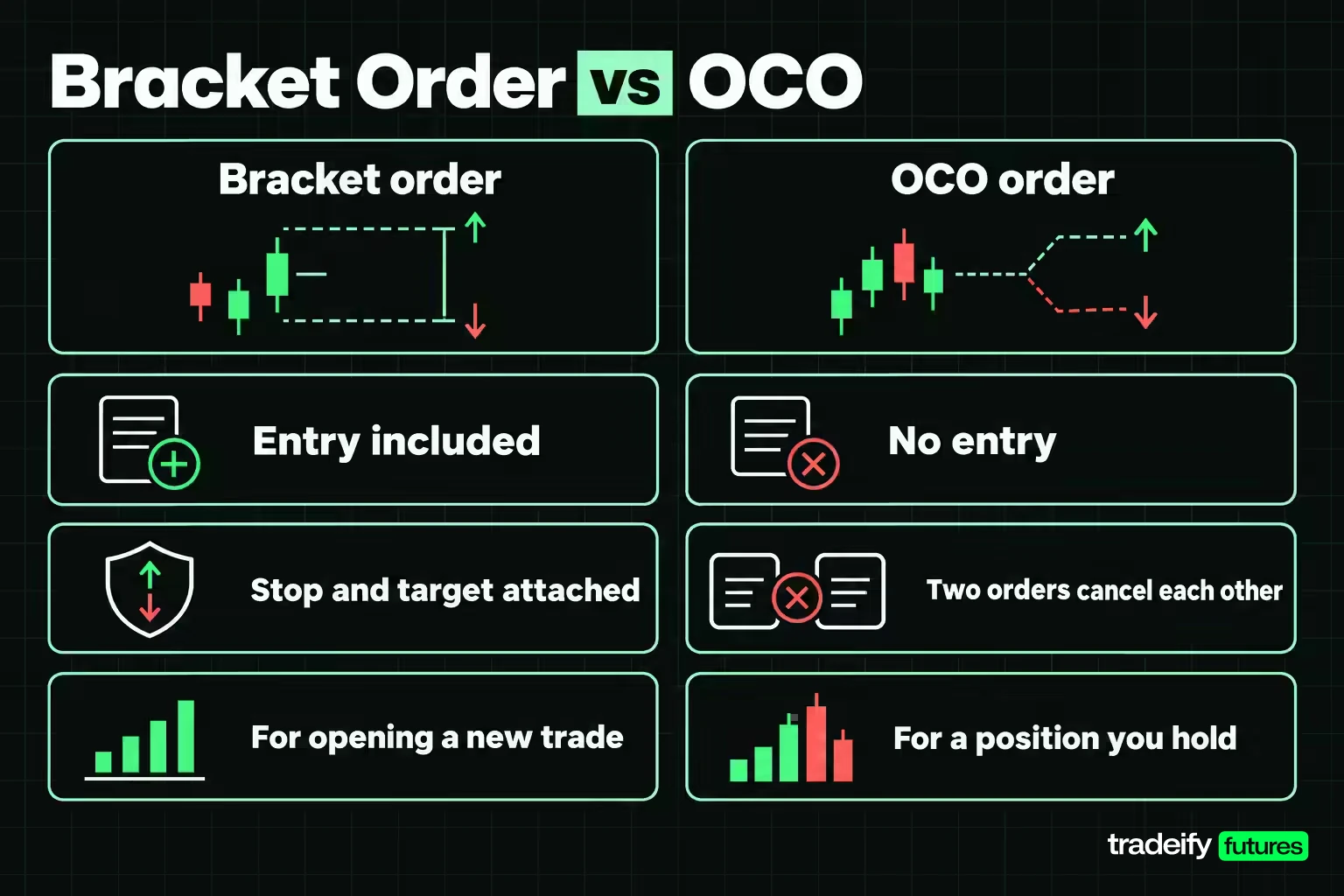
Bracket orders get confused with OCO and OSO orders because a bracket is built from both. The difference is whether an entry is attached and what triggers what.
| Order | What it links | Entry included | Typical use |
|---|---|---|---|
| Bracket order | An entry plus a stop and a target that cancel each other | Yes | Opening a trade with the full exit plan attached |
| OCO (one-cancels-the-other) | Two orders where a fill on one cancels the other | No | Adding a stop and target to a position you already hold |
| OSO (one-sends-other) | A parent order whose fill sends a child order | Yes, as the parent | Sending exits only after an entry fills |
| Cover order | An entry plus a mandatory stop-loss, no target | Yes | Intraday trades in some Indian broker apps |
In practice, a bracket order is an OSO with an OCO pair as the child. If you already hold a position and want protection, you need an OCO pair, not a new bracket. If you only want a mandatory stop without a target, a stop-only bracket or a cover order (where offered) does that.
Zerodha's notes on its bracket order shutdown point traders toward cover orders and its intraday product as alternatives. That is a broker product decision, not a sign that brackets are flawed everywhere.
Related lesson: Stop-limit orders
Bracket Orders in Futures, Stocks and Indian Intraday Trading
Bracket orders exist in most markets, but under different names and rules. The SEC's investor bulletin warns that order types vary by brokerage firm and that similar names can hide important differences.
- Futures platforms. Usually a saved template that attaches a stop and target to any filled entry: ATM Strategies on Tradovate and NinjaTrader, brackets on R Trader Pro, Tradesea and WealthCharts.
- Stock brokers. Often an "attach bracket" option on the order ticket. Interactive Brokers, for example, lets you attach a profit-taking limit and a stop to a buy limit before transmitting.
- Indian intraday trading. "BO" products from some brokers, typically intraday only. Zerodha disabled bracket orders on Kite in March 2020 and points users to cover orders and its intraday product instead. Other Indian brokers set their own policies, including ICICI Direct, so check your broker's current order menu.
- Crypto exchanges. Many offer take-profit and stop-loss attachments with their own trigger and fill rules.
Whatever the market, check three things in your platform's documentation: what order type each leg uses, when the exits go live, and where the linkage is held.
Related lesson: Tick size and tick value
Modifying or Cancelling a Bracket Order
You can usually modify a bracket order after you send it, but the way you do it matters.
- Moving a leg. Dragging the stop or target on most futures platforms modifies that order in place and keeps the OCO link. The temptation is to drag the stop away as price approaches it. Move a stop further away only if your original invalidation level was wrong, not because price is getting close.
- Cancelling the entry before it fills. On most platforms this cancels the whole bracket, since the exits never activated. Check your working orders to confirm nothing remains.
- Cancelling one exit. This can break the bracket. If you cancel the target and keep the stop, you have a stop-only position. If you cancel the stop, you have no protection at all.
- Closing the position manually. Flattening a position doesn't always cancel its working exits. Tradovate's guide notes that cancelling an order does not close a position, and its "Exit at Mkt & Cxl" button exists to do both at once for that instrument.
Checking a bracket order after any change
After any change, look at two lists: your positions and your working orders. The quantity on each working exit should match the open position. A working exit with no position behind it is a new trade waiting to happen.
Bracket Order Quantity Mistakes That Open Unwanted Positions
The most expensive bracket order mistakes are quantity mistakes. A wrong price costs you a bad exit. A wrong quantity can open a position you never meant to take, and it usually happens on the trade that went right.
Oversized exit legs
Illustrative long 2 MES at 6000.00, but both exits were left at 3 contracts, perhaps from a cloned template. Price reaches the 6012.00 target and the target sells 3. Two contracts close your long for $120.00. The third opens a new short at 6012.00 that nothing is managing.
If price then runs to 6040.00, that stray short loses $140.00. A planned $120.00 win becomes a $20.00 loss, on a trade that did exactly what you expected.
Partial fills with exits sized at submission
Your entry for 2 MES fills only 1 at 6000.00, but the exits were sent for 2. The target sells 2 at 6012.00: one closes your long for $60.00 and the other opens a short. If price runs to 6040.00, the short loses $140.00, and the trade is down $80.00.
Orphaned exits and uncovered contracts
An orphaned exit is a leg that outlives its position. The target fills, but the linkage fails and the stop stays working. Later, a leftover 2-lot sell stop at 5994.00 fires while you're flat, and you're short 2 contracts in a falling market.
The opposite mistake is an undersized exit: the position grew after the exits were set, so some contracts have no protection at all.
| Bracket order mistake | What happens | Warning sign | Fix |
|---|---|---|---|
| Exit legs larger than the position | Extra contracts open a new position the other way | Exit quantity above position quantity | Match every leg to the entry quantity |
| Entry partially fills | Full-size exits overshoot the smaller position | Working exit shows the original size | Resize the exits or use a platform that sizes them to the fill |
| Orphaned exit after closing | A leftover leg fills into a flat position | Working order with no position | Cancel all working orders in that instrument when flat |
| Exit legs smaller than the position | Some contracts have no stop or target | Position quantity above exit quantity | Add exits or resize before walking away |
| Double fill in a fast market | Both exits execute before one is cancelled | Position flips direction after a spike | Size so a double fill is survivable, and check after spikes |
Bracket order checklist before sending the ticket
- Every leg shows the same quantity as the entry.
- Each exit sits on the correct side: a sell stop below and sell limit above for a long; a buy stop above and buy limit below for a short.
- The stop distance, in dollars, fits your planned risk for the trade.
- The target is a level price can realistically reach.
- After the entry fills, both exits appear in working orders with the right quantity.
- After the trade closes, no working orders remain in that instrument.
On our accounts, every position must be closed by 4:45 PM ET on regular trading days, so any bracket order you use is managing an intraday trade. Our daily loss limit is an account rule, not a stop, and we tell traders never to use it as one, because losses can run past it before protection triggers. Your bracket and any platform risk settings are your own tools and don't replace our rules, and funded accounts are simulated.
Bracket Order FAQ
What does BO order mean in trading?
BO stands for bracket order. It is an entry with a stop-loss and a profit target attached, where the first exit to fill cancels the other. Indian brokers popularized the abbreviation for an intraday product.
Is bracket order available in Zerodha?
No. Zerodha disabled bracket orders on its Kite platform in March 2020, citing problems they caused in volatile markets. It points traders to cover orders and its intraday product instead.
How do I place a bracket order in ICICI Direct?
Look for a bracket or BO option on ICICI Direct's current order ticket and help pages, since Indian brokers change their order menus. Wherever you place one, enter the entry, the target and the stop-loss, and confirm all three show the same quantity before you submit.
Does a bracket order guarantee my stop price?
No. The stop is a trigger, not a promised fill. Once triggered, a stop market order takes the available price, which can be worse in fast markets or gaps.
Can I add a bracket order to a position I already hold?
Usually yes, but adding protection to an open position works as an OCO pair (a stop and a target that cancel each other) rather than a new three-leg bracket order. Check that the pair's quantity matches the contracts you hold.
Do bracket orders work on futures?
Yes. Most futures platforms offer them as saved templates that attach a stop and target once the entry fills. Find out whether your platform holds the linkage on your computer or on a server.
This article is for education only and is not trading or investment advice. Futures are leveraged, and losses can exceed what you planned, including through slippage and gaps past a stop. A bracket order does not guarantee an exit price or limit a loss to a set amount. All prices in the examples are illustrative, not quotes. Evaluation and funded accounts are simulated, and results in them may not match live trading.


