


TL;DR: A futures prop account with no daily loss limit removes a separate session-loss threshold, not the account’s maximum-loss boundary. Tradeify Select has no DLL during evaluation, and Select Flex keeps that feature at the funded stage. Topstep makes the daily loss limit optional on its standard Trading Combine and Express Funded paths, while My Funded Futures’ Rapid EOD guides list no daily limit in evaluation and simulated funding. Verify add-ons, stage changes, and live-account rules. Keep a personal daily risk budget even when the firm does not impose one.
A strategy can have ordinary losing sessions that do not fit a tight daily cap. That makes no-daily-loss-limit accounts worth comparing, especially when the strategy’s broader risk controls are already defined.
But removing a daily boundary can also make it easier to lose the entire remaining account buffer in one session. The feature is flexibility, not protection.
Choose a program because its rules fit a tested process. Do not choose it merely because it lets you continue trading after a day has gone badly.
Compare where the no-DLL feature applies
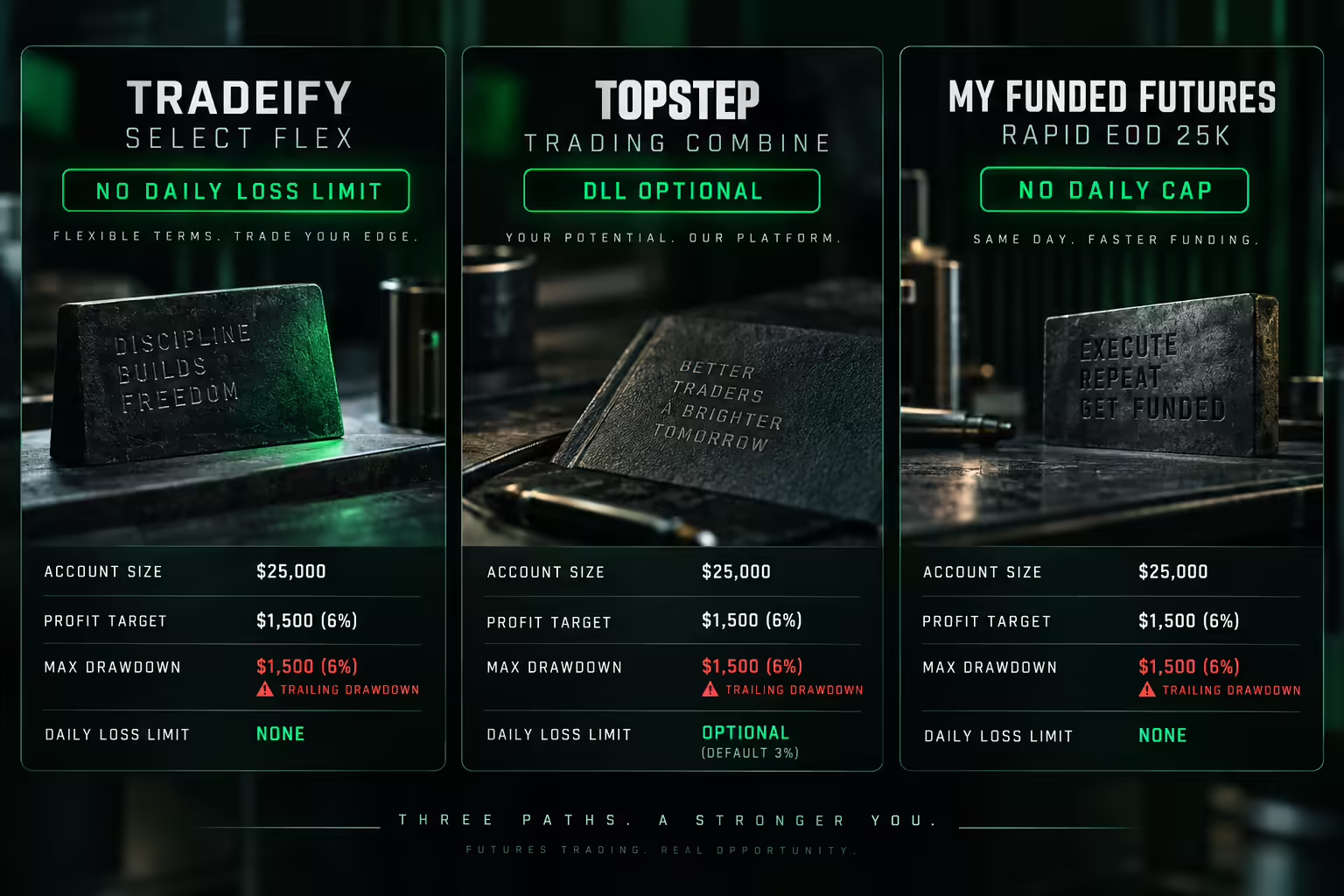
Rules checked September 10, 2026. “No daily loss limit” describes the specific configuration and stage below; it does not remove maximum drawdown. Confirm each firm’s current published rules before buying.
Path | Where no DLL applies | What changes the answer |
|---|---|---|
Tradeify Select to Select Flex | Select evaluation and Select Flex funded account | Selecting Daily instead adds a DLL; do not extend Flex rules to every live arrangement |
Topstep standard path without a purchase-set DLL | Trading Combine and Express Funded Account | Optional checkout DLL carries forward; Live Funded Accounts have a DLL |
My Funded Futures Rapid EOD 25K | Evaluation and simulated-funded stages | Maximum-loss and payout rules remain; verify the later live agreement |
What no daily loss limit actually means
A daily loss limit is a separate threshold tied to a trading session. Depending on the program, reaching it can pause trading or cause another stated consequence.
An account without that threshold still has other constraints. Maximum drawdown, position limits, prohibited conduct, session closing requirements, and payout conditions remain in force.
The closest account boundary matters. If only $900 remains above the failure floor, the absence of a daily cap does not create more than $900 of account room, and planned risk should leave additional space for costs and slippage.
Also distinguish a firm-imposed limit from a personal platform setting. A trader can choose to enforce a smaller personal limit even when the program does not require one.
Topstep without the optional daily loss limit
According to the firm’s published rules, Topstep describes the DLL as optional for its standard Trading Combine and Express Funded paths, while live funded accounts have a DLL.
The checkout choice matters. A purchase-set daily limit can carry into the Express Funded stage, and a discounted option may include that condition. Do not select an add-on and later assume the account has the unrestricted version of the rule.
Topstep is therefore a candidate for traders who want the standard evaluation and Express Funded route without that optional daily control. It is not evidence of no daily limit across every Topstep product or live stage.
Check the exact checkout configuration and the account’s personal risk settings before the first trade.
My Funded Futures Rapid EOD without a daily cap
According to the firm’s published rules, My Funded Futures’ Rapid EOD 25K plan lists no daily loss limit in both evaluation and simulated funding. It retains a $1,000 maximum-loss amount and changes news permission after evaluation.
This creates a candidate for traders seeking no separate daily threshold while using an EOD funded drawdown model. The total loss boundary still controls whether the account survives.
Do not confuse the plan with legacy Flex rules or other Rapid variants. A historical help page can describe an account that is no longer available to new buyers, and a similarly named plan can use a different trailing method.
Confirm the current plan, size, and live-transition conditions directly. A no-DLL simulated account does not establish the rules of a later live account.
Compare no-DLL accounts by remaining risk room
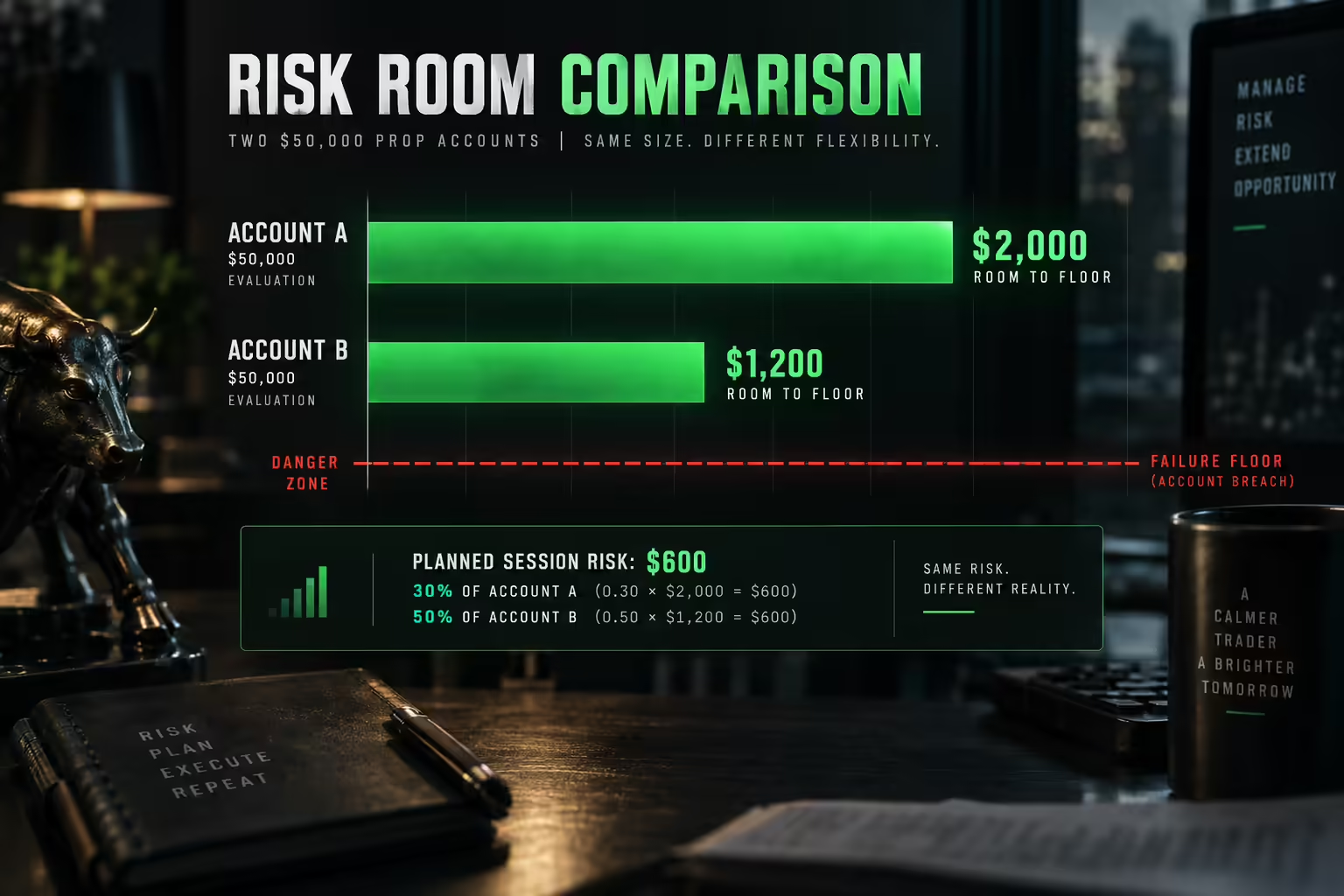
Nominal account size is a poor substitute for the actual failure buffer. Compare the active floor with current equity, then consider any required payout reserve or personal cushion.
Suppose two hypothetical accounts both display $50,000. Account A has $2,000 of room to its floor and Account B has $1,200. If your planned session risk is $600 before costs, that uses 30% of A’s room and 50% of B’s.
The headline account size is identical. The practical burden of the same session is not.
Repeat this calculation after profitable closes and withdrawals. A trailing floor or payout can change the room even if your strategy’s dollar risk stays constant.
Build a personal daily limit anyway
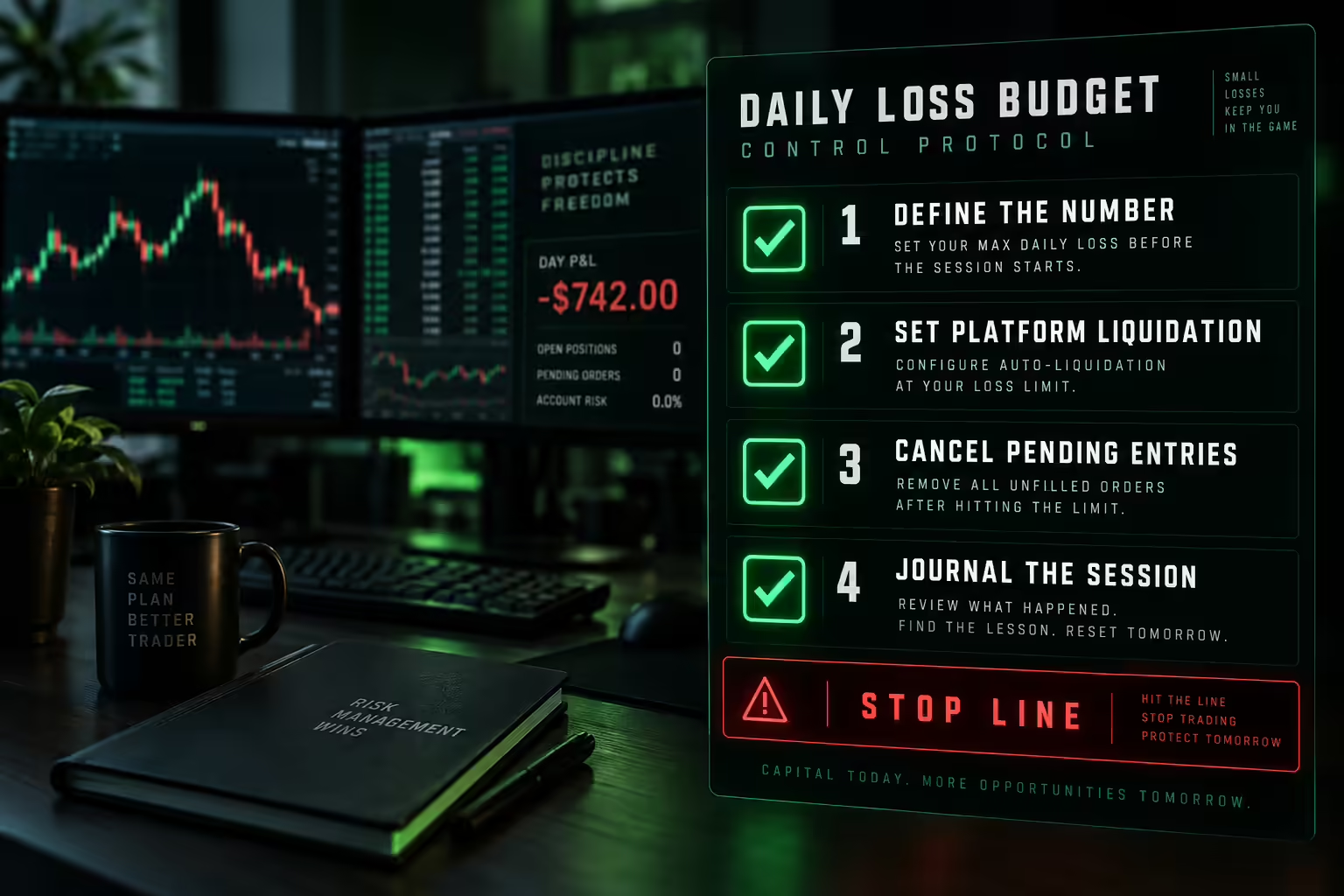
A personal loss budget can prevent a difficult session from becoming an account-ending one. The amount should reflect your tested distribution, current account room, costs, and ability to follow the plan.
Define the response as well as the number. Will the platform liquidate and block new orders? Will you cancel pending entries and finish the session manually? Can the setting be changed while you are frustrated?
Use the strongest practical control that fits your process. A number written in a journal is easier to override than a setting you commit to before trading.
Do not use the account’s maximum drawdown as the everyday session budget. Keeping the firm from intervening is only one part of responsible risk management.
Common no daily loss limit account mistakes
A no-DLL account is easy to misread in ways that end it. Check your plan against these errors before you trade it.
- Treating the missing daily cap as extra room. The maximum-loss floor still sets how much you can lose, in one session or across many.
- Assuming the feature covers every stage. A plan can drop the daily limit in evaluation and add one later, or apply it only to a specific funded policy.
- Buying a checkout add-on by accident. A discounted option can include a daily limit that carries into the funded stage.
- Using maximum drawdown as the session budget. One bad day can then consume the entire remaining buffer.
- Skipping a personal stop. Without a firm limit, your own per-session cap is the only control that ends a losing day early.
Before each session, write down the current floor, the remaining room, and the most you plan to lose that day. If the planned loss is close to the remaining room, reduce size first.
Check the tradeoffs behind a no-DLL offer
Removing a daily cap does not remove the need to qualify for payouts. Compare consistency rules, winning-day requirements, buffers, caps, and the effect of withdrawals on equity.
Review whether the evaluation has different rules from the funded stage. A plan can be permissive during qualification and add controls afterward.
Also consider the purchase economics. A cheaper checkout option may include a daily limit, while a no-limit version costs more. Compare the exact configuration rather than combining the lowest price from one option with the rules of another.
This is especially relevant when promotions or optional risk add-ons appear beside the main plan selector.
No daily loss limit does not mean daily or uncapped payouts
Loss controls and withdrawal rules answer different questions. An account can have no DLL while requiring qualifying days, limiting withdrawal size, or reserving a buffer above the loss floor. Conversely, a daily-payout option can impose a daily loss control.
Compare the withdrawal schedule only after confirming the risk configuration. For Tradeify, the distinction between Select Flex and Select Daily is material: selecting a policy for its payout frequency also selects its associated rules. Do not combine Flex’s lack of a DLL with Daily’s withdrawal schedule in the same comparison row.
Decide whether a no-DLL account fits your behavior
The feature may fit a strategy whose validated daily outcome distribution needs more room than a firm’s preset cap. It is less helpful when the real objective is to keep trading until a losing session turns positive.
Review your worst sessions. Were the losses produced by valid setups at planned size, or by increasing risk, repeated attempts, and lower standards after frustration?
If the latter pattern dominates, removing a daily control may make the problem more expensive. Work on the behavior in practice before paying for additional flexibility.
No rule structure can turn an untested strategy into a reliable one.
Tradeify Select Flex for traders who want no funded daily cap
Tradeify’s daily-loss rules distinguish Select Flex, which has no DLL, from Select Daily, which does. Both remain subject to their account-loss conditions.
Tradeify Select Flex is a fit to consider when a separate daily cap conflicts with your tested strategy, but you still want a defined account-loss boundary. Our Select Daily option has a DLL, so it does not meet the same buying requirement. Choose the funded policy for its complete rules rather than payout frequency alone.
Compare the daily control, drawdown, withdrawal requirements, and remaining risk room together. The feature that matters most depends on how the strategy actually trades.
Choose a no-DLL prop account with clear limits of your own
Before purchase, confirm the plan and stage, whether the DLL is absent by default, any add-on that changes it, and the maximum-loss method. Write a personal session budget that leaves room above the failure line.
Then test the complete rule set against representative sessions. The right account should let you follow a controlled process, not give you more ways to ignore one.
Frequently asked questions
What does no daily loss limit mean in a futures prop firm?
It means the account has no separate threshold tied to a single trading session. The maximum-loss boundary, position limits, prohibited conduct rules, and payout conditions still apply. Losing through the remaining account buffer in one session can still fail the account.
Does a no daily loss limit account still have a maximum drawdown?
Yes. Removing the daily cap does not remove the account’s failure floor. If only $900 remains above that floor, the account has no more than $900 of room, whatever the daily rules say.
Does My Funded Futures have a daily loss limit?
According to the firm’s published rules, its Rapid EOD 25K plan lists no daily loss limit in evaluation or simulated funding, while keeping a $1,000 maximum-loss amount. Other plans and legacy variants can use different rules, and a later live account may differ, so confirm the exact plan before buying.
Does Topstep have a daily loss limit?
According to the firm’s published rules, the daily loss limit is optional on the standard Trading Combine and Express Funded paths, while live funded accounts have one. A daily limit chosen at checkout can carry into the Express Funded stage. Check the exact configuration before the first trade.
Should you set a personal daily loss limit without a firm limit?
Yes, in most cases. A personal loss budget can stop a difficult session from becoming an account-ending one. Base it on your tested results, current account room, and costs, and commit to it before trading rather than during a losing session.